Join us at FabCon Atlanta from March 16 - 20, 2026, for the ultimate Fabric, Power BI, AI and SQL community-led event. Save $200 with code FABCOMM.
Register now!The Power BI Data Visualization World Championships is back! Get ahead of the game and start preparing now! Learn more
Hi,
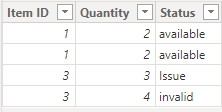
im currenty using report server and i have this table:
| Item ID | Quantity | Status |
| 1 | 2 | available |
| 1 | 2 | available |
| 3 | 3 | Issue |
| 3 | 4 | invalid |
I would like to add a column which can identify if quantity is equals when its same "Item ID" AND checks if Status is "Available".
Earlier Function didnt work cause the table doesnt has logical order for this function.
Thank in Advanced
Solved! Go to Solution.
Hi @dshmulenson ,
Please try below steps:
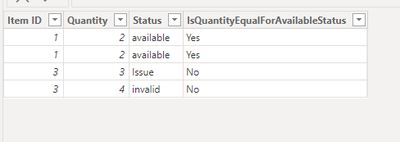
1. below is my test table
Table:
2. create a new column with below dax formula
IsQuantityEqualForAvailableStatus =
VAR currentItemID = 'Table'[Item ID]
VAR currentQuantity = 'Table'[Quantity]
VAR availableItemsSameID =
FILTER (
ALL ( 'Table' ),
'Table'[Item ID] = currentItemID
&& 'Table'[Status] = "available"
)
RETURN
IF (
COUNTROWS ( availableItemsSameID ) > 1
&& CALCULATE ( MIN ( 'Table'[Quantity] ), availableItemsSameID ) = currentQuantity
&& CALCULATE ( MAX ( 'Table'[Quantity] ), availableItemsSameID ) = currentQuantity,
"Yes",
"No"
)
Please refer the attached .pbix file.
Best regards,
Community Support Team_Binbin Yu
If this post helps, then please consider Accept it as the solution to help the other members find it more quickly.
Hi @dshmulenson ,
Please try below steps:
1. below is my test table
Table:
2. create a new column with below dax formula
IsQuantityEqualForAvailableStatus =
VAR currentItemID = 'Table'[Item ID]
VAR currentQuantity = 'Table'[Quantity]
VAR availableItemsSameID =
FILTER (
ALL ( 'Table' ),
'Table'[Item ID] = currentItemID
&& 'Table'[Status] = "available"
)
RETURN
IF (
COUNTROWS ( availableItemsSameID ) > 1
&& CALCULATE ( MIN ( 'Table'[Quantity] ), availableItemsSameID ) = currentQuantity
&& CALCULATE ( MAX ( 'Table'[Quantity] ), availableItemsSameID ) = currentQuantity,
"Yes",
"No"
)
Please refer the attached .pbix file.
Best regards,
Community Support Team_Binbin Yu
If this post helps, then please consider Accept it as the solution to help the other members find it more quickly.
You should be able to group across these three columns and then return all the groups where the rowcount is greater than 1.
The Power BI Data Visualization World Championships is back! Get ahead of the game and start preparing now!
| User | Count |
|---|---|
| 10 | |
| 5 | |
| 5 | |
| 4 | |
| 3 |