
cancel
Showing results for 
Search instead for 
Did you mean: 

Vote for your favorite vizzies from the Power BI Dataviz World Championship submissions. Vote now!

Reply
Anonymous
Not applicable

Bookmarking collapsed Decomposition Tree Desktop vs. Server

Hi - 


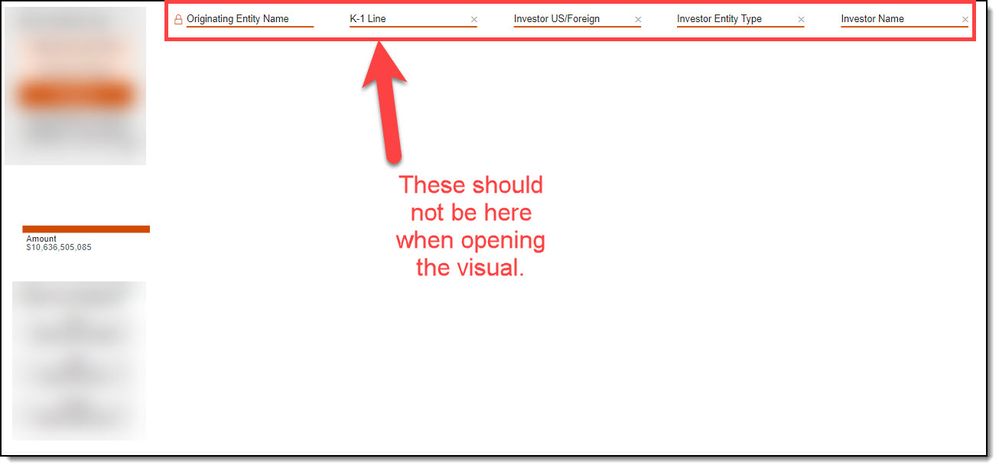
Found an issue with how the Decomp Tree visual is bookmarked in Desktop vs. published on Server.  On Desktop, the bookmarked visual opens as expected: completely collapsed.  On Server, the bookmarked visual opens with 5 fields already selected (the first field locked and 4 others unlocked).  Screenshots attached.Opening bookmarked Decomp Tree in DesktopOpening bookmarked Decomp Tree in DesktopOpening bookmarked Decomp Tree on ServerOpening bookmarked Decomp Tree on Server


This issue does not come up when I open an un-bookmarked Decomp Tree on the Server.  Could someone please help?


Desktop Version: 2.102.683.0 64-bit (February 2022)

1 ACCEPTED SOLUTION
lbendlin
Super User
Super User

This here is the questions and answers forum - for issues you may want to head over to https://issues.powerbi.com

View solution in original post

2 REPLIES 2
Anonymous
Not applicable

@lbendlin - Ok, thanks for the guidance

lbendlin
Super User
Super User

This here is the questions and answers forum - for issues you may want to head over to https://issues.powerbi.com

Helpful resources

Announcements
Power BI DataViz World Championships

Power BI Dataviz World Championships

Vote for your favorite vizzies from the Power BI World Championship submissions!

Sticker Challenge 2026 Carousel

Join our Community Sticker Challenge 2026

If you love stickers, then you will definitely want to check out our Community Sticker Challenge!

January Power BI Update Carousel

Power BI Monthly Update - January 2026

Check out the January 2026 Power BI update to learn about new features.

FabCon Atlanta 2026 carousel

FabCon Atlanta 2026

Join us at FabCon Atlanta, March 16-20, for the ultimate Fabric, Power BI, AI and SQL community-led event. Save $200 with code FABCOMM.