Get certified for free when you join Fabric Data Days 2026 and dive into Fabric, Power BI, SQL, AI, and other essential data skills.
Join nowTry your skills in the Power BI Dataviz World Championship! Round one ends June 26. Join now
Dear all, I would like to know, what is necessary to do on a Report Server side configuration in order to support oauth2 authentication type for (data source) Scheduled refresh.
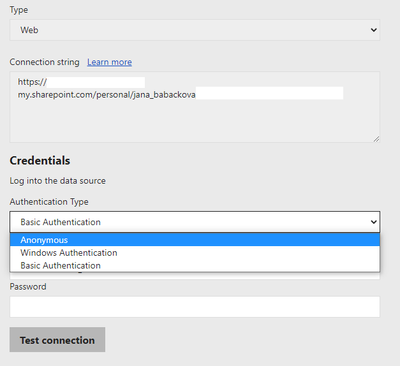
I am able to take PBI Desktop and use OneDrive / SharePoint online list or library like a source, I am able to refresh them manually or upload such a report to Report Server, however I am not able to configure Scheduled refresh for them (for any O365/M365 data source). There is simply no choice in the menu to use e-mail format of the credentials. Just Anonymous, Basic & Windows type credentials and none of this works. I also tried to use Web type connection with no luck, I tried to connect OneDrive folder like a network drive and use web type / excel type connection and again, with no luck.
Thank you for any hint, tip or help
Solved! Go to Solution.
Unfortunately there is nothing you can do. The data sources you are asking about are officially listed as not being supported for scheduled refresh (see https://docs.microsoft.com/en-us/power-bi/report-server/data-sources )
You don't have a lot of good options here, but in a nutshell the main onese are to either:
Unfortunately there is nothing you can do. The data sources you are asking about are officially listed as not being supported for scheduled refresh (see https://docs.microsoft.com/en-us/power-bi/report-server/data-sources )
You don't have a lot of good options here, but in a nutshell the main onese are to either:
Don't miss out on Data Days, June 15 through August 7. Learn Fabric, Power BI, SQL, AI and more.
Check out the May 2026 Power BI update to learn about new features.
| User | Count |
|---|---|
| 3 | |
| 1 | |
| 1 | |
| 1 | |
| 1 |