Share feedback directly with Fabric product managers, participate in targeted research studies and influence the Fabric roadmap.
Sign up nowGet Fabric certified for FREE! Don't miss your chance! Learn more
Hi,
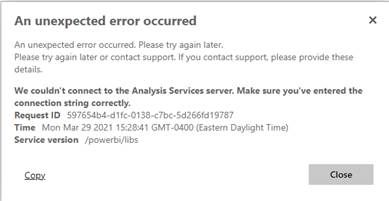
We get this error from PowerBI Server when we try to run a report with a direct query SQL connection to a SQL Server when the preview feature “Enhanced Dataset Metadata” is enabled.
We are running the latest builds (Jan 2021) for PowerBI Desktop and Server.
Our workaround currently is to disable the “Enhanced Dataset Metadata” preview feature on the desktop. However, Microsoft has indicated that they “ … aim to make the enhanced format generally available as the only option in the next release of Report Server.” from here.
We really need help on this now in order to continue running these reports in the next version of the PowerBI Report Server.
Would appreciate hearing from Microsoft Support on this – thanks in advance.
If you want to engage with Microsoft Support you would need to raise a support ticket which you should be able to do through your IT dept or MS Account manager or maybe also through https://powerbi.microsoft.com/en-us/support/pro/
Thank you for the guidance. I will check with my IT department to see how to move forward with this. Meanwhile, I would appreciate other suggestions from the users who might have faced similar issues.
Share feedback directly with Fabric product managers, participate in targeted research studies and influence the Fabric roadmap.
If you love stickers, then you will definitely want to check out our Community Sticker Challenge!
Check out the January 2026 Power BI update to learn about new features.
| User | Count |
|---|---|
| 3 | |
| 3 | |
| 1 | |
| 1 | |
| 1 |
| User | Count |
|---|---|
| 8 | |
| 5 | |
| 4 | |
| 3 | |
| 3 |