Don't miss your chance to take the Fabric Data Engineer (DP-600) exam for FREE! Find out how by watching the DP-600 session on-demand now through April 28th.
Learn moreJoin the FabCon + SQLCon recap series. Up next: Power BI, Real-Time Intelligence, IQ and AI, and Data Factory take center stage. All sessions are available on-demand after the live show. Register now
Hi folks,
I was told to add the HSTS header to the server but not sure how?
I tried this tutorial but it didn't work: https://learn.microsoft.com/en-us/sql/reporting-services/tools/server-properties-advanced-page-repor...
Can you help?
Thanks
Solved! Go to Solution.
What regex pattern did you use for the HSTS header?
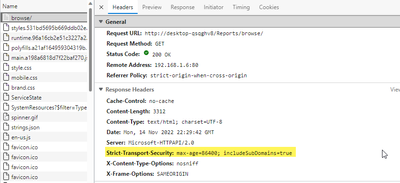
I did a test matching anything under /Reports/ and it appeared to work fine (I also stopped and re-started PBIRS after changing this setting just to be sure it was applied)
Steps are given below-
Enable the modification of response headers.
Uncomment the following Load Module directive for the mod_headers module in the httpd.conf file:
LoadModule headers_module modules/mod_headers.so
Define the HSTS policy for clients.
Make the following updates in the httpd.conf file:
Add the Header directive for Strict-Transport-Security.
The following example Header specifies useful options for defining your HSTS policy. The directive specifies that the server always requires HTTPS connections. The HTTPS connections apply to both the domain and any subdomain. A client can keep the domain in its preinstalled list of HSTS domains for a maximum of one year (31536000 seconds).
Header always set Strict-Transport-Security "max-age=31536000;
includeSubDomains; preload"
Add the Header directive to each virtual host section, <virtualhost>, that is enabled for Secure Sockets Layer (SSL).
Redirect requests from virtual hosts that are NOT enabled for SSL to virtual hosts that are enabled.
RewriteEngine on
RewriteRule ^/(.*) https://%{HTTP_HOST}/$1 [R,L]
Add the stanza once to each non-SSL virtual host section in the httpd.conf file.
Add the stanza once to the global httpd.conf file, but outside the virtual host sections.
This may help you,
Rachel Gomez
What regex pattern did you use for the HSTS header?
I did a test matching anything under /Reports/ and it appeared to work fine (I also stopped and re-started PBIRS after changing this setting just to be sure it was applied)
Check out the April 2026 Power BI update to learn about new features.
If you have recently started exploring Fabric, we'd love to hear how it's going. Your feedback can help with product improvements.
A new Power BI DataViz World Championship is coming this June! Don't miss out on submitting your entry.
| User | Count |
|---|---|
| 3 | |
| 3 | |
| 2 | |
| 2 | |
| 1 |
| User | Count |
|---|---|
| 6 | |
| 3 | |
| 3 | |
| 3 | |
| 3 |