cancel
Showing results for 
Search instead for 
Did you mean: 

Join the FabCon + SQLCon recap series. Up next: Power BI, Real-Time Intelligence, IQ and AI, and Data Factory take center stage. All sessions are available on-demand after the live show. Register now

Reply
Anonymous
Not applicable

API V2 : patch DataSources for change connection string, username and password

Hello,

For a pbi with datasource mode Import, I'am able to change the Username and Password but not able to change ConnectionString.

For my test

  1. I just retrive the datasource objet with GET PowerBIReports(uid)/DataSources
  2. I modify ConnectionString attribute, DataModelDataSource\Username and DataModelDataSource\Password
  3. Then I PATCH with GET PowerBIReports(uid)/DataSources and the modified body.

If I only change DataModelDataSource\Username and DataModelDataSource\Password its OK (200)

If I change ConnectionString its 400 Bad Request


I have to change others attributes in my Body?
Here the body:
[
        {
            "Id""uid",
            "Name"null,
            "Description"null,
            "Path"null,
            "Type""DataSource",
            "Hidden"false,
            "Size"0,
            "ModifiedBy""me",
            "ModifiedDate""2022-01-21T12:07:41.557+01:00",
            "CreatedBy""me",
            "CreatedDate""2022-01-21T09:31:56.927+01:00",
            "ParentFolderId"null,
            "IsFavorite"false,
            "IsEnabled"true,
            "ConnectionString": "XXXservernameXXX;XXXdatabasenameXXX",
            "DataSourceType""SQL",
            "IsConnectionStringOverridden"true,
            "IsReference"false,
            "DataSourceSubType""DataModel",
            "CredentialsByUser"null,
            "CredentialsInServer"null,
            "DataModelDataSource": {
                "Type""Import",
                "Kind""SQL",
                "AuthType""UsernamePassword",
                "SupportedAuthTypes": [
                    "Windows",
                    "UsernamePassword"
                ],
                "Username": "xxx",
                "Secret": "xxx",
                "ModelConnectionName""2790F0B88BC436CD2B78E4E6D532479CB2EA13D23BF04263D88ABB80DABCD863"
            }
        }
    ]


1 ACCEPTED SOLUTION
v-henryk-mstf
Community Support
Community Support

Hi @Anonymous ,


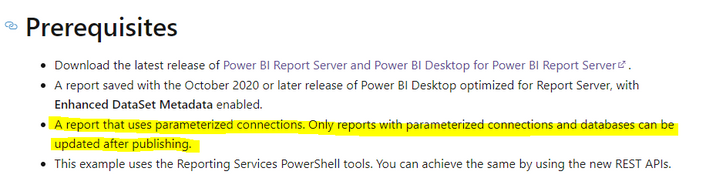
I think you can use PowerShell to change the data source connection string in a Power BI report, but only if  the report uses parametric connections, otherwise the change is not supported.

vhenrykmstf_0-1643615225252.png


Install the Reporting Services tool in powershell and change its parameters. Refer to the following official documentation for a detailed description of the steps.

Change data source connection strings in Power BI reports with PowerShell - Power BI Report Server


If the problem is still not resolved, please point it out and provide related operation screenshoots. Looking forward to your feedback.


Best Regards,
Henry


If this post helps, then please consider Accept it as the solution to help the other members find it more quickly.

View solution in original post

2 REPLIES 2
Anonymous
Not applicable

Hello

Thanks for the quit reply.


It works fine with ReportingServicesTools.

Set-RsRestItemDataModelParameters for Server and Database parameters

Set-RsRestItemDataSource for Login and Password

v-henryk-mstf
Community Support
Community Support

Hi @Anonymous ,


I think you can use PowerShell to change the data source connection string in a Power BI report, but only if  the report uses parametric connections, otherwise the change is not supported.

vhenrykmstf_0-1643615225252.png


Install the Reporting Services tool in powershell and change its parameters. Refer to the following official documentation for a detailed description of the steps.

Change data source connection strings in Power BI reports with PowerShell - Power BI Report Server


If the problem is still not resolved, please point it out and provide related operation screenshoots. Looking forward to your feedback.


Best Regards,
Henry


If this post helps, then please consider Accept it as the solution to help the other members find it more quickly.

Helpful resources

Announcements
April Power BI Update Carousel

Power BI Monthly Update - April 2026

Check out the April 2026 Power BI update to learn about new features.

New to Fabric survey Carousel

New to Fabric Survey

If you have recently started exploring Fabric, we'd love to hear how it's going. Your feedback can help with product improvements.

Power BI DataViz World Championships carousel

Power BI DataViz World Championships - June 2026

A new Power BI DataViz World Championship is coming this June! Don't miss out on submitting your entry.

FabCon and SQLCon Highlights Carousel

FabCon &SQLCon Highlights

Experience the highlights from FabCon & SQLCon, available live and on-demand starting April 14th.