This time we’re going bigger than ever. Fabric, Power BI, SQL, AI and more. We're covering it all. You won't want to miss it.
Learn moreDid you hear? There's a new SQL AI Developer certification (DP-800). Start preparing now and be one of the first to get certified. Register now
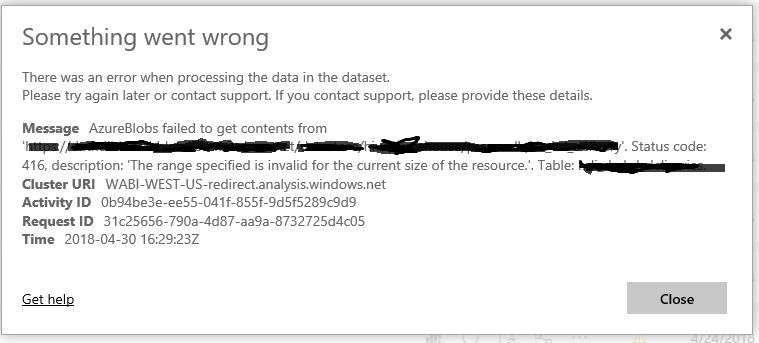
I am seeing this error in loading my BLOB table. This table refresh worked fine until 4/13 or so and started failing. This works perfectly fine on my desktop but somehow fails to load consistently on the Power BI scheduled and manual refresh. Any ideas?
Much appreciate your help.
Hi all,
We are also seeing this error, we have a Azure Blob (only, no other sources) report, running on a scheduled refresh, however this will not refresh either scheduled or through PBI desktop. We get the same error, the file is only 1.7mb and updated daily, the content looks/remains the same.
If I try to create a blank new .pbix file, setup the query, I can connect to the blob storage account, but when I try to expand the binary field/file it fails with this same error.
Status code: 416, description: 'The range specified is invalid for the current size of the resource.'.
DataSourceKind=AzureBlobs
DataSourcePath=https://xxxxxxxxxxxx.blob.core.windows.net/reports
Url=https://xxxxxxxxxxxx.blob.core.windows.net/reports/output.csv
Has anyone found an actual fix for this? The solution here doesn't seem to apply, or I'm not sure where this would be defined.
I am also facing the same error. Can any one have solution for this..?
And I am trying to connect to PowerBI Desktop
@Anonymous,
Do you get the above error when refreshing dataset in Power BI Service? Have you checked if your Power BI Service overloads?
Regards,
Lydia
Check out the April 2026 Power BI update to learn about new features.
Sign up to receive a private message when registration opens and key events begin.
If you have recently started exploring Fabric, we'd love to hear how it's going. Your feedback can help with product improvements.
| User | Count |
|---|---|
| 7 | |
| 5 | |
| 4 | |
| 3 | |
| 3 |