cancel
Showing results for 
Search instead for 
Did you mean: 

July 7 - July 17 | Round 2 of the Power BI Dataviz World Championships. Don't miss your chance! Learn more

Reply
Anonymous
Not applicable

multi dimension structure to flat structure

Hi

I'm pulling a report API that returns a multi-dimension JSON structure I'm not entirely sure how to handle in Power BI;

Source data;
image.png


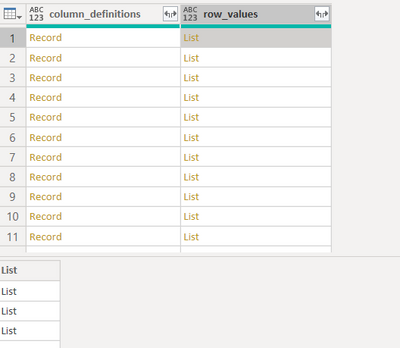
I can convert that to a table, transpose the data, promote the first row to column headers and then expand "column_definitions" so I end up with this;


image.png

"Column_definitions" contains records with the values I want as my headers, and "Row_values" contains a list with corresponding values to those headers.

How do I move forward to get this into a single flat table structure? 


1 REPLY 1
artemus
Microsoft Employee
Microsoft Employee

Something like (new custom step):  


#table(Record.FieldNames(PreviousStep[column_definitions]), PreviousStep[row_values])


This may depend on the format of column_definintions.


PreviousStep is the previous step in the query

Helpful resources

Announcements
FabCon and SQLCon Barcelona 2026

FabCon & SQLCon – Barcelona 2026

Join us in Barcelona for FabCon and SQLCon, the Fabric, Power BI, SQL, and AI community event. Save €200 with code FABCMTY200.

60 days of Data Days Carousel

Data Days 2026

Join Fabric Data Days 2026: 60 days of free live/on-demand sessions, challenges, study groups, and certification opportunities.

Power BI DataViz World Championships carousel

Power BI DataViz World Championships - June 2026

A new Power BI DataViz World Championship is coming this June! Don't miss out on submitting your entry.