
cancel
Showing results for 
Search instead for 
Did you mean: 

Try your skills in the Power BI Dataviz World Championship! Round one ends June 26. Join now

Reply
ValeriaBreve
Post Partisan
Post Partisan

lookup table values using a filter

Hello,

I have 2 tables, A and B.

I need to lookup column "ID" from table A, but only for the values of table B related column "ID2" are not null.


I would normally do a merge, only how do I handle the condition?


Thanks!

Kind regards

Valeria


1 ACCEPTED SOLUTION
v-yanjiang-msft
Community Support
Community Support

Hi @ValeriaBreve ,

According to your description, you want to do a conditional merge queries. Here's my solution.

Sample data:

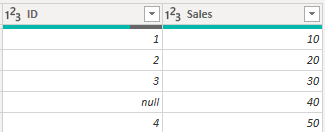
TableA:

vkalyjmsft_0-1669950084396.png

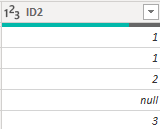
TableB:

vkalyjmsft_1-1669950129825.png

In my understanding, for null value in TableB, after merge queries with TableA, you want to return blank instead of 40(Sales for null in TableA).

Here's the original code when doing the general merge. Simply replace the three parameter in the Table.NestedJoin-"TableA" to "Table.SelectRows(#"TableA",each [ID]<>null)".

vkalyjmsft_3-1669950510941.png

                                         vkalyjmsft_6-1669950694948.png


vkalyjmsft_5-1669950634186.png

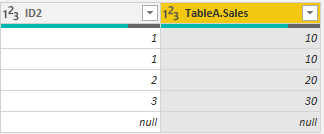
Get the correct result:

vkalyjmsft_7-1669950820511.png

I attach my sample below for your reference.


Best Regards,
Community Support Team _ kalyj

If this post helps, then please consider Accept it as the solution to help the other members find it more quickly.

View solution in original post

2 REPLIES 2
v-yanjiang-msft
Community Support
Community Support

Hi @ValeriaBreve ,

According to your description, you want to do a conditional merge queries. Here's my solution.

Sample data:

TableA:

vkalyjmsft_0-1669950084396.png

TableB:

vkalyjmsft_1-1669950129825.png

In my understanding, for null value in TableB, after merge queries with TableA, you want to return blank instead of 40(Sales for null in TableA).

Here's the original code when doing the general merge. Simply replace the three parameter in the Table.NestedJoin-"TableA" to "Table.SelectRows(#"TableA",each [ID]<>null)".

vkalyjmsft_3-1669950510941.png

                                         vkalyjmsft_6-1669950694948.png


vkalyjmsft_5-1669950634186.png

Get the correct result:

vkalyjmsft_7-1669950820511.png

I attach my sample below for your reference.


Best Regards,
Community Support Team _ kalyj

If this post helps, then please consider Accept it as the solution to help the other members find it more quickly.

Thanks! This looks so easy... I was trying solutions that were more complicated, I did not know you could declare a subset of the table in the merge function ! So thank you so much for showing me 🙂

Helpful resources

Announcements
Fabric Data Days is here Carousel

Fabric Data Days 2026

Don't miss out on Data Days, June 15 through August 7. Learn Fabric, Power BI, SQL, AI and more.

May Power BI Update Carousel

Power BI Monthly Update - May 2026

Check out the May 2026 Power BI update to learn about new features.

Power BI DataViz World Championships carousel

Power BI DataViz World Championships - June 2026

A new Power BI DataViz World Championship is coming this June! Don't miss out on submitting your entry.