This time we’re going bigger than ever. Fabric, Power BI, SQL, AI and more. We're covering it all. You won't want to miss it.
Learn moreDid you hear? There's a new SQL AI Developer certification (DP-800). Start preparing now and be one of the first to get certified. Register now
Hello,
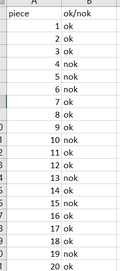
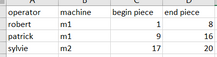
I have 2 excel file : one with the detail of every piece, and one with the detail of every machine/operator.
and
I want to copy on first excel (piece) specific rows of the second excel (machine) only if the rows is "ok". The specific rows of the second excel is choosed like that : the value of the piece of the first excel must be contained in the range value of second excel. Sorry for my english, better with the result that i want :
Thanks a lot
Solved! Go to Solution.
Hi @Anonymous ,
The ideal way to have your challenge resolve in a timely and accurate manner is by providing data in table format with all sensitive information removed.
Please see below for proposed solution.
Table1: The detail of every piece
Table2: The detail of every machine/operator
Below is a direct query and extract data from Table1 to Table2:
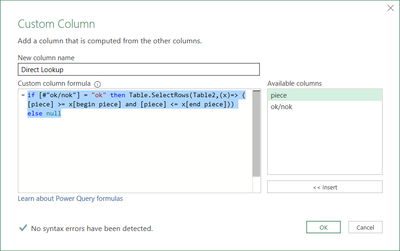
1. Add a custom step and add formula below (i.e. the direct query method):
if [#"ok/nok"] = "ok" then Table.SelectRows(Table2,(x)=> ([piece] >= x[begin piece] and [piece] <= x[end piece])) else null
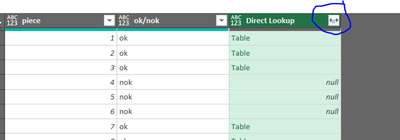
2. Expand the column:
Result:
Regards
KT
Hi @Anonymous ,
The ideal way to have your challenge resolve in a timely and accurate manner is by providing data in table format with all sensitive information removed.
Please see below for proposed solution.
Table1: The detail of every piece
Table2: The detail of every machine/operator
Below is a direct query and extract data from Table1 to Table2:
1. Add a custom step and add formula below (i.e. the direct query method):
if [#"ok/nok"] = "ok" then Table.SelectRows(Table2,(x)=> ([piece] >= x[begin piece] and [piece] <= x[end piece])) else null
2. Expand the column:
Result:
Regards
KT
Hi,
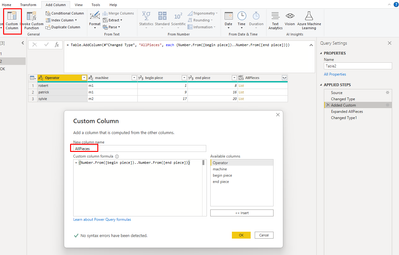
1. On table 2 (Operator) Add a custom column to see all the pieces between the "begin piece" and the "end piece"
{Number.From([begin piece])..Number.From([end piece])}
2. expand list
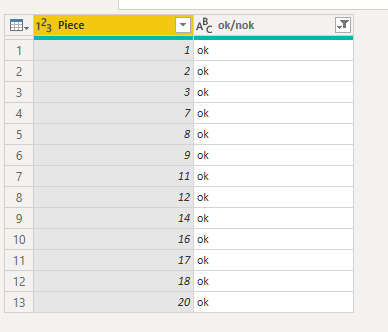
3. Created a duplicate table 1 (ok/nok)
4. Filtered to see only "ok"
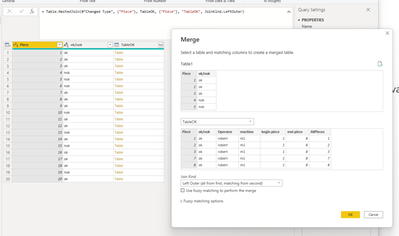
5. Merge Table 2 (custom column) onto Table 1 (Piece)
6. Expand table
7. Merge Duplicated Table1 onto Original Table1
8. Expand table to include only the columns you want
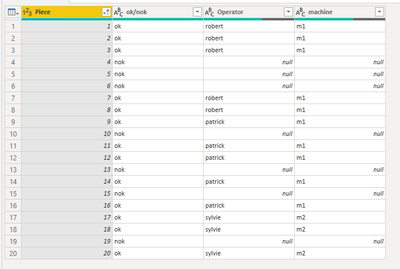
End Result:
Check out the April 2026 Power BI update to learn about new features.
Sign up to receive a private message when registration opens and key events begin.
If you have recently started exploring Fabric, we'd love to hear how it's going. Your feedback can help with product improvements.
| User | Count |
|---|---|
| 3 | |
| 3 | |
| 3 | |
| 2 | |
| 2 |