cancel
Showing results for 
Search instead for 
Did you mean: 

The Power BI Data Visualization World Championships is back! Get ahead of the game and start preparing now! Learn more

Reply
Girish_123
Helper I
Helper I

how to calculate total country value count from two column

HI team i am very new for Dax will you please help me out here 

Thanks in advance

Team 1       Team2                                 

  A                 C                   

 B                   A

C                   B

A                  B

C                  A

A                 D

A                 C         

Answer likw A = 6

                    B = 3

                   C  = 3

                   D = 1     

2 ACCEPTED SOLUTIONS
smpa01
Super User
Super User

@Girish_123  you can use a measure like this


Measure =
VAR _0 =
    UNION (
        SELECTCOLUMNS ( 'Table', "c1", 'Table'[column1] ),
        SELECTCOLUMNS ( 'Table', "c1", 'Table'[column2] )
    )
RETURN
    MAXX (
        ADDCOLUMNS (
            'Table 2',
            "freq",
                MAXX (
                    FILTER (
                        ADDCOLUMNS (
                            _0,
                            "Frequency", COUNTX ( FILTER ( _0, EARLIER ( [c1] ) = [c1] ), [c1] )
                        ),
                        [c1] = EARLIER ( 'Table 2'[column1] )
                    ),
                    [Frequency]
                )
        ),
        [freq]
    )


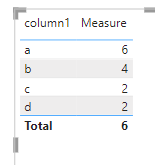
smpa01_0-1637954567876.png


Did I answer your question? Mark my post as a solution!
Proud to be a Super User!
My custom visualization projects
Plotting Live Sound: Viz1
Beautiful News:Viz1, Viz2, Viz3
Visual Capitalist: Working Hrs

View solution in original post

AlexisOlson
Super User
Super User

Define a new table Teams as follows:


Teams =
DISTINCT ( UNION ( VALUES ( Table1[Team 1] ), VALUES ( Table1[Team 2] ) ) )


Then set up relationships with both Team 1 and Team 2 columns in the model:

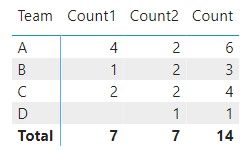
AlexisOlson_0-1637963581216.png


You can count both columns like this:


Count =
CALCULATE (
    COUNT ( Table1[Team 1] ),
    USERELATIONSHIP ( Teams[Team], Table1[Team 1] )
)
    + CALCULATE (
        COUNT ( Table1[Team 2] ),
        USERELATIONSHIP ( Teams[Team], Table1[Team 2] )
    )


AlexisOlson_1-1637963838164.png


You can do it without setting up the relationships too:


Count =
CALCULATE (
    COUNT ( Table1[Team 1] ),
    Table1[Team 1] IN VALUES ( Teams[Team] )
)
    + CALCULATE (
        COUNT ( Table1[Team 2] ),
        Table1[Team 2] IN VALUES ( Teams[Team] )
    )


View solution in original post

2 REPLIES 2
AlexisOlson
Super User
Super User

Define a new table Teams as follows:


Teams =
DISTINCT ( UNION ( VALUES ( Table1[Team 1] ), VALUES ( Table1[Team 2] ) ) )


Then set up relationships with both Team 1 and Team 2 columns in the model:

AlexisOlson_0-1637963581216.png


You can count both columns like this:


Count =
CALCULATE (
    COUNT ( Table1[Team 1] ),
    USERELATIONSHIP ( Teams[Team], Table1[Team 1] )
)
    + CALCULATE (
        COUNT ( Table1[Team 2] ),
        USERELATIONSHIP ( Teams[Team], Table1[Team 2] )
    )


AlexisOlson_1-1637963838164.png


You can do it without setting up the relationships too:


Count =
CALCULATE (
    COUNT ( Table1[Team 1] ),
    Table1[Team 1] IN VALUES ( Teams[Team] )
)
    + CALCULATE (
        COUNT ( Table1[Team 2] ),
        Table1[Team 2] IN VALUES ( Teams[Team] )
    )


smpa01
Super User
Super User

@Girish_123  you can use a measure like this


Measure =
VAR _0 =
    UNION (
        SELECTCOLUMNS ( 'Table', "c1", 'Table'[column1] ),
        SELECTCOLUMNS ( 'Table', "c1", 'Table'[column2] )
    )
RETURN
    MAXX (
        ADDCOLUMNS (
            'Table 2',
            "freq",
                MAXX (
                    FILTER (
                        ADDCOLUMNS (
                            _0,
                            "Frequency", COUNTX ( FILTER ( _0, EARLIER ( [c1] ) = [c1] ), [c1] )
                        ),
                        [c1] = EARLIER ( 'Table 2'[column1] )
                    ),
                    [Frequency]
                )
        ),
        [freq]
    )


smpa01_0-1637954567876.png


Did I answer your question? Mark my post as a solution!
Proud to be a Super User!
My custom visualization projects
Plotting Live Sound: Viz1
Beautiful News:Viz1, Viz2, Viz3
Visual Capitalist: Working Hrs

Helpful resources

Announcements
November Power BI Update Carousel

Power BI Monthly Update - November 2025

Check out the November 2025 Power BI update to learn about new features.

Fabric Data Days Carousel

Fabric Data Days

Advance your Data & AI career with 50 days of live learning, contests, hands-on challenges, study groups & certifications and more!

FabCon Atlanta 2026 carousel

FabCon Atlanta 2026

Join us at FabCon Atlanta, March 16-20, for the ultimate Fabric, Power BI, AI and SQL community-led event. Save $200 with code FABCOMM.