cancel
Showing results for 
Search instead for 
Did you mean: 

The Power BI Data Visualization World Championships is back! Get ahead of the game and start preparing now! Learn more

Reply
andrea_chiappo
Helper III
Helper III

google analytics query fields reference

I have googled extensively and also looked in this forum but couldn't find an answer.

I am new to Power BI, so I might just be posing the wrong question.


I need to create a Power BI report starting from GA data.

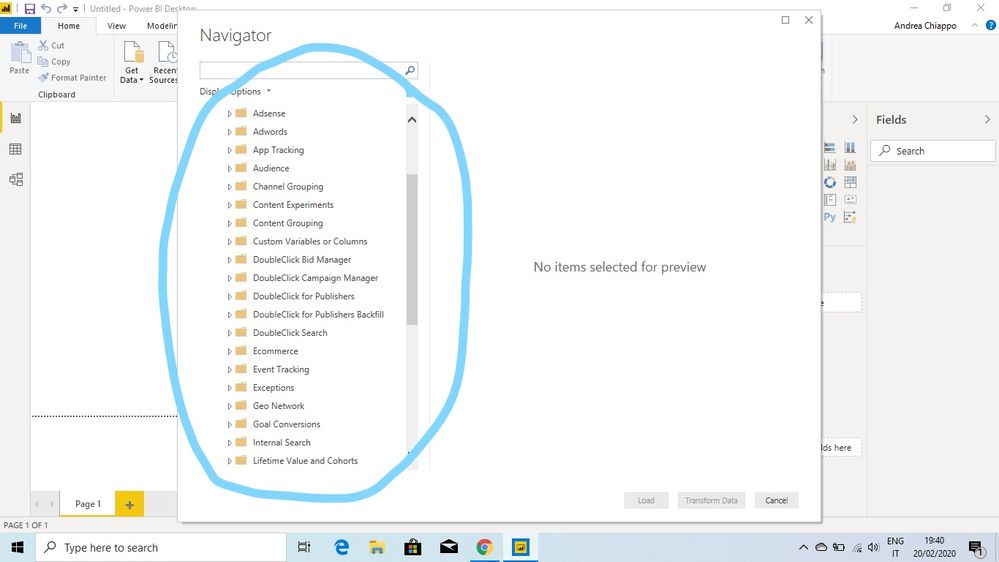
I am a bit lost with all the possible fields that show up after logging into GA

(what I'm circling in the attached picture, the cubes, if I'm not mistaking).


Is there anywhere a guide explaining the meaning of each item?

Screenshot (15)_LI.jpg

Thanks

1 ACCEPTED SOLUTION
dax
Community Support
Community Support

Hi @andrea_chiappo , 

 I am not familiar with these folders in GA, I think this is more related to GA, so I suggest you could post this problem in GS's forum where you might get more prpfessional suggestions.

Best Regards,
Zoe Zhi

If this post helps, then please consider Accept it as the solution to help the other members find it more quickly.

View solution in original post

1 REPLY 1
dax
Community Support
Community Support

Hi @andrea_chiappo , 

 I am not familiar with these folders in GA, I think this is more related to GA, so I suggest you could post this problem in GS's forum where you might get more prpfessional suggestions.

Best Regards,
Zoe Zhi

If this post helps, then please consider Accept it as the solution to help the other members find it more quickly.

Helpful resources

Announcements
Power BI DataViz World Championships

Power BI Dataviz World Championships

The Power BI Data Visualization World Championships is back! Get ahead of the game and start preparing now!

December 2025 Power BI Update Carousel

Power BI Monthly Update - December 2025

Check out the December 2025 Power BI Holiday Recap!

FabCon Atlanta 2026 carousel

FabCon Atlanta 2026

Join us at FabCon Atlanta, March 16-20, for the ultimate Fabric, Power BI, AI and SQL community-led event. Save $200 with code FABCOMM.

Top Solution Authors