Share feedback directly with Fabric product managers, participate in targeted research studies and influence the Fabric roadmap.
Sign up nowGet Fabric certified for FREE! Don't miss your chance! Learn more
I have googled extensively and also looked in this forum but couldn't find an answer.
I am new to Power BI, so I might just be posing the wrong question.
I need to create a Power BI report starting from GA data.
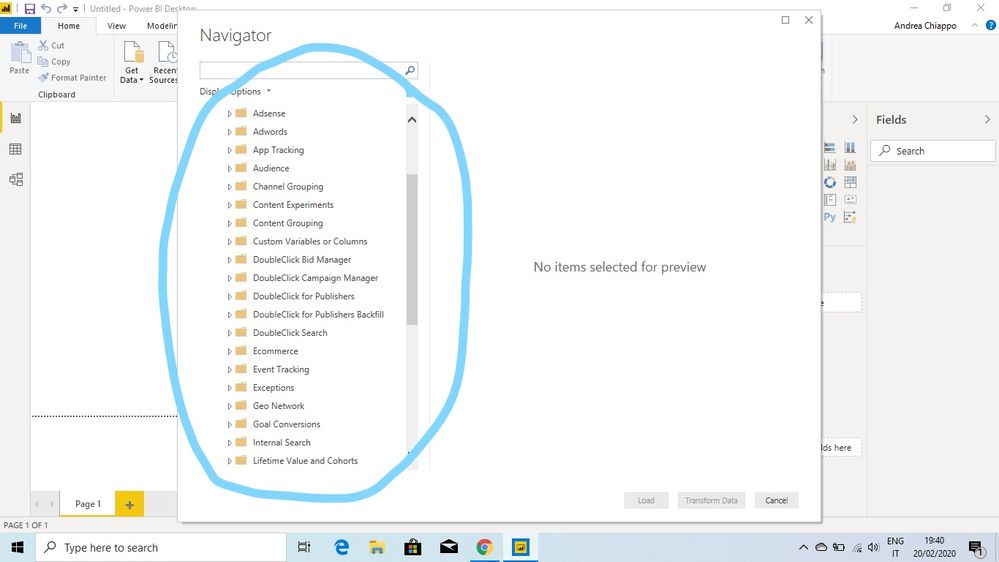
I am a bit lost with all the possible fields that show up after logging into GA
(what I'm circling in the attached picture, the cubes, if I'm not mistaking).
Is there anywhere a guide explaining the meaning of each item?
Thanks
Solved! Go to Solution.
Hi @andrea_chiappo ,
I am not familiar with these folders in GA, I think this is more related to GA, so I suggest you could post this problem in GS's forum where you might get more prpfessional suggestions.
Best Regards,
Zoe Zhi
If this post helps, then please consider Accept it as the solution to help the other members find it more quickly.
Hi @andrea_chiappo ,
I am not familiar with these folders in GA, I think this is more related to GA, so I suggest you could post this problem in GS's forum where you might get more prpfessional suggestions.
Best Regards,
Zoe Zhi
If this post helps, then please consider Accept it as the solution to help the other members find it more quickly.
Share feedback directly with Fabric product managers, participate in targeted research studies and influence the Fabric roadmap.
| User | Count |
|---|---|
| 7 | |
| 4 | |
| 4 | |
| 3 | |
| 3 |
| User | Count |
|---|---|
| 12 | |
| 11 | |
| 11 | |
| 7 | |
| 6 |