I have a store procedure connected to Power Bi. The store procedure requires Parameter as Name and Gender to filter the records accordingly. I have created two Parameter in Power BI as “ParameterName” and “ParameterGender” and based on this parameter I should able to filter the store procedure dynamically.
Please find the query for Store Procedure to execute in Power BI:
let
Source = Sql.Database("LINCOIN\SQL2014", "POWERBIDS", [Query="EXEC POWERBIDS.dbo.SelectAllCustomers @name='"& ParameterName & "', @Gender='"& ParameterGender & "';"])
in
Source
Now when I pass the value in Parameters then the store procedure is executed successfully and require output is seen in the table.

Now I want to achieve the same by-passing Parameters value through URL and filter the store procedure based on values passed in URL.
For Example: I create below URL to pass the ParameterName value as James and ParameterGender value as M
https://app.powerbi.com/groups/me/reports/ee8b08f7-2f92-4301-8e0e-15bfccf5fa3a/ReportSection5b46f510...
The filters are applied to the report as shown in below screenshot but the store procedure is not filter according to the parameter passed through URL.
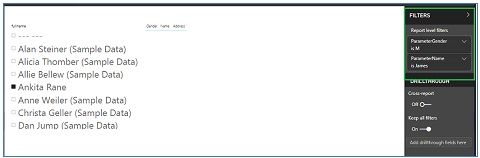
Please let me know how to execute the store procedure by parameter value passed through URL


