cancel
Showing results for 
Search instead for 
Did you mean: 

Vote for your favorite vizzies from the Power BI Dataviz World Championship submissions. Vote now!

Reply
Mark_Holtham
Regular Visitor

dynamics 365 URL filter by date

Hello all,


I've been told by an engineer to move to the Dynamics 365 9.0 api for Power BI queries but I'm finding that I receive an error when filtering by date.  I suspect it is a formatting issue because I can filter by text field but not by date.


I've tried this with various date formats but getting the error below:


OData.Feed("https://<tenant>.api.crm.dynamics.com/api/data/v9.0/invoices?$filter=createdon eq datetime'2018-01-01'")


Error

OData Version: 3 and 4, Error: The remote server returned an error: (400) Bad Request. (Unrecognized 'Edm.String' literal 'datetime'2018-01-01'' at '13' in 'createdon gt datetime'2018-01-01''.)


Any chance someone can point me in the right direction?


In case it helps, the original query was: https://<tenant>.api.crm.dynamics.com/XRMServices/2011/Organization.svc/InvoiceSet?$filter=CreatedOn gt datetime '2018-01-01'


Mark

1 ACCEPTED SOLUTION
Anonymous
Not applicable

@Mark_Holtham,

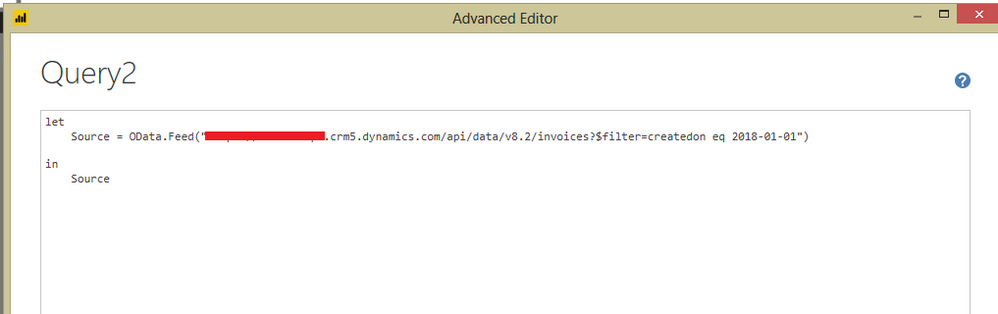
Change your code to the following:

OData.Feed("https://<tenant>.api.crm.dynamics.com/api/data/v9.0/invoices?$filter=createdon eq 2018-01-01
")

1.PNG


Reference:
https://msdn.microsoft.com/en-us/library/mt628816.aspx

Regards,
Lydia

View solution in original post

2 REPLIES 2
Anonymous
Not applicable

@Mark_Holtham,

Change your code to the following:

OData.Feed("https://<tenant>.api.crm.dynamics.com/api/data/v9.0/invoices?$filter=createdon eq 2018-01-01
")

1.PNG


Reference:
https://msdn.microsoft.com/en-us/library/mt628816.aspx

Regards,
Lydia

Thank you, that worked. Thats the one variation I didnt try!


One version of this issue I still have though relates to cross table filtering by date.  For example I have the similar date filtering requirement for saleorderdetails where I want to filter only the ones where the salesorder has a specific date.


Normally I would expand and then filter but this does not seem to be supported anymore.


Source = OData.Feed("<tenant>.api.crm.dynamics.com/api/data/v9.0/salesorderdetails?&$expand=salesorderid&$filter=salesorderid/createdon gt 2016-11-01


Any chance you can point me in the right direction for this one as well?


Thanks

Helpful resources

Announcements
Power BI DataViz World Championships

Power BI Dataviz World Championships

Vote for your favorite vizzies from the Power BI World Championship submissions!

Sticker Challenge 2026 Carousel

Join our Community Sticker Challenge 2026

If you love stickers, then you will definitely want to check out our Community Sticker Challenge!

January Power BI Update Carousel

Power BI Monthly Update - January 2026

Check out the January 2026 Power BI update to learn about new features.

FabCon Atlanta 2026 carousel

FabCon Atlanta 2026

Join us at FabCon Atlanta, March 16-20, for the ultimate Fabric, Power BI, AI and SQL community-led event. Save $200 with code FABCOMM.