Join us at FabCon Atlanta from March 16 - 20, 2026, for the ultimate Fabric, Power BI, AI and SQL community-led event. Save $200 with code FABCOMM.
Register now!The Power BI Data Visualization World Championships is back! Get ahead of the game and start preparing now! Learn more
Hi
I'm completely new to DAX and power BI, so I'm struggling with even the simple stuff. I'm looking to create a new table based on distinct value from another table. For each of the distinct values, I want to create new rows with a list of variables. The end result looks like this:
Budget (distinct value from another table)
500
1000
1500
...
Year
2019
2020
2021
...
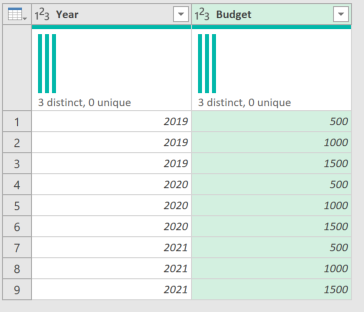
Result:
Budget Year
500 2019
500 2020
500 2021
1000 2019
1000 2020
1000 2021
1500 2019
1500 2020
1500 2021
I am using a very primitive and manual way to generate my new table, Can anyway direct me as to a better way to do this (probably using some sort of for loop or generate list method)
let
#"BudgetList" = Table.FromList(List.Distinct(#"Budget Analysis"[Budget]), Splitter.SplitByNothing(), null, null, ExtraValues.Error),
#"2020" = Table.AddColumn(BudgetList, "Year",each 2020),
#"2021" = Table.AddColumn(BudgetList, "Year",each 2021),
#"2022" = Table.AddColumn(BudgetList, "Year",each 2022),
#"2023" = Table.AddColumn(BudgetList, "Year",each 2023),
#"2024" = Table.AddColumn(BudgetList, "Year",each 2024),
CombinedYearlySummary = Table.Combine({
#"2020",
#"2021",
#"2022",
#"2023",
#"2024"})
in
#"CombinedYearlySummary"
Hi @Anonymous
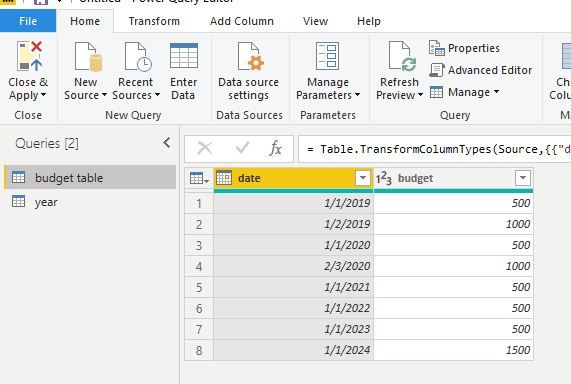
Assume your budget table is as below
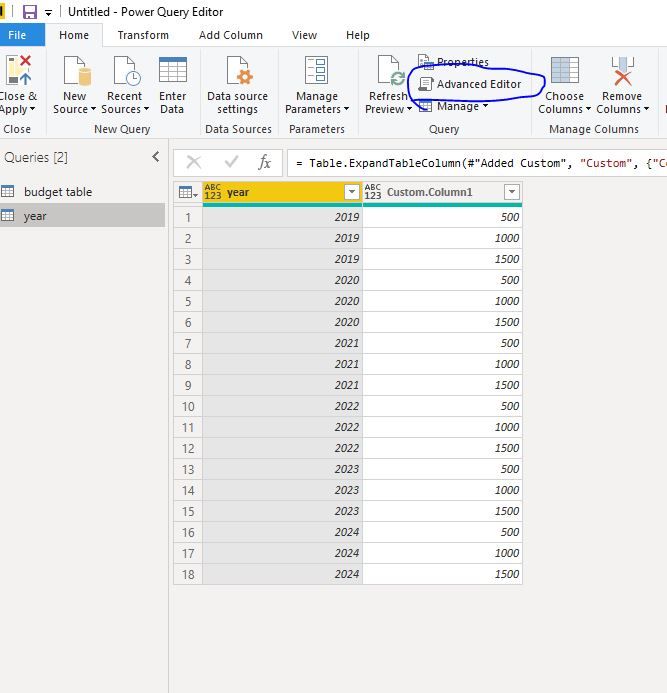
Then create a new query names "year",
code in Advanced editor(create year from 2019~2024)
let
Source = List.Numbers(2019,6),
#"Converted to Table" = Table.FromList(Source, Splitter.SplitByNothing(), null, null, ExtraValues.Error),
#"Renamed Columns" = Table.RenameColumns(#"Converted to Table",{{"Column1", "year"}}),
Source2=Table.FromList(List.Distinct(#"budget table"[budget]), Splitter.SplitByNothing(), null, null, ExtraValues.Error),
#"Added Custom" = Table.AddColumn(#"Renamed Columns", "Custom", each Source2),
#"Expanded Custom" = Table.ExpandTableColumn(#"Added Custom", "Custom", {"Column1"}, {"Custom.Column1"})
in
#"Expanded Custom"
No magic required here. Just a little trick to make it a Cartesian Join.
I used Excel for this to make it easy.
Full M code for the Year query which is were I added the "budget" column.
let
Source = Excel.CurrentWorkbook(){[Name="Year"]}[Content],
#"Changed Type" = Table.TransformColumnTypes(Source,{{"Year", Int64.Type}}),
#"Added Custom" = Table.AddColumn(#"Changed Type", "Budget Table", each Budget),
#"Expanded Budget Table" = Table.ExpandTableColumn(#"Added Custom", "Budget Table", {"Budget"}, {"Budget"})
in
#"Expanded Budget Table"
Here is my Excel file if you want to look at it.
DAX is for Analysis. Power Query is for Data Modeling
Proud to be a Super User!
MCSA: BI ReportingThe Power BI Data Visualization World Championships is back! Get ahead of the game and start preparing now!