
Join us at FabCon Atlanta from March 16 - 20, 2026, for the ultimate Fabric, Power BI, AI and SQL community-led event. Save $200 with code FABCOMM.
Register now!The Power BI Data Visualization World Championships is back! Get ahead of the game and start preparing now! Learn more
Good morning!
Hi I was trying to see what SQL queries does my Power BI report generate for the DB, and in my case i was trying a paralelperiod function to see how it is generated in the DB. I´m using a Direct Query connection to my DB in Vertica. This is the example DAX query:
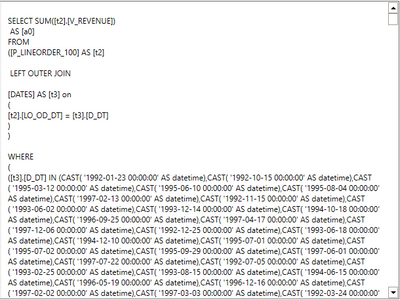
When I evaluate the query in DAX Studio I get that the selection of DATES for the query is done one by one with an IN. The column D_DT is Date Time format and when I see the SQL query in DAX studio the result is this:
If you look the scrollbar you realize there is a huge amount of Dates written one by one.
So my doubt is , isn´t this very inefficient? Wouldn´t it be better just to use a BETWEEN or any other way more efficient rather than generate all the DATES that is going to use one by one?
Thanks for your time!
Solved! Go to Solution.
@Anonymous
You may use DATESINPERIOD().
DATESINPERIOD function (DAX) - DAX | Microsoft Docs
Paul Zheng
@Anonymous
You may use DATESINPERIOD().
DATESINPERIOD function (DAX) - DAX | Microsoft Docs
Paul Zheng
Thanks, that is what i was looking for!
I have just tried it and it works in the same way. I´m not searching for a practical solution though, I´m just trying to know why it works the way it does and not other way that for me would look more efficient. But thank you anyways for the response.
I would agree but the developers probably have a good reason for not using BETWEEN. Do you know what the compatibility level is for BETWEEN ?
Not really ,I was just asking myself why this was the way parallelperiod worked existing the other ways. But I also agree with you, the developers may have a reason for it
The Power BI Data Visualization World Championships is back! Get ahead of the game and start preparing now!
Check out the November 2025 Power BI update to learn about new features.
| User | Count |
|---|---|
| 10 | |
| 6 | |
| 5 | |
| 4 | |
| 2 |