cancel
Showing results for 
Search instead for 
Did you mean: 

The Power BI Data Visualization World Championships is back! Get ahead of the game and start preparing now! Learn more

Reply
Anonymous
Not applicable

Using Corrections to overwrite historical data

Hi, 


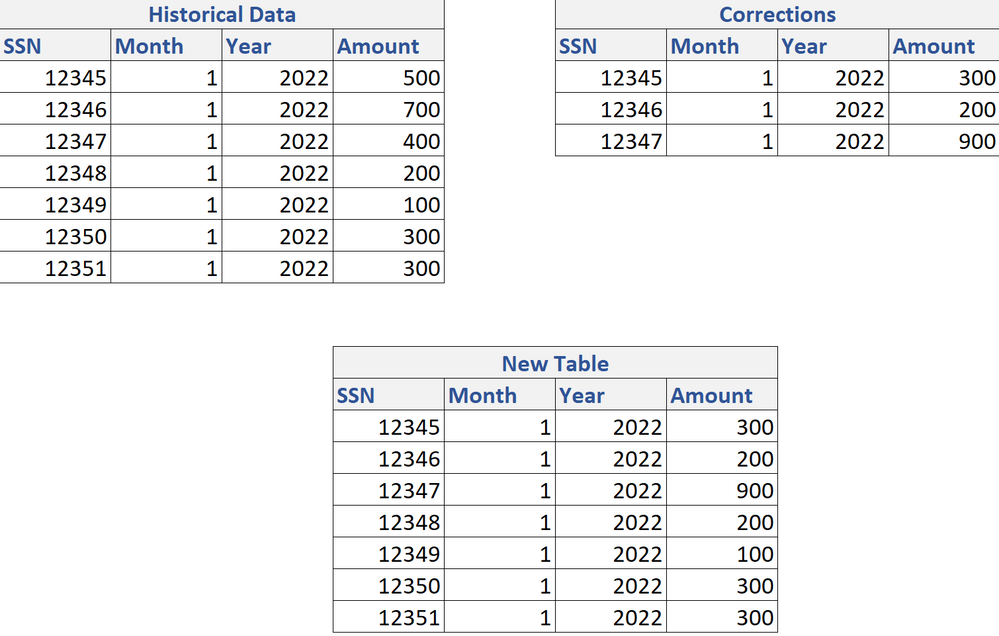
I have two table (Historical Data & Corrections). I need to load all the historical data and if there are corrections I need to be able to overwrite the Historical Data where the corrections happened.


See example below: 

ExampleExample


1 ACCEPTED SOLUTION
jennratten
Super User
Super User

Hello - this is one way you can accomplish the result - add a date column to both tables for the date the row is added to the table.  Then append the tables and group by the max date for each like so.

Historical Data table
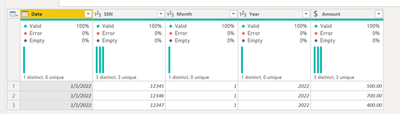
jennratten_0-1653322337732.png

let
    Source = Table.FromRows(Json.Document(Binary.Decompress(Binary.FromText("i45WMtQ31DcyMDJS0lEyNDI2MQXRQAwVMjUwUIrVwVBlhqrKHLsqc1RVJiBVsQA=", BinaryEncoding.Base64), Compression.Deflate)), let _t = ((type nullable text) meta [Serialized.Text = true]) in type table [Date = _t, SSN = _t, Month = _t, Year = _t, Amount = _t]),
    #"Changed Type" = Table.TransformColumnTypes(Source,{{"Amount", Currency.Type}, {"Year", Int64.Type}, {"Month", Int64.Type}, {"SSN", Int64.Type}, {"Date", type date}})
in
    #"Changed Type"

Corrections table
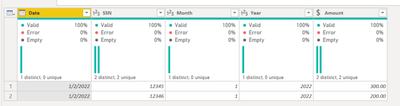
jennratten_1-1653322358225.png

let
    Source = Table.FromRows(Json.Document(Binary.Decompress(Binary.FromText("i45WMtQ30jcyMDJS0lEyNDI2MQXRQAwVMjYwUIrVwVBlhqrKCKQqFgA=", BinaryEncoding.Base64), Compression.Deflate)), let _t = ((type nullable text) meta [Serialized.Text = true]) in type table [Date = _t, SSN = _t, Month = _t, Year = _t, Amount = _t]),
    Custom1 = Table.TransformColumnTypes(Source,{{"Amount", Currency.Type}, {"Year", Int64.Type}, {"Month", Int64.Type}, {"SSN", Int64.Type}, {"Date", type date}})
in
    Custom1

New Table
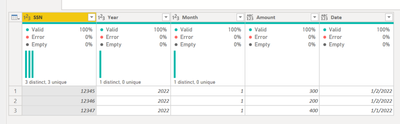
jennratten_2-1653322379778.png


New Table script:

let
    Source = Table.Combine({#"Historical Data", Corrections}),
    GroupedRows = Table.Group(Source, {"SSN", "Year", "Month"}, {{"Data", each _, type table}}),
    LatestDate = Table.TransformColumns(
        GroupedRows,
        {
            "Data",
            (t) => Table.SelectRows ( t, let MaxDate = List.Max ( t[Date] ) in each [Date] = MaxDate )
        }
    ),
    #"Expanded Data" = Table.ExpandTableColumn(LatestDate, "Data", {"Amount", "Date"})

in
    #"Expanded Data"

 

View solution in original post

2 REPLIES 2
jennratten
Super User
Super User

Hello - this is one way you can accomplish the result - add a date column to both tables for the date the row is added to the table.  Then append the tables and group by the max date for each like so.

Historical Data table

jennratten_0-1653322337732.png

let
    Source = Table.FromRows(Json.Document(Binary.Decompress(Binary.FromText("i45WMtQ31DcyMDJS0lEyNDI2MQXRQAwVMjUwUIrVwVBlhqrKHLsqc1RVJiBVsQA=", BinaryEncoding.Base64), Compression.Deflate)), let _t = ((type nullable text) meta [Serialized.Text = true]) in type table [Date = _t, SSN = _t, Month = _t, Year = _t, Amount = _t]),
    #"Changed Type" = Table.TransformColumnTypes(Source,{{"Amount", Currency.Type}, {"Year", Int64.Type}, {"Month", Int64.Type}, {"SSN", Int64.Type}, {"Date", type date}})
in
    #"Changed Type"

Corrections table

jennratten_1-1653322358225.png

let
    Source = Table.FromRows(Json.Document(Binary.Decompress(Binary.FromText("i45WMtQ30jcyMDJS0lEyNDI2MQXRQAwVMjYwUIrVwVBlhqrKCKQqFgA=", BinaryEncoding.Base64), Compression.Deflate)), let _t = ((type nullable text) meta [Serialized.Text = true]) in type table [Date = _t, SSN = _t, Month = _t, Year = _t, Amount = _t]),
    Custom1 = Table.TransformColumnTypes(Source,{{"Amount", Currency.Type}, {"Year", Int64.Type}, {"Month", Int64.Type}, {"SSN", Int64.Type}, {"Date", type date}})
in
    Custom1

New Table

jennratten_2-1653322379778.png


New Table script:

let
    Source = Table.Combine({#"Historical Data", Corrections}),
    GroupedRows = Table.Group(Source, {"SSN", "Year", "Month"}, {{"Data", each _, type table}}),
    LatestDate = Table.TransformColumns(
        GroupedRows,
        {
            "Data",
            (t) => Table.SelectRows ( t, let MaxDate = List.Max ( t[Date] ) in each [Date] = MaxDate )
        }
    ),
    #"Expanded Data" = Table.ExpandTableColumn(LatestDate, "Data", {"Amount", "Date"})

in
    #"Expanded Data"


Anonymous
Not applicable

Thank you! 

Helpful resources

Announcements
Power BI DataViz World Championships

Power BI Dataviz World Championships

The Power BI Data Visualization World Championships is back! Get ahead of the game and start preparing now!

December 2025 Power BI Update Carousel

Power BI Monthly Update - December 2025

Check out the December 2025 Power BI Holiday Recap!

FabCon Atlanta 2026 carousel

FabCon Atlanta 2026

Join us at FabCon Atlanta, March 16-20, for the ultimate Fabric, Power BI, AI and SQL community-led event. Save $200 with code FABCOMM.

Top Solution Authors