cancel
Showing results for 
Search instead for 
Did you mean: 

The Power BI Data Visualization World Championships is back! Get ahead of the game and start preparing now! Learn more

Reply
im_newbie_123
Frequent Visitor

Use advanced power query editor to use SQL statement

I have a sql statement which is union of two tables.


I want to use the sql statement inside advaced query editor.


My SQL Statement :

SELECT [ABC],[XYZ] FROM TABLE1
UNION
SELECT [PQR],[YAA] FROM TABLE2


I have to create something similar to a view which will have union of these two tables along with a new name for the dataset.

3 REPLIES 3
Anonymous
Not applicable

You could write the SQL in PowerQuery:

= Table.NestedJoin(#"weekly report", {"Unique ID"}, Tracker, {"Unique ID"}, "Tracker", JoinKind.LeftOuter)

v-frfei-msft
Community Support
Community Support

Hi @im_newbie_123 ,


In power query, we should rename the column [PQR],[YAA] in table2 to  [ABC],[XYZ], then we can append the tables to get a excepted table.


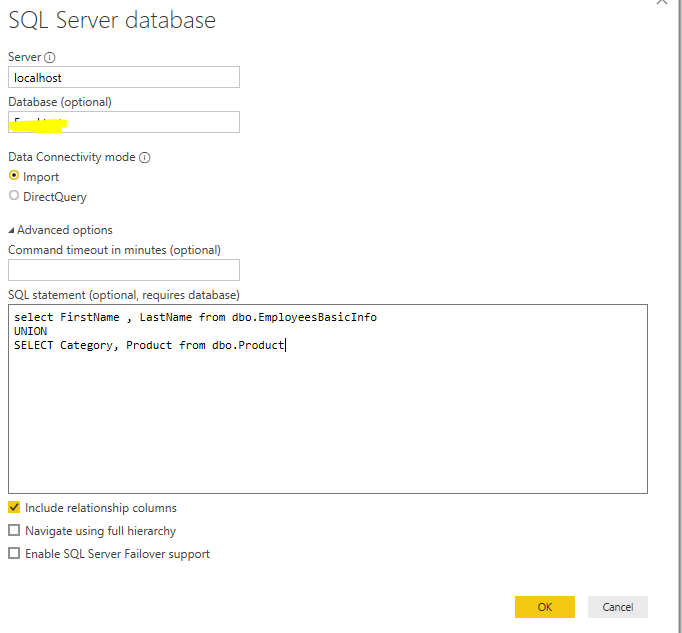
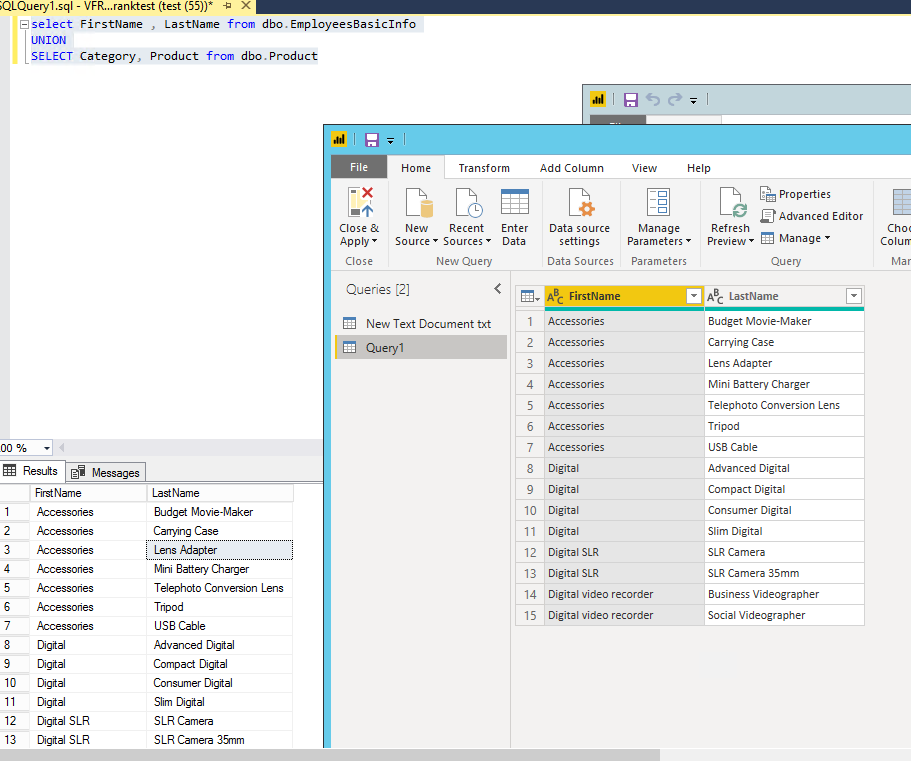
Btw, we can enter the sql statement when we connect to the database in power bi desktop.

2.PNGCapture.PNG


Community Support Team _ Frank
If this post helps, then please consider Accept it as the solution to help the others find it more quickly.
Anonymous
Not applicable

As I understand you can not do SQL on PowerQuery but you can do exactly the same operation with an APPEND of two Queries. 

Helpful resources

Announcements
Power BI DataViz World Championships

Power BI Dataviz World Championships

The Power BI Data Visualization World Championships is back! Get ahead of the game and start preparing now!

December 2025 Power BI Update Carousel

Power BI Monthly Update - December 2025

Check out the December 2025 Power BI Holiday Recap!

FabCon Atlanta 2026 carousel

FabCon Atlanta 2026

Join us at FabCon Atlanta, March 16-20, for the ultimate Fabric, Power BI, AI and SQL community-led event. Save $200 with code FABCOMM.