Don't miss your chance to take the Fabric Data Engineer (DP-700) exam on us!
Learn moreWe've captured the moments from FabCon & SQLCon that everyone is talking about, and we are bringing them to the community, live and on-demand. Starts on April 14th. Register now
Hi all,
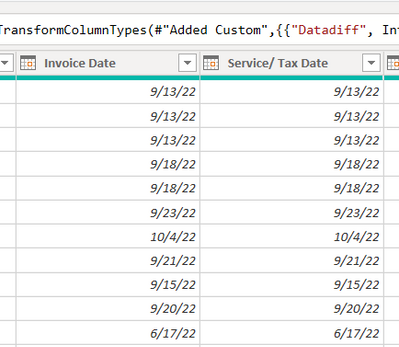
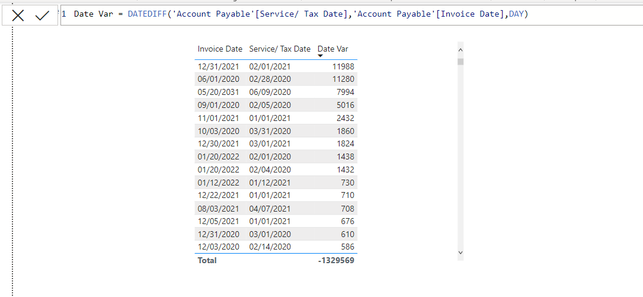
I am calculating a simply date difference using Datediff function. But the value I got is wrong. I check the data types of the two date column are date. I still can not find the reason. Please help!
Thank you in advance!
Branko
Solved! Go to Solution.
Hi @Anonymous
if you change the aggregation from SUM to MAX or MIN you will get correct results at the table visual row level but wrong at the total level.
You have two options.
first option is to create a measure based on the Date Var column that you have created
Difference (days) =
SUMX (
SUMMARIZE ( 'Table', 'Table'[Invoice Date], 'Table'[Service/ Tax Date] ),
CALCULATE ( MAX ( 'Table'[Date Var] ) )
)
or directly using the following measure
Difference (days) =
SUMX (
SUMMARIZE ( 'Table', 'Table'[Invoice Date], 'Table'[Service/ Tax Date] ),
DATEDIFF ( 'Table'[Service/ Tax Date], 'Table'[Invoice Date], DAY )
)
Hi @Anonymous
if you change the aggregation from SUM to MAX or MIN you will get correct results at the table visual row level but wrong at the total level.
You have two options.
first option is to create a measure based on the Date Var column that you have created
Difference (days) =
SUMX (
SUMMARIZE ( 'Table', 'Table'[Invoice Date], 'Table'[Service/ Tax Date] ),
CALCULATE ( MAX ( 'Table'[Date Var] ) )
)
or directly using the following measure
Difference (days) =
SUMX (
SUMMARIZE ( 'Table', 'Table'[Invoice Date], 'Table'[Service/ Tax Date] ),
DATEDIFF ( 'Table'[Service/ Tax Date], 'Table'[Invoice Date], DAY )
)
Hi,
Thank you very much for your solution!!!! But could you tell me the reason, why I can't get right outcoming by simply using DateDiff?
Thank you!
@Anonymous
The problem is not with DATEDIFF. You are creating a calculated column and you have duplicate dates. It depends on your business logic. Actually, the first result you got is arguably correct. If you divide the number of days over how many times the 'Table'[Invoice Date] ; 'Table'[Service/ Tax Date] combination is dupicated in your data, you'll get the same result on my solution. However, it can be argued the first result is the correct one as it aggregates the days for each record. It is up to your business requirement and logic to determine which result is required.
If you have recently started exploring Fabric, we'd love to hear how it's going. Your feedback can help with product improvements.
A new Power BI DataViz World Championship is coming this June! Don't miss out on submitting your entry.
Share feedback directly with Fabric product managers, participate in targeted research studies and influence the Fabric roadmap.
| User | Count |
|---|---|
| 9 | |
| 6 | |
| 3 | |
| 2 | |
| 2 |
| User | Count |
|---|---|
| 23 | |
| 14 | |
| 10 | |
| 6 | |
| 5 |