cancel
Showing results for 
Search instead for 
Did you mean: 

July 7 - July 17 | Round 2 of the Power BI Dataviz World Championships. Don't miss your chance! Learn more

Reply
amolkulkarnigk1
Regular Visitor

Unpivot table w

I have a table as below


Wrong Rate

Sr. No  Name  Appl. No  PolicyRate 

1          Abc     1234         10

2          zxc      1224         11

Need one additional column which shows values from 1st header i. e as "Wrong Rate" In each row of table


1 ACCEPTED SOLUTION
Anonymous
Not applicable

Hi @amolkulkarnigk1 ,

Based on the description, I'm assuming your table looks like this:

vcgaomsft_0-1703493628245.png

You can get the value of Wrong Rate by adding a custom column(After the twice Promoted Headers):
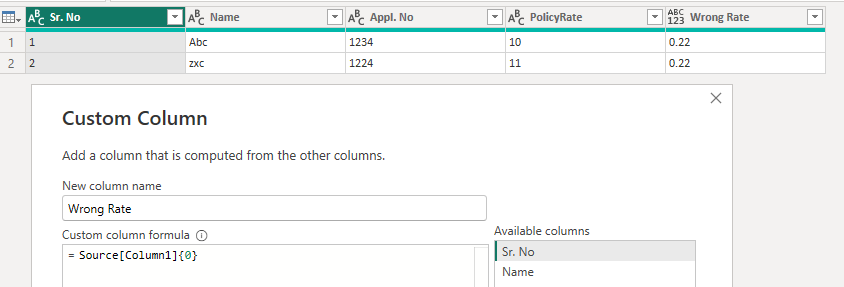
vcgaomsft_1-1703493845978.png

Advanced editor.

let
    Source = Table.FromRows(Json.Document(Binary.Decompress(Binary.FromText("i45WMtAzMlLSUYKiWJ1opeAiPQW/fCDPLzE3FUg5FhTkQEUC8nMykyuDEktSwSoNQbJJyUDS0MjYBEQZgMVBBlZVQMSNwOKGSrGxAA==", BinaryEncoding.Base64), Compression.Deflate)), let _t = ((type nullable text) meta [Serialized.Text = true]) in type table [Column1 = _t, Column2 = _t, Column3 = _t, Column4 = _t]),
    #"Promoted Headers" = Table.PromoteHeaders(Source, [PromoteAllScalars=true]),
    #"Promoted Headers1" = Table.PromoteHeaders(#"Promoted Headers", [PromoteAllScalars=true]),
    #"Added Custom" = Table.AddColumn(#"Promoted Headers1", "Wrong Rate", each Source[Column1]{0})
in
    #"Added Custom"

Best Regards,
Gao

Community Support Team


If there is any post helps, then please consider Accept it as the solution  to help the other members find it more quickly.
If I misunderstand your needs or you still have problems on it, please feel free to let us know. Thanks a lot!

How to get your questions answered quickly --  How to provide sample data in the Power BI Forum -- China Power BI User Group

View solution in original post

2 REPLIES 2
Anonymous
Not applicable

Hi @amolkulkarnigk1 ,

Based on the description, I'm assuming your table looks like this:

vcgaomsft_0-1703493628245.png

You can get the value of Wrong Rate by adding a custom column(After the twice Promoted Headers):

vcgaomsft_1-1703493845978.png

Advanced editor.

let
    Source = Table.FromRows(Json.Document(Binary.Decompress(Binary.FromText("i45WMtAzMlLSUYKiWJ1opeAiPQW/fCDPLzE3FUg5FhTkQEUC8nMykyuDEktSwSoNQbJJyUDS0MjYBEQZgMVBBlZVQMSNwOKGSrGxAA==", BinaryEncoding.Base64), Compression.Deflate)), let _t = ((type nullable text) meta [Serialized.Text = true]) in type table [Column1 = _t, Column2 = _t, Column3 = _t, Column4 = _t]),
    #"Promoted Headers" = Table.PromoteHeaders(Source, [PromoteAllScalars=true]),
    #"Promoted Headers1" = Table.PromoteHeaders(#"Promoted Headers", [PromoteAllScalars=true]),
    #"Added Custom" = Table.AddColumn(#"Promoted Headers1", "Wrong Rate", each Source[Column1]{0})
in
    #"Added Custom"

Best Regards,
Gao

Community Support Team


If there is any post helps, then please consider Accept it as the solution  to help the other members find it more quickly.
If I misunderstand your needs or you still have problems on it, please feel free to let us know. Thanks a lot!

How to get your questions answered quickly --  How to provide sample data in the Power BI Forum -- China Power BI User Group

PijushRoy
Community Champion
Community Champion

Hi @amolkulkarnigk1 

I am not clear with your requirement, if the below solution is not working, please share more details and a screenshot of the requirement.


Try this, Create a Custom Column in Power Query
Give column name
In formula box, type

="Wrong Rate"

It will create a new column with the Wrong Rate text

 
If solved your requirement, please mark this answer as SOLUTION.
If this comment helps you, appreciate your KUDOS

Thanks 
Pijush


Did I answer your question? Mark my post as a solution!
Appreciate your Like/Kudos

Proud to be a Super User!


Helpful resources

Announcements
FabCon and SQLCon Barcelona 2026

FabCon & SQLCon – Barcelona 2026

Join us in Barcelona for FabCon and SQLCon, the Fabric, Power BI, SQL, and AI community event. Save €200 with code FABCMTY200.

60 days of Data Days Carousel

Data Days 2026

Join Fabric Data Days 2026: 60 days of free live/on-demand sessions, challenges, study groups, and certification opportunities.

Power BI DataViz World Championships carousel

Power BI DataViz World Championships - June 2026

A new Power BI DataViz World Championship is coming this June! Don't miss out on submitting your entry.