Join us at FabCon Atlanta from March 16 - 20, 2026, for the ultimate Fabric, Power BI, AI and SQL community-led event. Save $200 with code FABCOMM.
Register now!Learn from the best! Meet the four finalists headed to the FINALS of the Power BI Dataviz World Championships! Register now
Hi Power Query gurus!
I am struggling with the following case:
Case
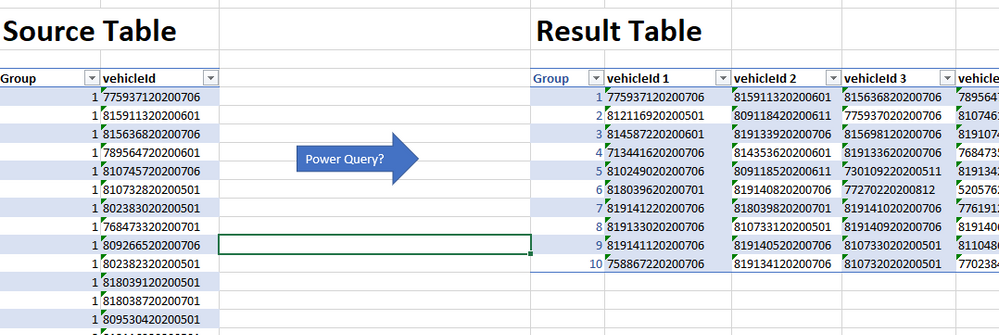
I want to transpose the source table so that all vehicleIds for each group is on the same row. Is that possible to do with power query? (I guss if it is, its really simple 🙂 But I cant find a sollution in splendid isolation)
Here is my example data: https://drive.google.com/file/d/1OTOcq8U32qeGiynUkoYoIc0_7XWkvHCr/view?usp=sharing
Best regards
Trond Erik
Solved! Go to Solution.
if you allow me to break your isolation, I would propose this idea to you
let
Source = Table.FromRows(Json.Document(Binary.Decompress(Binary.FromText("i45WMlTSUUo0VIrVgTCTEMxkCNMIpMAIzkxCMJOBzFgA", BinaryEncoding.Base64), Compression.Deflate)), let _t = ((type nullable text) meta [Serialized.Text = true]) in type table [id = _t, veic = _t]),
#"Changed Type" = Table.TransformColumnTypes(Source,{{"id", Int64.Type}, {"veic", type text}}),
#"Grouped Rows" = Table.Group(#"Changed Type", {"id"}, {{"vehic", each _[veic]}}),
#"Extracted Values" = Table.TransformColumns(#"Grouped Rows", {"vehic", each Text.Combine(List.Transform(_, Text.From), ","), type text}),
#"Split Column by Delimiter" = Table.SplitColumn(#"Extracted Values", "vehic", Splitter.SplitTextByDelimiter(",", QuoteStyle.Csv), {"vehic.1", "vehic.2", "vehic.3"}),
#"Changed Type1" = Table.TransformColumnTypes(#"Split Column by Delimiter",{{"vehic.1", type text}, {"vehic.2", type text}, {"vehic.3", type text}})
in
#"Changed Type1"
if you allow me to break your isolation, I would propose this idea to you
let
Source = Table.FromRows(Json.Document(Binary.Decompress(Binary.FromText("i45WMlTSUUo0VIrVgTCTEMxkCNMIpMAIzkxCMJOBzFgA", BinaryEncoding.Base64), Compression.Deflate)), let _t = ((type nullable text) meta [Serialized.Text = true]) in type table [id = _t, veic = _t]),
#"Changed Type" = Table.TransformColumnTypes(Source,{{"id", Int64.Type}, {"veic", type text}}),
#"Grouped Rows" = Table.Group(#"Changed Type", {"id"}, {{"vehic", each _[veic]}}),
#"Extracted Values" = Table.TransformColumns(#"Grouped Rows", {"vehic", each Text.Combine(List.Transform(_, Text.From), ","), type text}),
#"Split Column by Delimiter" = Table.SplitColumn(#"Extracted Values", "vehic", Splitter.SplitTextByDelimiter(",", QuoteStyle.Csv), {"vehic.1", "vehic.2", "vehic.3"}),
#"Changed Type1" = Table.TransformColumnTypes(#"Split Column by Delimiter",{{"vehic.1", type text}, {"vehic.2", type text}, {"vehic.3", type text}})
in
#"Changed Type1"
Thx for helping me out of my isolation 🙂
I knew the solution was simple, it always is with power query!
Best regards
Trond Erik
Share feedback directly with Fabric product managers, participate in targeted research studies and influence the Fabric roadmap.
Check out the February 2026 Power BI update to learn about new features.
| User | Count |
|---|---|
| 16 | |
| 12 | |
| 9 | |
| 7 | |
| 6 |