Join us at FabCon Atlanta from March 16 - 20, 2026, for the ultimate Fabric, Power BI, AI and SQL community-led event. Save $200 with code FABCOMM.
Register now!The Power BI Data Visualization World Championships is back! Get ahead of the game and start preparing now! Learn more
Hi experts, I want to have 1 column of attribute for multiple rows of value.
so it i want to transform this
| attribute | value |
| Oid | 0 |
| DIAMETER | 254 |
| Q | |
| ID | 34 |
| LABEL | P-0976 |
| LENGTH | 672 |
| MATERIAL | Ductile Iron |
| STARTNODE | 31 |
| START_L | J-1 |
| STOPNODE | 33 |
| STOP_NODEL | J-2 |
| V | |
| Oid | 1 |
| DIAMETER | 254 |
| Q | |
| ID | 37 |
| LABEL | P-0977 |
| LENGTH | 271 |
| MATERIAL | Ductile Iron |
| STARTNODE | 33 |
| START_L | J-2 |
| STOPNODE | 36 |
| STOP_NODEL | J-3 |
| V |
into this
| Oid | DIAMETER | Q | ID | LABEL | LENGTH | MATERIAL | STARTNODE | START_L | STOPNODE | STOP_NODEL | V |
| 0 | 254 | 34 | P-0976 | 672 | Ductile Iron | 31 | J-1 | 33 | J-2 | ||
| 1 | 254 | 37 | P-0977 | 345 | wood | 2 | J-20 | 2 | J-1 |
Here is my actual attemp:
let
Source = API CALL.Contents(),
Source1 = Source{[Name="Source1"]}[Data],
#"1221" = Source1{[ID=1424]}[Data],
CAP = #"1221"{[Name="CAP"]}[Data],
Pipes = CAP{[Name="Pipes"]}[Data],
list1 = Table.FromList(Pipes, Splitter.SplitByNothing(), null, null, ExtraValues.Error),
test = Table.ExpandListColumn(list1, "Column1"),
expandColumn1 = Table.ExpandRecordColumn(test, "Column1", {"attribute", "value"}, {"attribute", "value"}),
#"Transposed Table" = Table.Transpose(expandColumn1),
#"Promoted Headers" = Table.PromoteHeaders(#"Transposed Table", [PromoteAllScalars=true])
in
#"Promoted Headers"
Basically I've
1. expand list
2. expand records
3.transpose column attribute
4. promote first row as header
The problem is when i transpose and set the first row as the header, the columns are expending instead of creating a new row for each attribute.
| Oid | DIAMETER | Q | ID | LABEL | LENGTH | MATERIAL | STARTNODE | START_L | STOPNODE | STOP_NODEL | V | Oid_1 | DIAMETER_2 | Q_3 | ID_4 | LABEL_5 | LENGTH_6 | MATERIAL_7 | STARTNODE_8 | START_L_9 | STOPNODE_10 | STOP_NODEL_11 | V_12 |
| 0 | 254 | 34 | P-0976 | 672 | Ductile Iron | 31 | J-1 | 33 | J-2 | 1 | 254 | 37 | P-0977 | 271 | Ductile Iron | 33 | J-2 | 36 | J-3 |
I also tryed to pivot instead but it says
Expression.Error: There were too many elements in the enumeration to complete the operation.Details:[List]
Thank you for your time
Solved! Go to Solution.
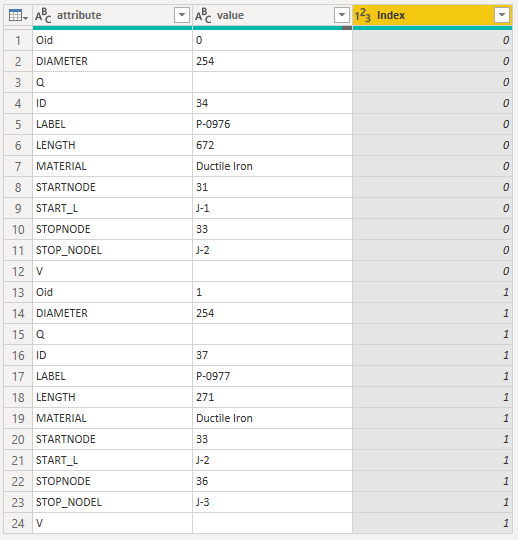
If you have an index to keep track of which record is which, (like this)
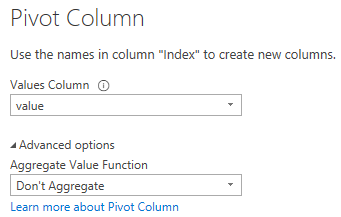
then you can do this in a single step, i.e., pivot the [attribute] column (Transform tabe > Pivot Column):
To generate this index column, one option is to generate a standard index column from 0 and then integer divide by the number of distinct attributes.
Full M code:
let
Source = Table.FromRows(Json.Document(Binary.Decompress(Binary.FromText("i45W8s9MUdJRMlCK1YlWcvF09HUNcQ0CChiZmoCFAoFsBTDL0wXINIaI+jg6ufoAuQG6BpbmZhAhVz/3EA+gmJm5EVjA1xFokqcjSJlLaXJJZk6qgmdRfh5YLjjEMSjEz9/FFWSkIUIoHqTaSxcm4h8AU2MMF4kHCUGUQewJg7sQ4hVDYr1ijukVc1SvGJkbkuYVYwyvGGF4xQybV4zhXlGKjQUA", BinaryEncoding.Base64), Compression.Deflate)), let _t = ((type nullable text) meta [Serialized.Text = true]) in type table [attribute = _t, value = _t]),
#"Changed Type" = Table.TransformColumnTypes(Source,{{"attribute", type text}, {"value", type text}}),
#"Added Index" = Table.AddIndexColumn(#"Changed Type", "Index", 0, 1, Int64.Type),
NumAttr = Table.RowCount(Table.Distinct(#"Added Index", "attribute")),
#"Integer-Divided Column" = Table.TransformColumns(#"Added Index", {{"Index", each Number.IntegerDivide(_, NumAttr), Int64.Type}}),
#"Pivoted Column" = Table.Pivot(#"Integer-Divided Column", List.Distinct(#"Integer-Divided Column"[attribute]), "attribute", "value")
in
#"Pivoted Column"
This is working like a charm, i understand where my error was. thank you
If you have an index to keep track of which record is which, (like this)
then you can do this in a single step, i.e., pivot the [attribute] column (Transform tabe > Pivot Column):
To generate this index column, one option is to generate a standard index column from 0 and then integer divide by the number of distinct attributes.
Full M code:
let
Source = Table.FromRows(Json.Document(Binary.Decompress(Binary.FromText("i45W8s9MUdJRMlCK1YlWcvF09HUNcQ0CChiZmoCFAoFsBTDL0wXINIaI+jg6ufoAuQG6BpbmZhAhVz/3EA+gmJm5EVjA1xFokqcjSJlLaXJJZk6qgmdRfh5YLjjEMSjEz9/FFWSkIUIoHqTaSxcm4h8AU2MMF4kHCUGUQewJg7sQ4hVDYr1ijukVc1SvGJkbkuYVYwyvGGF4xQybV4zhXlGKjQUA", BinaryEncoding.Base64), Compression.Deflate)), let _t = ((type nullable text) meta [Serialized.Text = true]) in type table [attribute = _t, value = _t]),
#"Changed Type" = Table.TransformColumnTypes(Source,{{"attribute", type text}, {"value", type text}}),
#"Added Index" = Table.AddIndexColumn(#"Changed Type", "Index", 0, 1, Int64.Type),
NumAttr = Table.RowCount(Table.Distinct(#"Added Index", "attribute")),
#"Integer-Divided Column" = Table.TransformColumns(#"Added Index", {{"Index", each Number.IntegerDivide(_, NumAttr), Int64.Type}}),
#"Pivoted Column" = Table.Pivot(#"Integer-Divided Column", List.Distinct(#"Integer-Divided Column"[attribute]), "attribute", "value")
in
#"Pivoted Column"
The Power BI Data Visualization World Championships is back! Get ahead of the game and start preparing now!
| User | Count |
|---|---|
| 19 | |
| 9 | |
| 8 | |
| 7 | |
| 6 |