cancel
Showing results for 
Search instead for 
Did you mean: 

Try your skills in the Power BI Dataviz World Championship! Round one ends June 26. Join now

Reply
Ttaylor9870
Helper III
Helper III

Sum per month Power Query

Hey Experts!


I'm stuck on the followng Power Query Problem, I would like the sum per month as a new column (see example below)...


MonthDateSalesWhat I Need
Jan01/01/2022510
Jan01/01/2022510
Feb01/02/202312
Reb 01/02/202312


My tables much larger than this with more columns but follows the same principle but needs to be done in Power Query.


I can't use group by aswell because I need the other columns.


How can I achieve this in Power Query? Any help would be greatly appreciated 🙂 


Many Thanks,


Taylor

2 ACCEPTED SOLUTIONS
ronrsnfld
Super User
Super User

  • Group by Month/Year
  • Advanced Aggregation:
    • Sum of Sales
    • All
  • Then re-expand. Since you havethe All column, you will restore the other columns
let

//change next lineto reflect data source
    Source = Excel.CurrentWorkbook(){[Name="Table4"]}[Content],
    #"Changed Type" = Table.TransformColumnTypes(Source,{{"Month", type text}, {"Date", type date}, {"Sales", Int64.Type}}),

//Add year-month column in case sales dates are not always on same day of month
    #"Added Custom" = Table.AddColumn(#"Changed Type", "YearMonth", each Date.ToText([Date],"yyyyMM"), type text),

//Group by year-month
// Then aggregate for All and Sum
    #"Grouped Rows" = Table.Group(#"Added Custom", {"YearMonth"}, {
        {"All", each _, type table [Month=nullable text, Date=nullable date, Sales=nullable number, YearMonth=text]}, 
        {"Monthly Sales", each List.Sum([Sales]), type nullable number}
        }),

//Remove the yearmonth column
    #"Removed Columns" = Table.RemoveColumns(#"Grouped Rows",{"YearMonth"}),

//Re-expand previous columns
    #"Expanded All" = Table.ExpandTableColumn(#"Removed Columns", "All", {"Month", "Date", "Sales"})
in
    #"Expanded All"


ronrsnfld_0-1692099058605.png


View solution in original post

Anonymous
Not applicable

Hi @Ttaylor9870 ,

Provide another way to think about it.

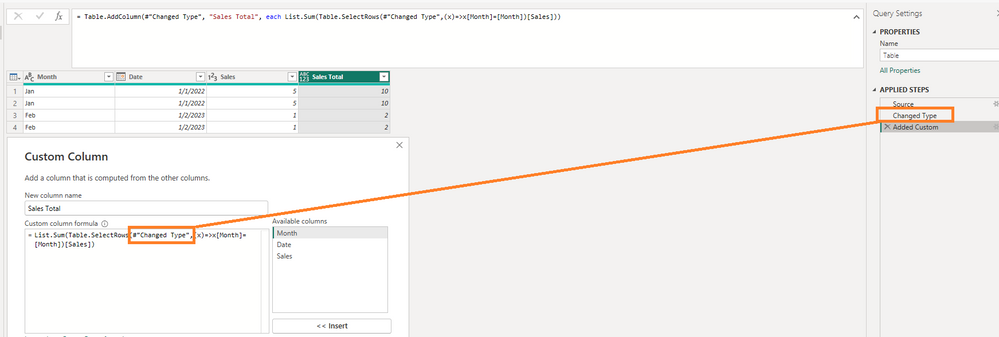
List.Sum(Table.SelectRows(PreviousStepName,(x)=>x[Month]=[Month])[Sales])

vcgaomsft_0-1692256181619.png

all steps.

let
    Source = Table.FromRows(Json.Document(Binary.Decompress(Binary.FromText("i45W8krMU9JRMtQ31DcyMDICMk2VYnVwCrulJoGFjUDCxiAmkvChBQaG+gbIUrEA", BinaryEncoding.Base64), Compression.Deflate)), let _t = ((type nullable text) meta [Serialized.Text = true]) in type table [Month = _t, Date = _t, Sales = _t]),
    #"Changed Type" = Table.TransformColumnTypes(Source,{{"Month", type text}, {"Date", type date}, {"Sales", Int64.Type}}),
    #"Added Custom" = Table.AddColumn(#"Changed Type", "Sales Total", each List.Sum(Table.SelectRows(#"Changed Type",(x)=>x[Month]=[Month])[Sales]))
in
    #"Added Custom"

Best Regards,
Gao

Community Support Team


If there is any post helps, then please consider Accept it as the solution  to help the other members find it more quickly. If I misunderstand your needs or you still have problems on it, please feel free to let us know. Thanks a lot!

How to get your questions answered quickly --  How to provide sample data in the Power BI Forum

View solution in original post

2 REPLIES 2
Anonymous
Not applicable

Hi @Ttaylor9870 ,

Provide another way to think about it.

List.Sum(Table.SelectRows(PreviousStepName,(x)=>x[Month]=[Month])[Sales])

vcgaomsft_0-1692256181619.png

all steps.

let
    Source = Table.FromRows(Json.Document(Binary.Decompress(Binary.FromText("i45W8krMU9JRMtQ31DcyMDICMk2VYnVwCrulJoGFjUDCxiAmkvChBQaG+gbIUrEA", BinaryEncoding.Base64), Compression.Deflate)), let _t = ((type nullable text) meta [Serialized.Text = true]) in type table [Month = _t, Date = _t, Sales = _t]),
    #"Changed Type" = Table.TransformColumnTypes(Source,{{"Month", type text}, {"Date", type date}, {"Sales", Int64.Type}}),
    #"Added Custom" = Table.AddColumn(#"Changed Type", "Sales Total", each List.Sum(Table.SelectRows(#"Changed Type",(x)=>x[Month]=[Month])[Sales]))
in
    #"Added Custom"

Best Regards,
Gao

Community Support Team


If there is any post helps, then please consider Accept it as the solution  to help the other members find it more quickly. If I misunderstand your needs or you still have problems on it, please feel free to let us know. Thanks a lot!

How to get your questions answered quickly --  How to provide sample data in the Power BI Forum

ronrsnfld
Super User
Super User

  • Group by Month/Year
  • Advanced Aggregation:
    • Sum of Sales
    • All
  • Then re-expand. Since you havethe All column, you will restore the other columns
let

//change next lineto reflect data source
    Source = Excel.CurrentWorkbook(){[Name="Table4"]}[Content],
    #"Changed Type" = Table.TransformColumnTypes(Source,{{"Month", type text}, {"Date", type date}, {"Sales", Int64.Type}}),

//Add year-month column in case sales dates are not always on same day of month
    #"Added Custom" = Table.AddColumn(#"Changed Type", "YearMonth", each Date.ToText([Date],"yyyyMM"), type text),

//Group by year-month
// Then aggregate for All and Sum
    #"Grouped Rows" = Table.Group(#"Added Custom", {"YearMonth"}, {
        {"All", each _, type table [Month=nullable text, Date=nullable date, Sales=nullable number, YearMonth=text]}, 
        {"Monthly Sales", each List.Sum([Sales]), type nullable number}
        }),

//Remove the yearmonth column
    #"Removed Columns" = Table.RemoveColumns(#"Grouped Rows",{"YearMonth"}),

//Re-expand previous columns
    #"Expanded All" = Table.ExpandTableColumn(#"Removed Columns", "All", {"Month", "Date", "Sales"})
in
    #"Expanded All"


ronrsnfld_0-1692099058605.png


Helpful resources

Announcements
Fabric Data Days is here Carousel

Fabric Data Days 2026

Don't miss out on Data Days, June 15 through August 7. Learn Fabric, Power BI, SQL, AI and more.

Power BI DataViz World Championships carousel

Power BI DataViz World Championships - June 2026

A new Power BI DataViz World Championship is coming this June! Don't miss out on submitting your entry.