cancel
Showing results for 
Search instead for 
Did you mean: 

Learn from the best! Meet the four finalists headed to the FINALS of the Power BI Dataviz World Championships! Register now

Reply
constantLearner
Frequent Visitor

Steps to connec to SQL Server 2012

Here's the problem I am facing:


I have an SQL Server 2012 database hosted on a remote machine which can be accessed from another remote machine. I need to connect to the SQL Server 2012 database using PowerBI desktop version.


Can anyone help me with the steps.

1 ACCEPTED SOLUTION
Anonymous
Not applicable

Hi @constantLearner,

Adding to other post, you can follow steps below to connect to SQL Server from Power BI Desktop.

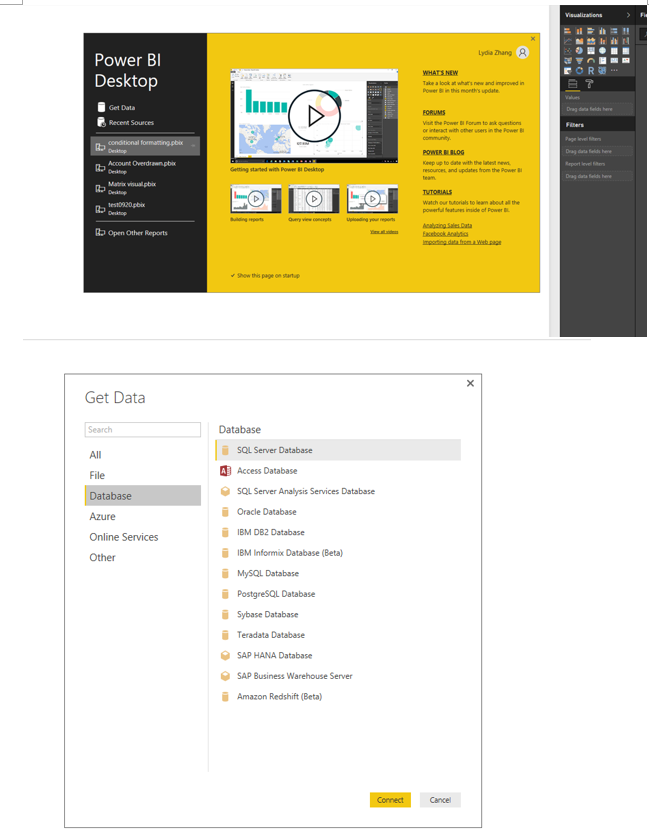
1. Open Power BI Desktop, select the Get Data>Database>SQL Server Database option as shown in the following screenshot.
1.PNG

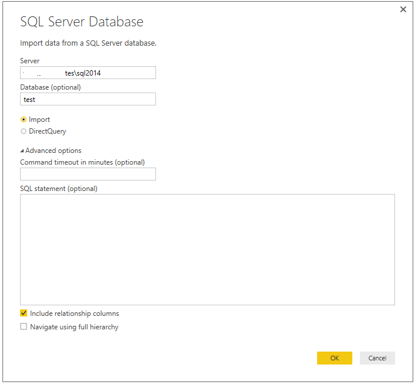
2. In the connection, enter your SQL Server name and the database name. For differences between Import and DirectQuery, please check this article. There are also advanced options to specify the timeout if the query takes long time to execute and an option the specify the SQL Commands.
2.PNG


3.Select the authentication method to connect to your database. If you use a SQL login rather than a Windows login, please choose Database in the following screenshot and enter your account and password.
3.PNG

4. You will receive a message about the connection. It does not support encrypted connection. Click OK to accept the unencrypted connection.

5. Select tables to load into Power BI Desktop from the navigator.

For more details about the above steps, you can also review this similar blog.


Thanks,
Lydia Zhang

View solution in original post

2 REPLIES 2
Anonymous
Not applicable

Hi @constantLearner,

Adding to other post, you can follow steps below to connect to SQL Server from Power BI Desktop.

1. Open Power BI Desktop, select the Get Data>Database>SQL Server Database option as shown in the following screenshot.
1.PNG

2. In the connection, enter your SQL Server name and the database name. For differences between Import and DirectQuery, please check this article. There are also advanced options to specify the timeout if the query takes long time to execute and an option the specify the SQL Commands.
2.PNG


3.Select the authentication method to connect to your database. If you use a SQL login rather than a Windows login, please choose Database in the following screenshot and enter your account and password.
3.PNG

4. You will receive a message about the connection. It does not support encrypted connection. Click OK to accept the unencrypted connection.

5. Select tables to load into Power BI Desktop from the navigator.

For more details about the above steps, you can also review this similar blog.


Thanks,
Lydia Zhang

ankitpatira
Community Champion
Community Champion

@constantLearner As long as from the machine where power bi desktop is installed you're able to talk to machine that is on another machine (where your database is), you don't need to do anythign except open power bi desktop and connect to database.

Helpful resources

Announcements
Power BI DataViz World Championships carousel

Power BI DataViz World Championships - June 2026

A new Power BI DataViz World Championship is coming this June! Don't miss out on submitting your entry.

Join our Fabric User Panel

Join our Fabric User Panel

Share feedback directly with Fabric product managers, participate in targeted research studies and influence the Fabric roadmap.

March Power BI Update Carousel

Power BI Community Update - March 2026

Check out the March 2026 Power BI update to learn about new features.