cancel
Showing results for 
Search instead for 
Did you mean: 

The Power BI Data Visualization World Championships is back! Get ahead of the game and start preparing now! Learn more

Reply
MXSven
Helper I
Helper I

Splitting a Column Pairwise

Hi,
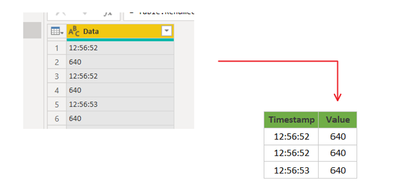
I would like to transform a single column with value pairs into two columns,
but I am struggeling with this task:


MXSven_0-1647860576501.png


1 ACCEPTED SOLUTION
Vijay_A_Verma
Super User
Super User

Open a blank query - Home - Advanced Editor - Remove everything from there and paste the below code

let
    Source = Table.FromRows(Json.Document(Binary.Decompress(Binary.FromText("i45WMjSyMjWzMjVSitWJVjKzsADThlbGJlaGEDELS4iQoZWhsZWJKYRjZKYUGwsA", BinaryEncoding.Base64), Compression.Deflate)), let _t = ((type nullable text) meta [Serialized.Text = true]) in type table [Data = _t]),
    #"Added Index" = Table.AddIndexColumn(Source, "Index", 0, 1, Int64.Type),
    #"Calculated Modulo" = Table.TransformColumns(#"Added Index", {{"Index", each Number.Mod(_, 2), type number}}),
    #"Added Index1" = Table.AddIndexColumn(#"Calculated Modulo", "Index.1", 0, 1, Int64.Type),
    #"Divided Column" = Table.TransformColumns(#"Added Index1", {{"Index.1", each _ / 2, type number}}),
    #"Rounded Down" = Table.TransformColumns(#"Divided Column",{{"Index.1", Number.RoundDown, Int64.Type}}),
    #"Pivoted Column" = Table.Pivot(Table.TransformColumnTypes(#"Rounded Down", {{"Index", type text}}, "en-US"), List.Distinct(Table.TransformColumnTypes(#"Rounded Down", {{"Index", type text}}, "en-US")[Index]), "Index", "Data"),
    #"Removed Columns" = Table.RemoveColumns(#"Pivoted Column",{"Index.1"}),
    #"Renamed Columns" = Table.RenameColumns(#"Removed Columns",{{"0", "Timestamp"}, {"1", "Value"}})
in
    #"Renamed Columns"

View solution in original post

2 REPLIES 2
Vijay_A_Verma
Super User
Super User

Open a blank query - Home - Advanced Editor - Remove everything from there and paste the below code

let
    Source = Table.FromRows(Json.Document(Binary.Decompress(Binary.FromText("i45WMjSyMjWzMjVSitWJVjKzsADThlbGJlaGEDELS4iQoZWhsZWJKYRjZKYUGwsA", BinaryEncoding.Base64), Compression.Deflate)), let _t = ((type nullable text) meta [Serialized.Text = true]) in type table [Data = _t]),
    #"Added Index" = Table.AddIndexColumn(Source, "Index", 0, 1, Int64.Type),
    #"Calculated Modulo" = Table.TransformColumns(#"Added Index", {{"Index", each Number.Mod(_, 2), type number}}),
    #"Added Index1" = Table.AddIndexColumn(#"Calculated Modulo", "Index.1", 0, 1, Int64.Type),
    #"Divided Column" = Table.TransformColumns(#"Added Index1", {{"Index.1", each _ / 2, type number}}),
    #"Rounded Down" = Table.TransformColumns(#"Divided Column",{{"Index.1", Number.RoundDown, Int64.Type}}),
    #"Pivoted Column" = Table.Pivot(Table.TransformColumnTypes(#"Rounded Down", {{"Index", type text}}, "en-US"), List.Distinct(Table.TransformColumnTypes(#"Rounded Down", {{"Index", type text}}, "en-US")[Index]), "Index", "Data"),
    #"Removed Columns" = Table.RemoveColumns(#"Pivoted Column",{"Index.1"}),
    #"Renamed Columns" = Table.RenameColumns(#"Removed Columns",{{"0", "Timestamp"}, {"1", "Value"}})
in
    #"Renamed Columns"
Thanks.

This works perfect.


Helpful resources

Announcements
Power BI DataViz World Championships

Power BI Dataviz World Championships

The Power BI Data Visualization World Championships is back! Get ahead of the game and start preparing now!

December 2025 Power BI Update Carousel

Power BI Monthly Update - December 2025

Check out the December 2025 Power BI Holiday Recap!

FabCon Atlanta 2026 carousel

FabCon Atlanta 2026

Join us at FabCon Atlanta, March 16-20, for the ultimate Fabric, Power BI, AI and SQL community-led event. Save $200 with code FABCOMM.