Join us at FabCon Atlanta from March 16 - 20, 2026, for the ultimate Fabric, Power BI, AI and SQL community-led event. Save $200 with code FABCOMM.
Register now!The Power BI Data Visualization World Championships is back! It's time to submit your entry. Live now!
Hi
I have Following Data-set
DATA
Interim Dividend
Interim Dividend
Interim Dividend
Stock Split
Bouns Issue 8:10
Bouns Issue 1:1
Stock Split
Bonus Issue 2:3
Expected Out Put
DATA
Interim Dividend
Interim Dividend
Interim Dividend
Stock Split
Bouns Issue 8:10
Bouns Issue 1:1
Stock Split
Bonus Issue 2:3
I would like to split rows which Contain Bonus Issue
Solved! Go to Solution.
@RAHULBANDI
When you have your table in the following step, click on the Fx button right next to the √ sign which will allow yout add custom step.
Clear what appears in the next step formula bar and past the following code
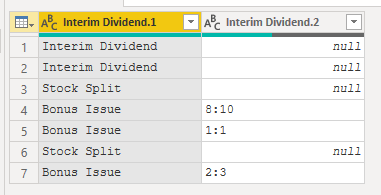
=Table.SplitColumn(#"Changed Type", "Interim Dividend", Splitter.SplitTextByCharacterTransition((c) => not List.Contains({"0".."9",":"}, c), {"0".."9"}), {"Interim Dividend.1", "Interim Dividend.2"})
Result
⭕ Subscribe and learn Power BI from these videos
⚪ Website ⚪ LinkedIn ⚪ PBI User Group
@RAHULBANDI
In Power Query, add a new colustom column as follows:
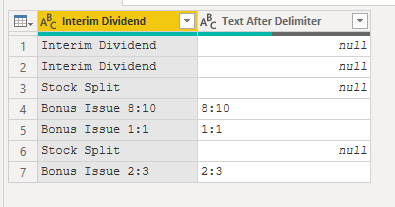
if Text.Contains([Interim Dividend],"Bonus Issue") then Text.AfterDelimiter([Interim Dividend], " ", 1) else null, type text
⭕ Subscribe and learn Power BI from these videos
⚪ Website ⚪ LinkedIn ⚪ PBI User Group
Hi
thq for your response
8:10, 1:1 etc... have been added to new column
But I'm looking for
Stock Split
Bouns Issue 8:10
Bouns Issue 1:1
Stock Split
Bonus Issue 2:3
numerical value completed seperated from text, like above example
@RAHULBANDI
When you have your table in the following step, click on the Fx button right next to the √ sign which will allow yout add custom step.
Clear what appears in the next step formula bar and past the following code
=Table.SplitColumn(#"Changed Type", "Interim Dividend", Splitter.SplitTextByCharacterTransition((c) => not List.Contains({"0".."9",":"}, c), {"0".."9"}), {"Interim Dividend.1", "Interim Dividend.2"})
Result
⭕ Subscribe and learn Power BI from these videos
⚪ Website ⚪ LinkedIn ⚪ PBI User Group
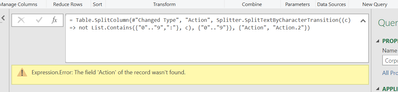
Hi i have used the above formula with different column name it's showing error
could you please look into it
@RAHULBANDI
Suppose your data looks like below
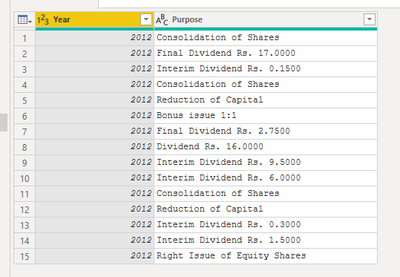
Click on Add Custom Column
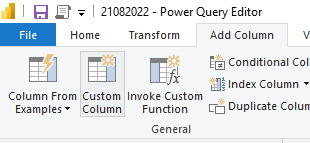
Add the formula as follows:
if Text.Contains([Purpose],"Bonus issue") then "Bonus issue" else [Purpose]
Add one more custom column
if Text.Contains([Purpose],"Bonus issue") then Text.Trim(Text.Replace([Purpose],"Bonus issue","")) else null
Result
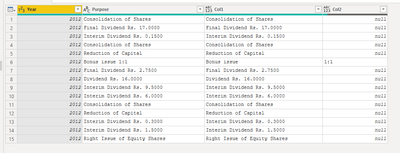
I have given the complete code which you can paste in a new blank query and check
let
Source = Table.FromRows(Json.Document(Binary.Decompress(Binary.FromText("rZCxCsIwEIZf5chcQhOpRUerQtc4lg7BRHtQE20Swbe3CJbWImbw1v/j7vuvqghPGScJKaxxtkUlPVoD9gSHRnbakToZkD0a2cIW76i0USAcBZbTtJ8xVRqvO7xMuZSybIpF3BNaheM7LuQVvWzH+caa4ACdCxrYmv1Q5TT/UJg2WcY1WdEsBptv+0PhL69dxAixmbfAc+OhfL2vv7e7BfSPwap+Ag==", BinaryEncoding.Base64), Compression.Deflate)), let _t = ((type nullable text) meta [Serialized.Text = true]) in type table [Year = _t, Purpose = _t]),
#"Changed Type" = Table.TransformColumnTypes(Source,{{"Year", Int64.Type}, {"Purpose", type text}}),
#"Added Custom" = Table.AddColumn(#"Changed Type", "Col1", each if Text.Contains([Purpose],"Bonus issue") then "Bonus issue" else [Purpose]),
#"Added Custom1" = Table.AddColumn(#"Added Custom", "Col2", each if Text.Contains([Purpose],"Bonus issue") then Text.Trim(Text.Replace([Purpose],"Bonus issue","")) else null)
in
#"Added Custom1"
⭕ Subscribe and learn Power BI from these videos
⚪ Website ⚪ LinkedIn ⚪ PBI User Group
The Power BI Data Visualization World Championships is back! It's time to submit your entry.
Check out the January 2026 Power BI update to learn about new features.
| User | Count |
|---|---|
| 15 | |
| 13 | |
| 9 | |
| 8 | |
| 6 |