cancel
Showing results for 
Search instead for 
Did you mean: 

The Power BI Data Visualization World Championships is back! Get ahead of the game and start preparing now! Learn more

Reply
LtKvasir
Frequent Visitor

Sharepoint Metadata Label returns only Numbers

Hello Everyone,


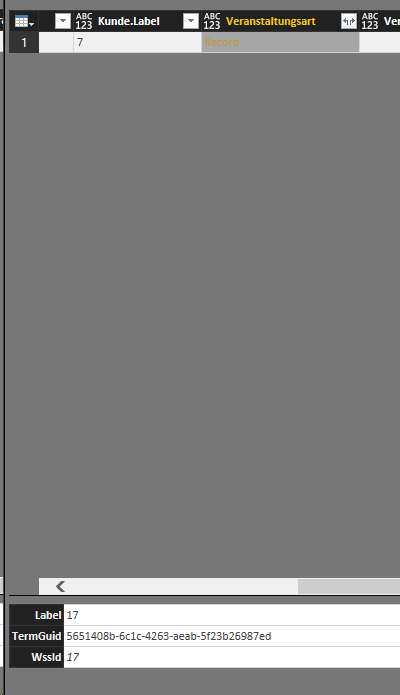
I'm trying to connect a SharePoint List that uses managed Metadata to Power BI. This works fine so far, but when I try to expand the Metadata Columne (which shows [record] first) I cannot extract the Metadata Names (e.g. name of the customer) but only Numbers (looks like IDs).


Anybody know this issue? And might have a solution?

Thanks for your help.


regards


Paul

Unbenannt.png


1 ACCEPTED SOLUTION

Bug with FieldValuesAsText has been fixes. Working fine now.

Regards

View solution in original post

5 REPLIES 5
Anonymous
Not applicable

Are your MetaData Names held in a separate SharePoint List at all?  It seems like this is simply a reference ID to the names held in that other list.


If so, you could bring that list in as well and use the table linking to connect them.

Anonymous
Not applicable

Hi @LtKvasir,

Do you use the latest version of Power BI Desktop(2.46.4732.581)? Do you get the same issue in previous version of Power BI Desktop(e.g. April 2017 version)?

Thanks,
Lydia Zhang

Hi Lydia and Ross,

thanks for your replies.


@AnonymousI updated to the newest version (2.46.4732.581 64-bit (Mai 2017)) - the problem still persists. I also tried the march version and the problem also exists.


@AnonymousI already expanded the managed metadata column in the screenshot. The SharePoint column-type is "managed metadata" pointing to a term-set.


What I learned from "Google/Bing", the corresponding list should be the "taxonomy hidden list". I'm also experiencing problems there, as the list appers as empty when directly calling it (using managed metadata in SP-lists works fine though). Permissions for "everyone" are correct.


It seems both problems (term labels and empty taxonomy list) are known for a few years. However, I could only find a few posts regarding these issues and they are all 2+ years old. Also none of the solutions there helped for my setting (O365 Business Premium SP)


Thanks,

Paul


After half a day experimenting and web-searching, here's is what I got:


  1. Managed Metadata labels showing only numbers seems to be not a bug, but a feature. At least according to this post: Technet Post
  2. The mentioned post also explains a solution/ workaround by using the column "field values as text" to display the term label.
  3. However, this workaround is not working for me either. (Un)fortunately this is a known bug according to this post which will be fixed soon.


regards

Bug with FieldValuesAsText has been fixes. Working fine now.

Regards

Helpful resources

Announcements
Power BI DataViz World Championships

Power BI Dataviz World Championships

The Power BI Data Visualization World Championships is back! Get ahead of the game and start preparing now!

December 2025 Power BI Update Carousel

Power BI Monthly Update - December 2025

Check out the December 2025 Power BI Holiday Recap!

FabCon Atlanta 2026 carousel

FabCon Atlanta 2026

Join us at FabCon Atlanta, March 16-20, for the ultimate Fabric, Power BI, AI and SQL community-led event. Save $200 with code FABCOMM.

Top Solution Authors