FabCon is coming to Atlanta
Join us at FabCon Atlanta from March 16 - 20, 2026, for the ultimate Fabric, Power BI, AI and SQL community-led event. Save $200 with code FABCOMM.
Register now!- Power BI forums
- Get Help with Power BI
- Desktop
- Service
- Report Server
- Power Query
- Mobile Apps
- Developer
- DAX Commands and Tips
- Custom Visuals Development Discussion
- Health and Life Sciences
- Power BI Spanish forums
- Translated Spanish Desktop
- Training and Consulting
- Instructor Led Training
- Dashboard in a Day for Women, by Women
- Galleries
- Data Stories Gallery
- Themes Gallery
- Contests Gallery
- QuickViz Gallery
- Quick Measures Gallery
- Visual Calculations Gallery
- Notebook Gallery
- Translytical Task Flow Gallery
- TMDL Gallery
- R Script Showcase
- Webinars and Video Gallery
- Ideas
- Custom Visuals Ideas (read-only)
- Issues
- Issues
- Events
- Upcoming Events
Vote for your favorite vizzies from the Power BI Dataviz World Championship submissions. Vote now!
- Power BI forums
- Forums
- Get Help with Power BI
- Power Query
- SharePoint Lists, Lookup Fields and Power Query
- Subscribe to RSS Feed
- Mark Topic as New
- Mark Topic as Read
- Float this Topic for Current User
- Bookmark
- Subscribe
- Printer Friendly Page

- Mark as New
- Bookmark
- Subscribe
- Mute
- Subscribe to RSS Feed
- Permalink
- Report Inappropriate Content
SharePoint Lists, Lookup Fields and Power Query
Hi folks,
Apologies if this has been covered elsewhere but I am getting into territory with Power Query that is a little beyond me at the moment and I haven't yet found a thread that answers the question..
I have a SharePoint site that has multiple lists;
List A
List B
List C
These lists all have the same columns, but are segregated for business reasons. Within each list there are a number of columns that are Type:Lookup
e.g.
| List | Column | Type |
| A | A | Unique ID |
| A | B | Single Test |
| A | C | Lookup - Allow Multiple Selections |
| A | D | Lookup - Allow Multiple Selections |
The Lookup columns Lookup data in other lists on the SharePoint (Columns D & E).
When I import Lists A, B & C into PowerBI Columns C & D display as List Type.
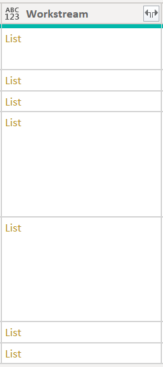
However the only way I have been able to display these values is by Expanding to new rows, the issue here is that Column A (the Unique ID) is duplicated and now prevents the data from refreshing properly.
Is there a way I can display the data in Columns D&E without having to Expand to New Rows? If I try to extract I get the error;
Solved! Go to Solution.


- Mark as New
- Bookmark
- Subscribe
- Mute
- Subscribe to RSS Feed
- Permalink
- Report Inappropriate Content
You can use try ... otherwise to avoid errors.
= try [Workstream]{0}[Name] otherwise null
Pat
Did I answer your question? Mark my post as a solution! Kudos are also appreciated!
To learn more about Power BI, follow me on Twitter or subscribe on YouTube.
@mahoneypa HoosierBI on YouTube
- Mark as New
- Bookmark
- Subscribe
- Mute
- Subscribe to RSS Feed
- Permalink
- Report Inappropriate Content
You can get multiple values with a more complex expression. Can you provide sample data? Or at least screen grabs of examples with one and two values?
Pat
Did I answer your question? Mark my post as a solution! Kudos are also appreciated!
To learn more about Power BI, follow me on Twitter or subscribe on YouTube.
@mahoneypa HoosierBI on YouTube
- Mark as New
- Bookmark
- Subscribe
- Mute
- Subscribe to RSS Feed
- Permalink
- Report Inappropriate Content
Thanks Pat, really appreciate this help 🙂
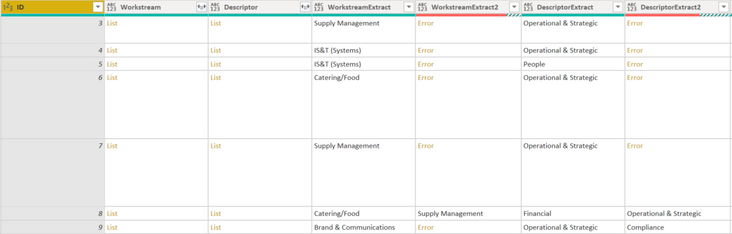
Below is the data I am currently working this. This is how it has exported from SharePoint into Excel (.iqy format)
| ID | Workstream | Descriptor |
| 3 | Supply Management;#46 | Operational & Strategic;#1 |
| 4 | IS&T (Systems);#43 | Operational & Strategic;#1 |
| 5 | IS&T (Systems);#43 | People;#2 |
| 6 | Catering/Food;#41 | Operational & Strategic;#1 |
| 7 | Supply Management;#46 | Operational & Strategic;#1 |
| 8 | Catering/Food;#41;#Supply Management;#46 | Financial;#3;#Operational & Strategic;#1 |
| 9 | Brand & Communications;#62 | Operational & Strategic;#1;#Compliance;#5 |
The below screen grab is how the data appears after I apply the custom column formula originally mentioned - tweaked with a second column to allow the second values [Workstream]{1}[lookupValue]
[lookupValue] is used in place of [Name] as that is the name of the column being pulled through in Drill Down
Many thanks,
Jamie
- Mark as New
- Bookmark
- Subscribe
- Mute
- Subscribe to RSS Feed
- Permalink
- Report Inappropriate Content
You can use try ... otherwise to avoid errors.
= try [Workstream]{0}[Name] otherwise null
Pat
Did I answer your question? Mark my post as a solution! Kudos are also appreciated!
To learn more about Power BI, follow me on Twitter or subscribe on YouTube.
@mahoneypa HoosierBI on YouTube
- Mark as New
- Bookmark
- Subscribe
- Mute
- Subscribe to RSS Feed
- Permalink
- Report Inappropriate Content
This has worked a treat.
Thank you so much for your support and guidance with this Pat 🙂
- Mark as New
- Bookmark
- Subscribe
- Mute
- Subscribe to RSS Feed
- Permalink
- Report Inappropriate Content
The error suggests it is a List containing one or more records. Click to the right of the List hyperlink in the cell to preview the contents to confirm, and to see what the Record field names are. You should be able to add a custom column (or do a transform step) to extract the desired field(s). For example, a custom column with
= [Workstream]{0}[Name]
should extract the Name field of the first/only Record in the List.
Pat
Did I answer your question? Mark my post as a solution! Kudos are also appreciated!
To learn more about Power BI, follow me on Twitter or subscribe on YouTube.
@mahoneypa HoosierBI on YouTube
- Mark as New
- Bookmark
- Subscribe
- Mute
- Subscribe to RSS Feed
- Permalink
- Report Inappropriate Content
Morning @mahoneypat
Thank you for your help with this - using the custom column has worked. One thing I am wondering is whether there is a way to modify that formula to allow it to extract multiple values? For example one of the records has two list items on the SharePoint site.
I tried setting up a 2nd custom column to extract that second value, however it returned errors for the rows that don't have the 2nd value which then created issues itself.
If I need to just use the 1st value that is absolutely fine though.
Thank you 🙂

Helpful resources

Power BI Dataviz World Championships
Vote for your favorite vizzies from the Power BI World Championship submissions!

Join our Community Sticker Challenge 2026
If you love stickers, then you will definitely want to check out our Community Sticker Challenge!

Power BI Monthly Update - January 2026
Check out the January 2026 Power BI update to learn about new features.

FabCon Atlanta 2026
Join us at FabCon Atlanta, March 16-20, for the ultimate Fabric, Power BI, AI and SQL community-led event. Save $200 with code FABCOMM.


| User | Count |
|---|---|
| 15 | |
| 11 | |
| 11 | |
| 8 | |
| 6 |


