We've captured the moments from FabCon & SQLCon that everyone is talking about, and we are bringing them to the community, live and on-demand. Starts on April 14th. Register now
Hi,
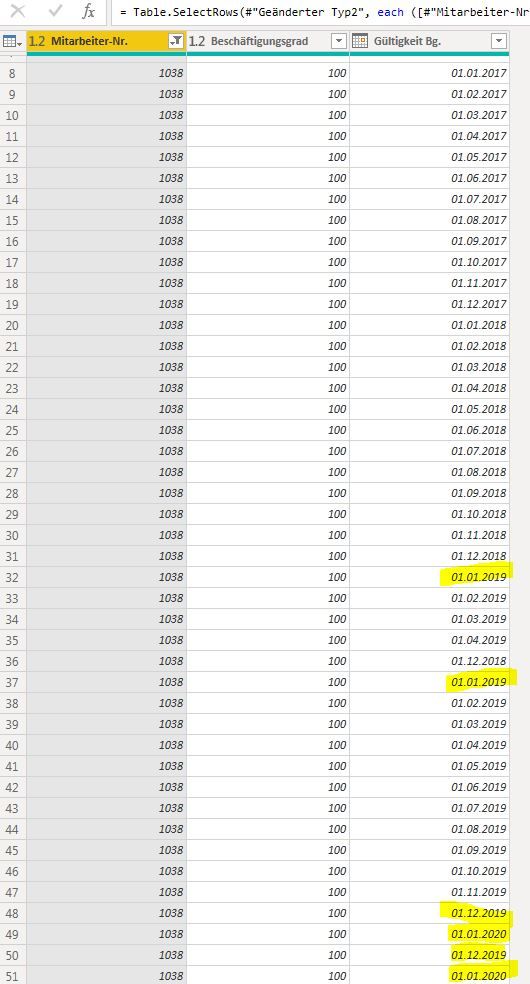
I have a Problem. Sometimes are system is creating two entries with the same Value (see below eg 01.01.2019 and 31.12.2019). In Power BI it multiplies these Values wrongly up.
Mitarbeiter-Nr.BeschäftigungsgradGültigkeit Bg.
| 1038 | 100 | 01.06.2016 |
| 1038 | 100 | 01.07.2016 |
| 1038 | 100 | 01.08.2016 |
| 1038 | 100 | 01.09.2016 |
| 1038 | 100 | 01.10.2016 |
| 1038 | 100 | 01.11.2016 |
| 1038 | 100 | 01.12.2016 |
| 1038 | 100 | 01.01.2017 |
| 1038 | 100 | 01.02.2017 |
| 1038 | 100 | 01.03.2017 |
| 1038 | 100 | 01.04.2017 |
| 1038 | 100 | 01.05.2017 |
| 1038 | 100 | 01.06.2017 |
| 1038 | 100 | 01.07.2017 |
| 1038 | 100 | 01.08.2017 |
| 1038 | 100 | 01.09.2017 |
| 1038 | 100 | 01.10.2017 |
| 1038 | 100 | 01.11.2017 |
| 1038 | 100 | 01.12.2017 |
| 1038 | 100 | 01.01.2018 |
| 1038 | 100 | 01.02.2018 |
| 1038 | 100 | 01.03.2018 |
| 1038 | 100 | 01.04.2018 |
| 1038 | 100 | 01.05.2018 |
| 1038 | 100 | 01.06.2018 |
| 1038 | 100 | 01.07.2018 |
| 1038 | 100 | 01.08.2018 |
| 1038 | 100 | 01.09.2018 |
| 1038 | 100 | 01.10.2018 |
| 1038 | 100 | 01.11.2018 |
| 1038 | 100 | 01.12.2018 |
| 1038 | 100 | 01.01.2019 |
| 1038 | 100 | 01.02.2019 |
| 1038 | 100 | 01.03.2019 |
| 1038 | 100 | 01.04.2019 |
| 1038 | 100 | 01.12.2018 |
| 1038 | 100 | 01.01.2019 |
| 1038 | 100 | 01.02.2019 |
| 1038 | 100 | 01.03.2019 |
| 1038 | 100 | 01.04.2019 |
| 1038 | 100 | 01.05.2019 |
| 1038 | 100 | 01.06.2019 |
| 1038 | 100 | 01.07.2019 |
| 1038 | 100 | 01.08.2019 |
| 1038 | 100 | 01.09.2019 |
| 1038 | 100 | 01.10.2019 |
| 1038 | 100 | 01.11.2019 |
| 1038 | 100 | 01.12.2019 |
| 1038 | 100 | 01.01.2020 |
| 1038 | 100 | 01.12.2019 |
| 1038 | 100 | 01.01.2020 |
How can I create a distinct Value or a Filter that there are no more double entries?
Many thanks in advance.
Regards,
Marc
Solved! Go to Solution.
@marc_frei, do you want to keep distinct rows?
If so, locate the table button on the left of the first column name, click the little arrow near this button. From the pop-up menu that will appear, click Remove Duplicates.
Or: select all columns and Home->Reduce Rows-> Remove Duplicates
Hi @marc_frei ,
I am not clear about your requirement, if you want to remove dulicated value, I think you could refer to above suggestions , choose all column and click remove reduplicated.
let
Source = Table.FromRows(Json.Document(Binary.Decompress(Binary.FromText("zdExDoQwDAXRu6RGyE5CbJ8Fcf9rLJu0eAoqmlA8fRFNzrOoNC/b/ZH7FN1l7FV0lGt7MANzsMhNBUzBKvxv7uzZKlgD62AH2AAzMAeL3FbPxKCLUpe5c+iZWAPrYAfYADMwB4vcVs/EoItSl7kL6JlYA+u5feku620TG2AG5mABXQQMuih1+e+qvN9dPw==", BinaryEncoding.Base64), Compression.Deflate)), let _t = ((type text) meta [Serialized.Text = true]) in type table [id = _t, amount = _t, date = _t]),
#"Changed Type" = Table.TransformColumnTypes(Source,{{"id", Int64.Type}, {"amount", Int64.Type}, {"date", type date}}),
#"Removed Duplicates" = Table.Distinct(#"Changed Type")
in
#"Removed Duplicates"
If not, please correct me and inform me more detailed information(such as your expected output and your sample data)? Then I will help you more correctly.
Please do mask sensitive data before uploading.
Thanks for your understanding and support.
Best Regards,
Zoe Zhi
If this post helps, then please consider Accept it as the solution to help the other members find it more quickly.
Hi @marc_frei ,
I am not clear about your requirement, if you want to remove dulicated value, I think you could refer to above suggestions , choose all column and click remove reduplicated.
let
Source = Table.FromRows(Json.Document(Binary.Decompress(Binary.FromText("zdExDoQwDAXRu6RGyE5CbJ8Fcf9rLJu0eAoqmlA8fRFNzrOoNC/b/ZH7FN1l7FV0lGt7MANzsMhNBUzBKvxv7uzZKlgD62AH2AAzMAeL3FbPxKCLUpe5c+iZWAPrYAfYADMwB4vcVs/EoItSl7kL6JlYA+u5feku620TG2AG5mABXQQMuih1+e+qvN9dPw==", BinaryEncoding.Base64), Compression.Deflate)), let _t = ((type text) meta [Serialized.Text = true]) in type table [id = _t, amount = _t, date = _t]),
#"Changed Type" = Table.TransformColumnTypes(Source,{{"id", Int64.Type}, {"amount", Int64.Type}, {"date", type date}}),
#"Removed Duplicates" = Table.Distinct(#"Changed Type")
in
#"Removed Duplicates"
If not, please correct me and inform me more detailed information(such as your expected output and your sample data)? Then I will help you more correctly.
Please do mask sensitive data before uploading.
Thanks for your understanding and support.
Best Regards,
Zoe Zhi
If this post helps, then please consider Accept it as the solution to help the other members find it more quickly.
So you should be able to use Remove Duplicates from the ribbon
this is not working, beacause there are several Numbers (First Row) with the same issue.
I filtered it just to post it here.
I need several numbers but just (first column) but with just one date.
Sorry my request was not clear.
@marc_frei, do you want to keep distinct rows?
If so, locate the table button on the left of the first column name, click the little arrow near this button. From the pop-up menu that will appear, click Remove Duplicates.
Or: select all columns and Home->Reduce Rows-> Remove Duplicates
If you have recently started exploring Fabric, we'd love to hear how it's going. Your feedback can help with product improvements.
A new Power BI DataViz World Championship is coming this June! Don't miss out on submitting your entry.
Share feedback directly with Fabric product managers, participate in targeted research studies and influence the Fabric roadmap.
| User | Count |
|---|---|
| 6 | |
| 4 | |
| 3 | |
| 2 | |
| 2 |
| User | Count |
|---|---|
| 11 | |
| 10 | |
| 7 | |
| 7 | |
| 6 |