cancel
Showing results for 
Search instead for 
Did you mean: 

The Power BI Data Visualization World Championships is back! Get ahead of the game and start preparing now! Learn more

Reply
Anonymous
Not applicable

SQL to DAX

Hi - I have 2 tables that I imported into my Power BI.  One is Households and one is named Contacts.  Each contact is linked to a Household.  I want to add 2 columns to the Household Table that are called Head_1_Name and Head_2_Name.  


The SQL to do this in our Database is:

Households.Household_Name ,(SELECT Top 1 First_Name FROM Contacts C WHERE C.Household_ID = Households.Household_ID and Household_Position_ID = 1 ORDER BY Gender_ID) AS Head_1_Name ,(SELECT Top 1 First_Name FROM Contacts C WHERE C.Household_ID = Households.Household_ID and Household_Position_ID = 1 AND EXISTS (SELECT 1 FROM Contacts C2 WHERE C2.Household_Position_ID = 1 AND C2.Household_ID = C.Household_ID GROUP BY Household_ID HAVING Count(*) > 1) GROUP BY Contact_ID, First_Name, Gender_ID ORDER BY Gender_ID Desc) AS Head_2_Name
 
Is there a way to do this in Power BI, and where would I include this SQL?  Thanks!
3 REPLIES 3
Anonymous
Not applicable

Hi @Anonymous ,


Could you tell me if your problem has been solved?

If it is, kindly Accept it as the solution. More people will benefit from it.

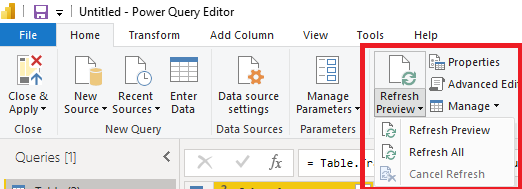
In fact, after you add a new column in SQL Server, you click the refresh button in Power Query, and the data will be refreshed.

23.png


Best Regards,

Stephen Tao


If this post helps, then please consider Accept it as the solution to help the other members find it more quickly.

CNENFRNL
Community Champion
Community Champion

Value.NativeQuery() comes to your rescue; you may pass the whole intact sql to it. Another wonderful blog in this regard for your reference.


Thanks to the great efforts by MS engineers to simplify syntax of DAX! Most beginners are SUCCESSFULLY MISLED to think that they could easily master DAX; but it turns out that the intricacy of the most frequently used RANKX() is still way beyond their comprehension!

DAX is simple, but NOT EASY!

Greg_Deckler
Community Champion
Community Champion

@Anonymous Sample data would be infinitely more helpful than SQL code. You didn't read this:
https://community.powerbi.com/t5/Community-Blog/Before-You-Post-Read-This/ba-p/1116882

In any case, probably the best thing to do would be to do this in Power Query via a Merge query.


But, you could something like DAX as well. One way would be to create an intermediate column like:

Column = 
  VAR __ID = [Household_ID]
RETURN
  CONCATENATEX(FILTER(Contacts,Contacts[Houshold_ID] = __ID),[Contact_ID] & [First_Name] & [Gender_ID],",")

You could then split this column out via SEARCH, LEFT, MID, etc. functions based on the comma. Again, not entirely sure what you are going for as I hate reading other people's SQL code.


Follow on LinkedIn
@ me in replies or I'll lose your thread!!!
Instead of a Kudo, please vote for this idea
Become an expert!: Enterprise DNA
External Tools: MSHGQM
YouTube Channel!: Microsoft Hates Greg
Latest book!:
DAX For Humans

DAX is easy, CALCULATE makes DAX hard...

Helpful resources

Announcements
Power BI DataViz World Championships

Power BI Dataviz World Championships

The Power BI Data Visualization World Championships is back! Get ahead of the game and start preparing now!

December 2025 Power BI Update Carousel

Power BI Monthly Update - December 2025

Check out the December 2025 Power BI Holiday Recap!

FabCon Atlanta 2026 carousel

FabCon Atlanta 2026

Join us at FabCon Atlanta, March 16-20, for the ultimate Fabric, Power BI, AI and SQL community-led event. Save $200 with code FABCOMM.