Don't miss your chance to take exam DP-600 or DP-700 on us!
Request nowLearn from the best! Meet the four finalists headed to the FINALS of the Power BI Dataviz World Championships! Register now
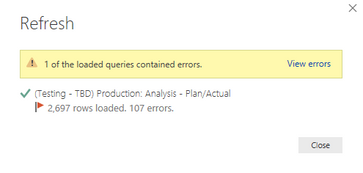
When refreshing a BEx query I'm notified that i have 107 errors but it appears that everything loaded.
When I click on View Errors the query editor window loads and I know have a new query for 'Errors in ..... My Query Name', however, when I look at this query there are no errors!!!
Any idea on how to determine what Power BI thinks the error is?
I tried to switch on debugging/tracking but the files don't mention anything about the errors.
Solved! Go to Solution.
Hi @Anonymous,
From the screenshots, it seems that you used the Keep Errors. Please go to the original query Production without clicking the View errors, in Applied Steps, find the step Keep Errors or select the steps one by one to see the results. Also you can try to use Remove Errors: Table.RemoveRowsWithErrors.
Best Regards,
Qiuyun Yu
Hi @Anonymous,
From the screenshots, it seems that you used the Keep Errors. Please go to the original query Production without clicking the View errors, in Applied Steps, find the step Keep Errors or select the steps one by one to see the results. Also you can try to use Remove Errors: Table.RemoveRowsWithErrors.
Best Regards,
Qiuyun Yu
I'm closing this ticket. I can't recall what the issue was but this is no longer an issue. If I recall correctly I just added a few columns and then added 1 column at a time until I recieved the error in order to identify the column that was causing the issues. If memory servers me correctly there was bad data coming from the source. My applogies for letting this hang out there so long.
Share feedback directly with Fabric product managers, participate in targeted research studies and influence the Fabric roadmap.
Check out the February 2026 Power BI update to learn about new features.
| User | Count |
|---|---|
| 9 | |
| 9 | |
| 8 | |
| 7 | |
| 6 |