Join us at FabCon Atlanta from March 16 - 20, 2026, for the ultimate Fabric, Power BI, AI and SQL community-led event. Save $200 with code FABCOMM.
Register now!The Power BI Data Visualization World Championships is back! It's time to submit your entry. Live now!
Hi,
I have 2 tables.
In table 1 (hours) I have a row with a hour_date column and an card_id column
In table 2 (salaries) I have a row with a start_date column, end_date column, salary_rate and a card_id column
Both tables have multiple rows with the same card_id.
eg. card_id 1 can have multiple hours rows as they have worked several times a week.
card_id 1 can have multiple salaries rows as they have a different salary at different dates
The goal is to have the right salary_rate in every hours row in table 1, obviously taken from table 2. Where the hour_date from table 1 should be same as or before the end_date from table 2.
I'd like the result to be put in table 1. That way, each row in table 1, has the correct salary_rate
I can't seem to figure out how.
Solved! Go to Solution.
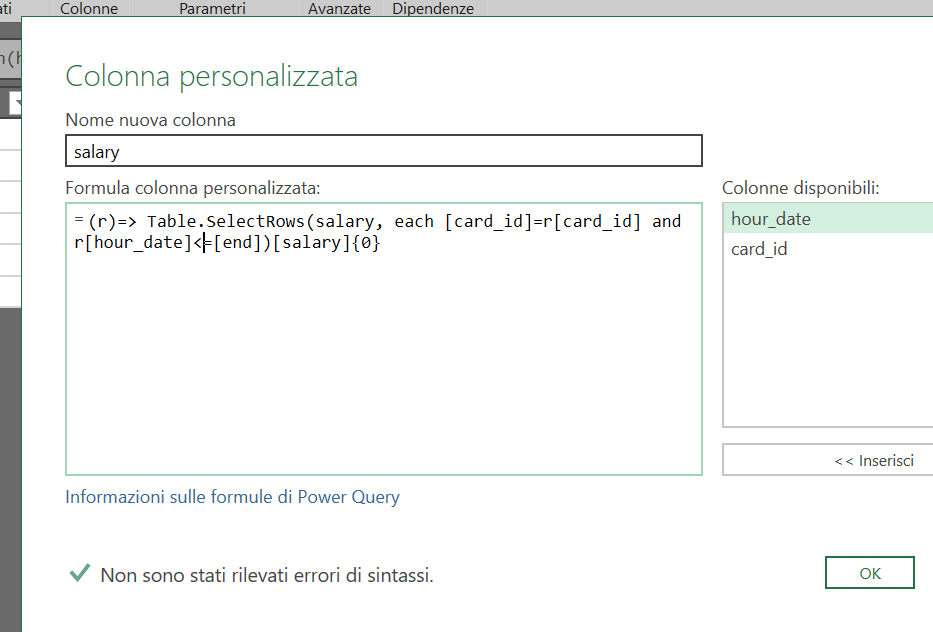
try to add a column in this way:
I still have some doubts as to whether the start_date information from the salary table is not used.
Hi @Anonymous
Hi,
Thanks for the provided solution, I will test it soon and will accept it when it's proven it worked. Will get back to it asap
try to add a column in this way:
I still have some doubts as to whether the start_date information from the salary table is not used.
The Power BI Data Visualization World Championships is back! It's time to submit your entry.
Check out the January 2026 Power BI update to learn about new features.
| User | Count |
|---|---|
| 18 | |
| 13 | |
| 9 | |
| 8 | |
| 8 |