cancel
Showing results for 
Search instead for 
Did you mean: 

The Power BI Data Visualization World Championships is back! Get ahead of the game and start preparing now! Learn more

Reply
annbjon
Regular Visitor

Report (direct Query) in PBI desktop and Azure SQL Server - do I need a gateway?

I have been creating reports in Power Bi desktop where I use Direct Query and data from Azure SQL database. I have a free trial with the Pro account and when I published the report to a dashboard we weeks ago I set up a personal gateway as I thought that was necessary.


However, that means that my dashboard is only live when my computer is connectec and that creates problems. 


when I look for information about this I find that I do not need a gateway as I have the azure sql database in the cloud.

I've now removed my personal gateway but I am unable to find any information about how to connect my reports / dashboard to the sql server which will make my reports / dashboard always live (even though my computer is not connected)


Can anybody help me with this issue?


Thank you in advance. 

4 REPLIES 4
Anonymous
Not applicable

Hi @annbjon,

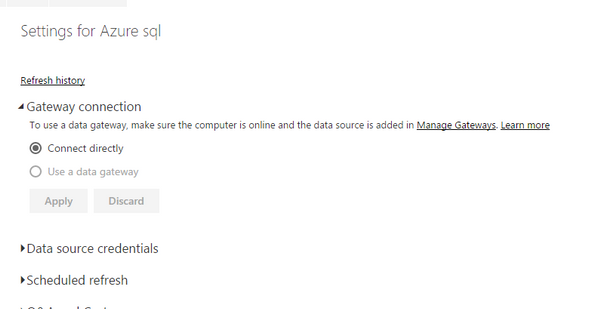
Does your dataset only contain the Azure SQL Server data source? If so, it doesn’t require gateway when refreshing data from Azure SQL database, when you publish the Power BI Desktop file to Service, you will find “Connect Directly” in the settings for the dataset.
1.PNG

However, if you combine on-premises SQL Server data source and Azure SQL data source in a single dataset, you will need to use gateway to refresh dataset in Power BI Service.

Thanks,
Lydia Zhang

Thank you for your reply @Anonymous


My dataset only contains the Azure SQL server data. However, I don't get the option of "connect directly" which leads me to my next question.


I believe I need to save my power bi desktop files to Azure and then Publish them from there in order for them to be always "live" - Is that correct?

I cannot find anwhere any guidelines on how to save Power bi desktop files to the Azure server. Until now I've used a personal gateway which I removed as my reports where never "live" when my computer was not connected.


All help is truly appreciated.

Has anyone figured this out? I'm running into the exact same problem.

Anonymous
Not applicable

Hi @annbjon,

You don't need to save the PBIX file to Azure. Please go to File -> Options and settings ->Data source settings in Power BI Desktop to check all the data sources of the dataset and post us a screenshot.


Thanks,
Lydia Zhang

Helpful resources

Announcements
Power BI DataViz World Championships

Power BI Dataviz World Championships

The Power BI Data Visualization World Championships is back! Get ahead of the game and start preparing now!

December 2025 Power BI Update Carousel

Power BI Monthly Update - December 2025

Check out the December 2025 Power BI Holiday Recap!

FabCon Atlanta 2026 carousel

FabCon Atlanta 2026

Join us at FabCon Atlanta, March 16-20, for the ultimate Fabric, Power BI, AI and SQL community-led event. Save $200 with code FABCOMM.

Top Solution Authors