cancel
Showing results for 
Search instead for 
Did you mean: 

Try your skills in the Power BI Dataviz World Championship! Round one ends June 26. Join now

Reply
Anonymous
Not applicable

Replacing null values with values from another column

Hi, 


I'm wondering where I'm going wrong with this formula. The goal is to replace the null values in "Description.2.2" with the values in "Description.1". I'm getting no errors with this formula, but it doesn't do anything at all. I've tried putting "null" in quotes, as well as without. It makes no difference.


What am I missing here?


= Table.ReplaceValue(#"Added Prefix","null", each _[Description.2.2],Replacer.ReplaceText,{"Description.1"})

1 ACCEPTED SOLUTION
v-juanli-msft
Community Support
Community Support

Hi @Anonymous 

use the following queries

let
    Source = Table.FromRows(Json.Document(Binary.Decompress(Binary.FromText("i45WMlTSUTIyVorViVZKBDLBDGMYowzIKCpRio0FAA==", BinaryEncoding.Base64), Compression.Deflate)), let _t = ((type text) meta [Serialized.Text = true]) in type table [Description.1 = _t, Description.2.2 = _t]),
    #"Changed Type" = Table.TransformColumnTypes(Source,{{"Description.1", type text}, {"Description.2.2", type text}}),
    #"Replaced Value" = Table.ReplaceValue(#"Changed Type","",each _[Description.1],Replacer.ReplaceValue,{"Description.2.2"})
in
    #"Replaced Value"

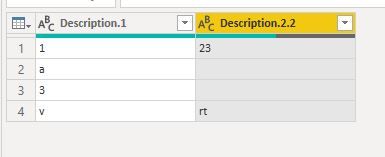
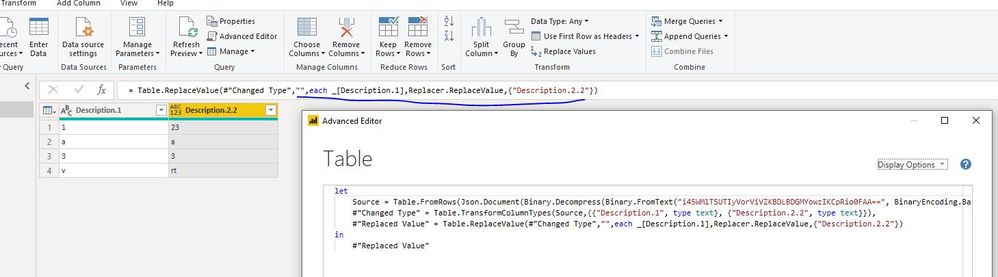
Capture23.JPG

Capture24.JPG

 
Best Regards
Maggie
Community Support Team _ Maggie Li
If this post helps, then please consider Accept it as the solution to help the other members find it more quickly.

View solution in original post

3 REPLIES 3
Anonymous
Not applicable

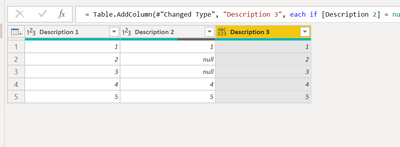
Create a new conditional column and populate values from both columns based on condition.


= Table.AddColumn(#"Changed Type", "Description 3", each if [Description 2] = null then [Description 1] else [Description 2])

Description3.png

v-juanli-msft
Community Support
Community Support

Hi @Anonymous 

use the following queries

let
    Source = Table.FromRows(Json.Document(Binary.Decompress(Binary.FromText("i45WMlTSUTIyVorViVZKBDLBDGMYowzIKCpRio0FAA==", BinaryEncoding.Base64), Compression.Deflate)), let _t = ((type text) meta [Serialized.Text = true]) in type table [Description.1 = _t, Description.2.2 = _t]),
    #"Changed Type" = Table.TransformColumnTypes(Source,{{"Description.1", type text}, {"Description.2.2", type text}}),
    #"Replaced Value" = Table.ReplaceValue(#"Changed Type","",each _[Description.1],Replacer.ReplaceValue,{"Description.2.2"})
in
    #"Replaced Value"

Capture23.JPG

Capture24.JPG

 
Best Regards
Maggie
Community Support Team _ Maggie Li
If this post helps, then please consider Accept it as the solution to help the other members find it more quickly.
jthomson
Solution Sage
Solution Sage

Easiest just to make a new column using similar conditional logic, rather than amending an existing one

Helpful resources

Announcements
Fabric Data Days is here Carousel

Fabric Data Days 2026

Don't miss out on Data Days, June 15 through August 7. Learn Fabric, Power BI, SQL, AI and more.

Power BI DataViz World Championships carousel

Power BI DataViz World Championships - June 2026

A new Power BI DataViz World Championship is coming this June! Don't miss out on submitting your entry.