Don't miss your chance to take exam DP-600 or DP-700 on us!
Request nowLearn from the best! Meet the four finalists headed to the FINALS of the Power BI Dataviz World Championships! Register now
i,
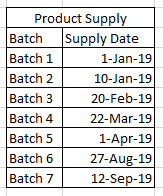
I have 2 sets of tables in my data set - one for Product demand and another for product supply. I would like an output that displays supply based on their availability dates against the demand dates.
Product Demands
Supply
Desired Output
Note - Batch 6 & 7 from the Product supply should not appear against any demand since the availability dates do not match.
Thanks
Sheetal
Solved! Go to Solution.
@Anonymous,
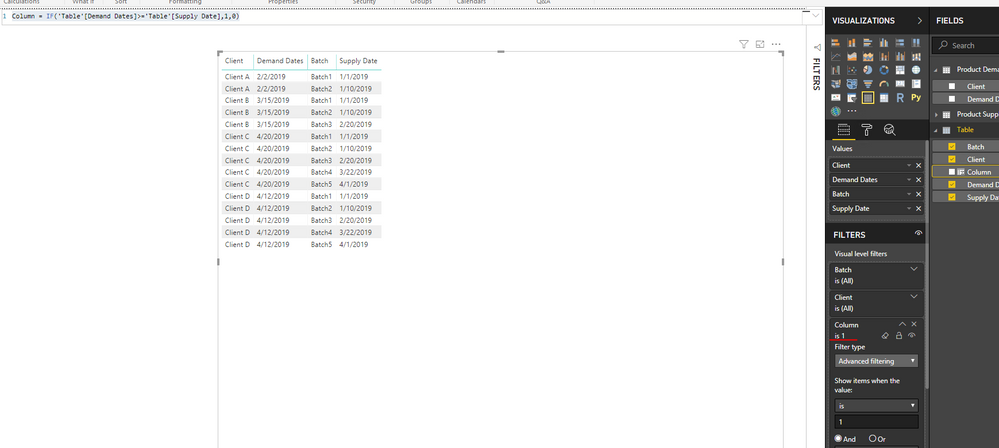
Please create a table using dax below.
Table = CROSSJOIN('Product Demand','Product Supply')
Then create a column in the new table using DAX below.
Column = IF('Table'[Demand Dates]>='Table'[Supply Date],1,0)
Drag the column to visual level filter and set its value to 1.
Regards,
Lydia
@Anonymous,
Please create a table using dax below.
Table = CROSSJOIN('Product Demand','Product Supply')
Then create a column in the new table using DAX below.
Column = IF('Table'[Demand Dates]>='Table'[Supply Date],1,0)
Drag the column to visual level filter and set its value to 1.
Regards,
Lydia
Share feedback directly with Fabric product managers, participate in targeted research studies and influence the Fabric roadmap.
Check out the February 2026 Power BI update to learn about new features.
| User | Count |
|---|---|
| 10 | |
| 9 | |
| 7 | |
| 5 | |
| 5 |