cancel
Showing results for 
Search instead for 
Did you mean: 

Learn from the best! Meet the four finalists headed to the FINALS of the Power BI Dataviz World Championships! Register now

Reply
ebottom
Frequent Visitor

Reference Rows to return values when Condition is met

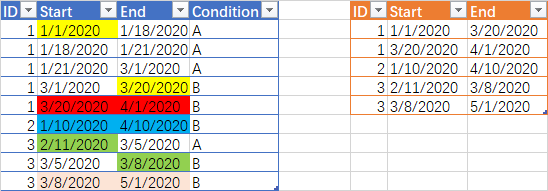
I want to run through rows of a table and return 2 date values based on the value of another column. In the example below, I would like to return a table with the  [ID], [Start] and [End] based on the value in [Condition]. I want to return the intial [ID] and [Start] and move through each row until [Condition]= "B" and return the [End]. I have read that loops in Power Query and DAX are known limitations but I'm wondering if someone has a good work around? I am having a tough time getting it right.


Source table:

ID
Start
End
Condition
1
1/1/2020
1/18/2020
A
1
1/18/2020
1/21/2020
A
1
1/21/2020
3/1/2020
A
1
3/1/2020
3/20/2020
B
1
3/20/2020
4/1/2020
B
2
1/10/2020
4/10/2020
B
3
2/11/2020
3/5/2020
A
3
3/5/2020
3/8/2020
B
3
3/8/2020
5/1/2020
B


Table to be returned:

ID
Start
End
1
1/1/2020
3/20/2020
1
3/20/2020
4/1/2020
2
1/10/2020
4/10/2020
3
2/11/2020
3/8/2020
3
3/8/2020
5/1/2020


1 ACCEPTED SOLUTION
ziying35
Impactful Individual

@ebottom


Was the last record in your simulation result table wrong? Shouldn't there be two records?

1.png

If what I understand is correct, you can try my code


let
    Source = Table.FromRecords(Json.Document(Binary.Decompress(Binary.FromText("i65W8nRRsjLUUQouSSwqUbJSMozRByIjAyMDJR0l17wUqJAFXMw5Py8lsyQzPw8o46hUq4PVBAtMI4wMSTLCCN0VxsgOI2iCMaY3jEF8rCY44TABSTnECBNcbkCYYIQaENhMIOQIY4QRRkDlWPxhSiAgjFG8YYppAPboxOoEFNUQA0zxBEMsAA==",BinaryEncoding.Base64),Compression.Deflate))),
    rows = Table.ToRows(Source)&{{null,null,null,null}},
    acc = List.Accumulate(
             rows,
             {"","","",{}},//comparer/Start_date status/End_date status/output
             (s,c)=>if s{0}="" then {c{3}, c, c, s{3}}
                    else if s{0}<>"B" then { c{3}, s{1}, c, s{3}}
                    else { c{3}, c, c, s{3}&{{s{1}{0}, s{1}{1}, s{2}{2}}}}
          ){3},
    tbl = Table.FromRows(acc,List.RemoveLastN(Table.ColumnNames(Source))),
    result = Table.TransformColumnTypes(tbl,{{"ID", Int64.Type}, {"Start", type date}, {"End", type date}})
in
    result


View solution in original post

3 REPLIES 3
Mariusz
Community Champion
Community Champion

Hi @ebottom 


If you prefer a no-code solution please see the below or see the attached.


let
    Source = Table.FromRows(Json.Document(Binary.Decompress(Binary.FromText("bY2xDcAgDAR3cU1hv4NEm6yB2H+NIDtgktCd7jBfKwklAoNZOFBKx5NaWrtJR8imY6Lypmv8r+CO16ebNDzsqXfEfnSJex0Sskzlua9v+WD537s0zGO/3Q==", BinaryEncoding.Base64), Compression.Deflate)), let _t = ((type text) meta [Serialized.Text = true]) in type table [ID = _t, Start = _t, End = _t, Condition = _t]),
    #"Changed Type" = Table.TransformColumnTypes(Source,{{"Start", type date}, {"End", type date}, {"ID", Int64.Type}}),
    #"Sorted Rows" = Table.Sort(#"Changed Type",{{"ID", Order.Ascending}, {"End", Order.Descending}}),
    #"Added Conditional Column" = Table.AddColumn(#"Sorted Rows", "Custom", each if [Condition] = "B" then [End] else null),
    #"Filled Down" = Table.FillDown(#"Added Conditional Column",{"Custom"}),
    #"Removed Columns" = Table.RemoveColumns(#"Filled Down",{"End"}),
    #"Renamed Columns" = Table.RenameColumns(#"Removed Columns",{{"Custom", "End"}}),
    #"Changed Type1" = Table.TransformColumnTypes(#"Renamed Columns",{{"End", type date}}),
    #"Grouped Rows" = Table.Group(#"Changed Type1", {"ID", "End"}, {{"Start", each List.Min([Start]), type date}}),
    #"Reordered Columns" = Table.ReorderColumns(#"Grouped Rows",{"ID", "Start", "End"})
in
    #"Reordered Columns"


Best Regards,
Mariusz

If this post helps, then please consider Accepting it as the solution.

Please feel free to connect with me.
LinkedIn


ziying35
Impactful Individual

@ebottom


Was the last record in your simulation result table wrong? Shouldn't there be two records?

1.png

If what I understand is correct, you can try my code


let
    Source = Table.FromRecords(Json.Document(Binary.Decompress(Binary.FromText("i65W8nRRsjLUUQouSSwqUbJSMozRByIjAyMDJR0l17wUqJAFXMw5Py8lsyQzPw8o46hUq4PVBAtMI4wMSTLCCN0VxsgOI2iCMaY3jEF8rCY44TABSTnECBNcbkCYYIQaENhMIOQIY4QRRkDlWPxhSiAgjFG8YYppAPboxOoEFNUQA0zxBEMsAA==",BinaryEncoding.Base64),Compression.Deflate))),
    rows = Table.ToRows(Source)&{{null,null,null,null}},
    acc = List.Accumulate(
             rows,
             {"","","",{}},//comparer/Start_date status/End_date status/output
             (s,c)=>if s{0}="" then {c{3}, c, c, s{3}}
                    else if s{0}<>"B" then { c{3}, s{1}, c, s{3}}
                    else { c{3}, c, c, s{3}&{{s{1}{0}, s{1}{1}, s{2}{2}}}}
          ){3},
    tbl = Table.FromRows(acc,List.RemoveLastN(Table.ColumnNames(Source))),
    result = Table.TransformColumnTypes(tbl,{{"ID", Int64.Type}, {"Start", type date}, {"End", type date}})
in
    result


Yes- apologize for the error on ID=3. This has been corrected. Thank you for your help! 

Helpful resources

Announcements
Join our Fabric User Panel

Join our Fabric User Panel

Share feedback directly with Fabric product managers, participate in targeted research studies and influence the Fabric roadmap.

February Power BI Update Carousel

Power BI Monthly Update - February 2026

Check out the February 2026 Power BI update to learn about new features.

FabCon Atlanta 2026 carousel

FabCon Atlanta 2026

Join us at FabCon Atlanta, March 16-20, for the ultimate Fabric, Power BI, AI and SQL community-led event. Save $200 with code FABCOMM.

Top Solution Authors