cancel
Showing results for 
Search instead for 
Did you mean: 

The Power BI Data Visualization World Championships is back! Get ahead of the game and start preparing now! Learn more

Reply
pbiquest
Regular Visitor

Reference Query & Azure Cost Management Connector

Hi! I am using the Azure Cost Management Connector from which the Usage Details table comes without a unique id column. Therefore, I add an index column and subsequently create a reference query where the index column is kept along with one other column (tags, in a json format). The json column is expanded and then unpivoted, along with some other transformation. When I relate the two tables based on the index column I get strange results about every 2-4 times I hit refresh. Does anyone know why the results are not either consistantly wrong or correct? I believe the reference query causes power query to collect data from the source twice, and perhaps if the data is not returned in the exact same order each time, the index columns in the two tables will not match. Any suggestions on how to overcome this issue?     


https://docs.microsoft.com/en-us/power-bi/connect-data/desktop-connect-azure-cost-management

2 REPLIES 2
v-yingjl
Community Support
Community Support

Hi @pbiquest ,

You can try to consider the Reference query and the Duplicate query in Query editor.


Duplicate will give you an exact copy of the query with all steps, Reference will create a reference to the original query instead as a new query. Duplicate is a good option to choose when you want the two copies to be isolated from each other, Reference is a good option when you create different branches from one original query. 


Please refer this document which introduces their differences in details:

Reference vs Duplicate in Power BI; Power Query Back to Basics 


Best Regards,
Community Support Team _ Yingjie Li
If this post helps, then please consider Accept it as the solution to help the other members find it more quickly.


Hi @v-yingjl. Thank you for your suggestions.


I tried both approaches (duplicate & reference query). Either way, the source is hit multiple times for each referenced query. From my understanding, this is by design.  


I read two of Chris Webb’s two blog posts about caching, parallelism, and reference queries:

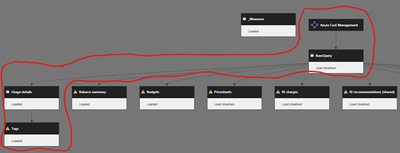
From reading his blog posts, I was hoping to be able to force the use of caching by separating the source in its own query with load disabled (“BaseQuery” below). This query is then referenced by “Usage Details” and “Tags”. However, the source is still called multiple times, even with parallel loading disabled, which makes me think caching is not supported for this particular connector source.  


Then the only fix I can think of is creating a unique ID based on a combination of column values in the dataset. This may result in very long text strings, so not really an option either. Any suggestions on how I can get consistent results for the referenced queries, so that I can use the index column to relate tables?
 

pbiquest_0-1628148293325.png


Helpful resources

Announcements
Power BI DataViz World Championships

Power BI Dataviz World Championships

The Power BI Data Visualization World Championships is back! Get ahead of the game and start preparing now!

December 2025 Power BI Update Carousel

Power BI Monthly Update - December 2025

Check out the December 2025 Power BI Holiday Recap!

FabCon Atlanta 2026 carousel

FabCon Atlanta 2026

Join us at FabCon Atlanta, March 16-20, for the ultimate Fabric, Power BI, AI and SQL community-led event. Save $200 with code FABCOMM.