cancel
Showing results for 
Search instead for 
Did you mean: 

The Power BI Data Visualization World Championships is back! Get ahead of the game and start preparing now! Learn more

Reply
CEllinger
Helper I
Helper I

Redistributing a calculation across date range

I am attempting to quantify the redistribution of a backlog of sales orders (cause of some virus or something  😓) If anyone can help me I would be super appreciative.


I have a normal Date Table connected to a normal Shipped Sales Table. (Shipped dates for sales orders)


I used (a direct copy paste) @tondeli 's DAX Date Facts table and Dynamic Date Table to calculate the total number of backlogged orders we accrue for a given date range. (The separate tables allow my users to see their graphs change as they adjust the date slicer)

I want to know how to add the total backlogged orders to the dates that constitute the rest of the year.


2020-04-15_14-41-37.png


Here is a screenshot for clarity.

I am trying to redistribute the Total Backlog over the rest of the year. Any advice from anyone out there?

(I have already tried just adding the Order Backlog to the Adding Test columns. The order backlog retains its Date Context if that is any help.)


1 ACCEPTED SOLUTION

Hi @CEllinger 

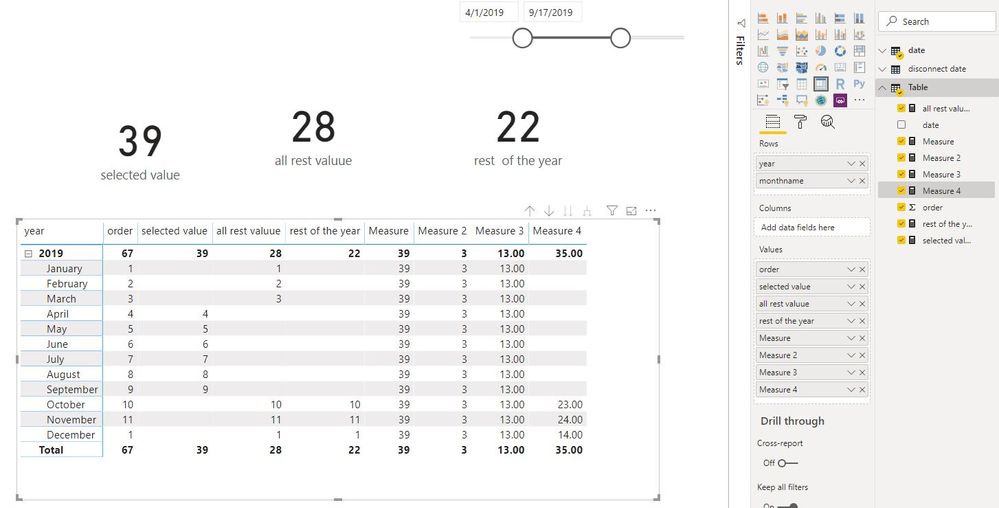
Add three measures

Measure = SUMX(ALLEXCEPT('date','date'[year]),[selected value])

Measure 2 =
CALCULATE (
    DISTINCTCOUNT ( 'date'[year monthno] ),
    FILTER (
        ALLSELECTED ( 'date' ),
        'date'[year]
            = MAX ( 'date'[year] )
            && 'date'[Date]
                > EOMONTH (
                    MAX ( 'disconnect date'[Date] ),
                    0
                )
    )
)


Measure 3 = [Measure]/[Measure 2]

Measure 4 =
IF (
    MAX ( 'date'[Date] )
        > EOMONTH (
            MAX ( 'disconnect date'[Date] ),
            0
        ),
    [rest  of the year] + [Measure 3]
)

Capture4.JPG


Best Regards
Maggie
Community Support Team _ Maggie Li
If this post helps, then please consider Accept it as the solution to help the other members find it more quickly.

View solution in original post

4 REPLIES 4
v-juanli-msft
Community Support
Community Support

Hi @CEllinger 

Is this expected?
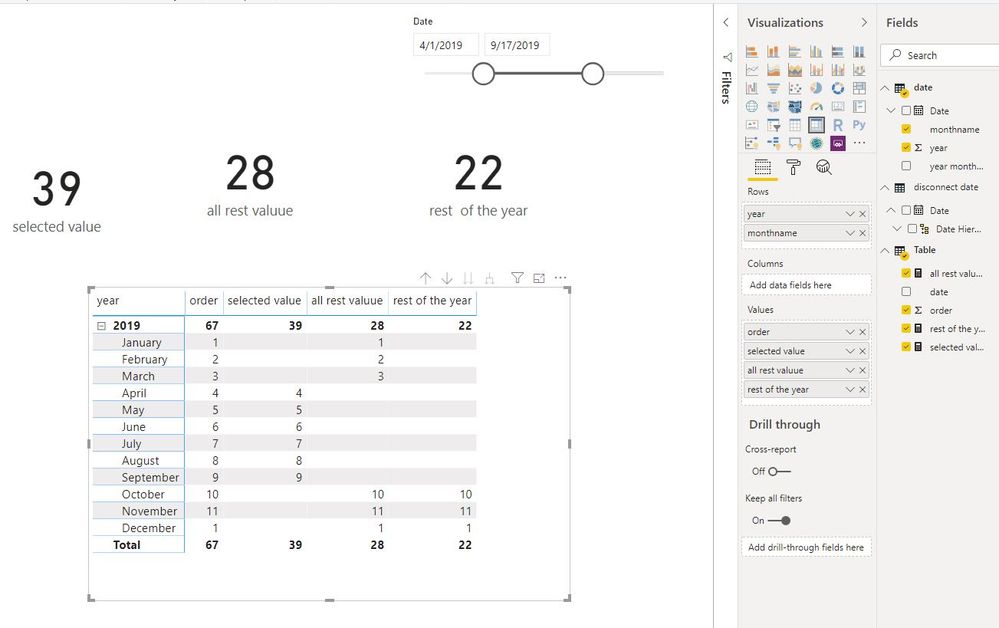
Capture6.JPG

If it is ok, please see my steps below:

Create a date table without relationship

Capture7.JPG

Add [date] column to a slicer from this "disconnect date" table.

Create measures

selected value =
CALCULATE (
    SUM ( 'Table'[order] ),
    FILTER (
        'Table',
        'Table'[date]
            >= MIN ( 'disconnect date'[Date] )
            && 'Table'[date]
                <= MAX ( 'disconnect date'[Date] )
    )
)

all rest valuue =
CALCULATE (
    SUM ( 'Table'[order] ),
    FILTER (
        'Table',
        'Table'[date]
            < MIN ( 'disconnect date'[Date] )
            || 'Table'[date]
                > MAX ( 'disconnect date'[Date] )
    )
)
rest  of the year =
CALCULATE (
    SUM ( 'Table'[order] ),
    FILTER (
        'Table',
        'Table'[date]
            > MAX ( 'disconnect date'[Date] )
            && YEAR ( 'Table'[date] )
                = YEAR (
                    MAX ( 'disconnect date'[Date] )
                )
    )
)


Best Regards
Maggie
Community Support Team _ Maggie Li
If this post helps, then please consider Accept it as the solution to help the other members find it more quickly.

Thanks for replying @v-juanli-msft !


I have been able to replicate that so far on my own. What I am trying to do is (from your model) take the 'All Selected Value" and spread it evenly across the "Rest of the Year." 


So rest of the year should be 


OrderSelectedAll RestRest of YearDesired Rest of Year

1


 1  
2 2  
3 3  
44   
55   
66   
77   
88   
99   
10 101010 +13
1 111+13
2 222+13


So the SUM(Selected) moved to the Date Range of (Rest of Year).


Is that more clear?


Hi @CEllinger 

Add three measures

Measure = SUMX(ALLEXCEPT('date','date'[year]),[selected value])

Measure 2 =
CALCULATE (
    DISTINCTCOUNT ( 'date'[year monthno] ),
    FILTER (
        ALLSELECTED ( 'date' ),
        'date'[year]
            = MAX ( 'date'[year] )
            && 'date'[Date]
                > EOMONTH (
                    MAX ( 'disconnect date'[Date] ),
                    0
                )
    )
)


Measure 3 = [Measure]/[Measure 2]

Measure 4 =
IF (
    MAX ( 'date'[Date] )
        > EOMONTH (
            MAX ( 'disconnect date'[Date] ),
            0
        ),
    [rest  of the year] + [Measure 3]
)

Capture4.JPG


Best Regards
Maggie
Community Support Team _ Maggie Li
If this post helps, then please consider Accept it as the solution to help the other members find it more quickly.

@v-juanli-msft  I could not have asked for better help!


Thank you so much!

Helpful resources

Announcements
Power BI DataViz World Championships

Power BI Dataviz World Championships

The Power BI Data Visualization World Championships is back! Get ahead of the game and start preparing now!

December 2025 Power BI Update Carousel

Power BI Monthly Update - December 2025

Check out the December 2025 Power BI Holiday Recap!

FabCon Atlanta 2026 carousel

FabCon Atlanta 2026

Join us at FabCon Atlanta, March 16-20, for the ultimate Fabric, Power BI, AI and SQL community-led event. Save $200 with code FABCOMM.

Top Solution Authors