Join us at FabCon Atlanta from March 16 - 20, 2026, for the ultimate Fabric, Power BI, AI and SQL community-led event. Save $200 with code FABCOMM.
Register now!Get Fabric certified for FREE! Don't miss your chance! Learn more
Hello everyone,
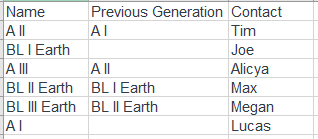
I have a table similar to this one :
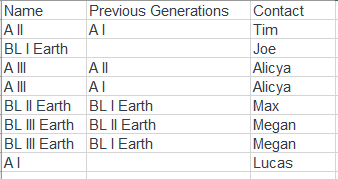
So the first column is the name of an object and the generation (I, II, III, IV, ...), second column correspond to the previous generation of this object, and the last one is the name of a contact associated to this object. I would like to have a table similar to this :
So I would then be able to filter on my report on a Name, and see ALL the previous generations of this object and the contact associated.
I have coded similar things in Python but I have no clue about how to do it on Power Bi (M language or DAX).
Thank you very much for your help !
Gautier
try this M code
NewStep=let gens={"IV","III","II","I"} in #table(Table.ColumnNames(PreviousStepName),List.TransformMany(Table.ToRows(PreviousStepName),each let a=List.Skip(gens,(x)=>not List.Contains(Text.Split(_{1}," "),x)) in if a={} then {_} else List.Transform(a,(x)=>Text.Combine(Splitter.SplitTextByAnyDelimiters(gens)(_{1}),x)),(x,y)=>{x{0},y,x{2}}))
Share feedback directly with Fabric product managers, participate in targeted research studies and influence the Fabric roadmap.
Check out the February 2026 Power BI update to learn about new features.
| User | Count |
|---|---|
| 12 | |
| 12 | |
| 10 | |
| 6 | |
| 5 |