cancel
Showing results for 
Search instead for 
Did you mean: 

Join the FabCon + SQLCon recap series. Up next: Power BI, Real-Time Intelligence, IQ and AI, and Data Factory take center stage. All sessions are available on-demand after the live show. Register now

Reply
mzeppieri
Regular Visitor

Question: Gateway Integration with a SharePoint List

Have a question on Gateway integrations with SharePoint lists. I've setup a Gateway between PowerBI and a SharePoint list. The gateway refreshes the data into PowerBI daily.


The problem is, I need the data to refresh every time someone adds a new line of data to the SharePoint list. Two questions:


  • Is there a way for the gateway to refresh every time someone adds new data to the SharePoint list? The most frequent option I see is to set a daily refresh.
  • Is there a way for users to manually fetch data from the SharePoint list. The workflow would be: (1) Add data to sharepoint list (2) Log into PowerBI through browser (3) Open dashboard (4) Manually fetch data from SharePoint?
1 ACCEPTED SOLUTION
Anonymous
Not applicable

@mzeppieri,


Firstly, you are able to refresh a dataset up to 8 times a day, if you need a more frequent refresh time, consider to purchase Power BI Premium license. With this license, you are able to refresh a dataset up to 48 times a day.

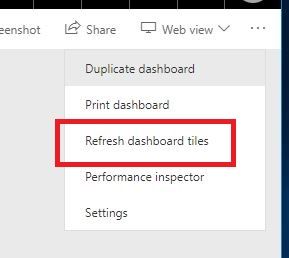
Secondly, after you change data in SharePoint list, click "Refresh Now" in Power BI Service, then click "Refresh dashboard tiles" in dashboard, this way, you can manually fetch data from SharePoint list.
1.JPG


Regards,
Lydia

View solution in original post

1 REPLY 1
Anonymous
Not applicable

@mzeppieri,


Firstly, you are able to refresh a dataset up to 8 times a day, if you need a more frequent refresh time, consider to purchase Power BI Premium license. With this license, you are able to refresh a dataset up to 48 times a day.

Secondly, after you change data in SharePoint list, click "Refresh Now" in Power BI Service, then click "Refresh dashboard tiles" in dashboard, this way, you can manually fetch data from SharePoint list.
1.JPG


Regards,
Lydia

Helpful resources

Announcements
April Power BI Update Carousel

Power BI Monthly Update - April 2026

Check out the April 2026 Power BI update to learn about new features.

New to Fabric survey Carousel

New to Fabric Survey

If you have recently started exploring Fabric, we'd love to hear how it's going. Your feedback can help with product improvements.

Power BI DataViz World Championships carousel

Power BI DataViz World Championships - June 2026

A new Power BI DataViz World Championship is coming this June! Don't miss out on submitting your entry.

FabCon and SQLCon Highlights Carousel

FabCon &SQLCon Highlights

Experience the highlights from FabCon & SQLCon, available live and on-demand starting April 14th.