cancel
Showing results for 
Search instead for 
Did you mean: 

A new Data Days event is coming soon! This time we’re going bigger than ever. Fabric, Power BI, SQL, AI and more. Don't miss out.

Reply
Anonymous
Not applicable

Query editor

Hello All, I am still beginner in this APP, trying to learn the Queries, I use PowerBI desktop version 2.79.5768 


How can i log in to the query editor? as the learning videos using earlier version and the interface is different. 

1 ACCEPTED SOLUTION
edhans
Community Champion
Community Champion

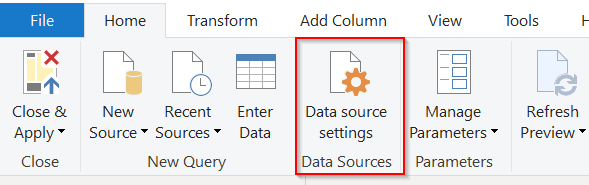
No, you have to change the source of the file to where you have it. Click on the Data Source Settings and point the file to where it is on your computer, not where the author put it in their exercise.


2020-05-14 19_17_39-Inventory Stock Status - Power Query Editor.png


Did I answer your question? Mark my post as a solution!
Did my answers help arrive at a solution? Give it a kudos by clicking the Thumbs Up!

DAX is for Analysis. Power Query is for Data Modeling


Proud to be a Super User!

MCSA: BI Reporting

View solution in original post

4 REPLIES 4
edhans
Community Champion
Community Champion

It is the Transform Data button on the home ribbon if you have the new ribbon interface.

2020-05-14 15_51_47-Untitled - Power BI Desktop.png


Did I answer your question? Mark my post as a solution!
Did my answers help arrive at a solution? Give it a kudos by clicking the Thumbs Up!

DAX is for Analysis. Power Query is for Data Modeling


Proud to be a Super User!

MCSA: BI Reporting
Anonymous
Not applicable

Yeah, When i tried that it comes with error 

DataSource.NotFound: File or Folder: We couldn't find the folder 'C:\Users\rnuan\Desktop\Sales Data\*'.
Details:
C:\Users\rnuan\Desktop\Sales Data


I guess this is because i downloaded the exercise as it is, do i have to download the excel sheets uploaded it to the app first?

Hi @Anonymous 

If you want to load excel file to power bi and use query editor to transform data, you could click on "Home"->"Get data"->excel, then click on "Transfrom data" to use edit query.

the previous reply by edhans says how you could change the source file in Power bi.

If you have any other problem, feel free to ask and it is appreciated to share some details for better analysis.


Best Regards

Maggie

edhans
Community Champion
Community Champion

No, you have to change the source of the file to where you have it. Click on the Data Source Settings and point the file to where it is on your computer, not where the author put it in their exercise.


2020-05-14 19_17_39-Inventory Stock Status - Power Query Editor.png


Did I answer your question? Mark my post as a solution!
Did my answers help arrive at a solution? Give it a kudos by clicking the Thumbs Up!

DAX is for Analysis. Power Query is for Data Modeling


Proud to be a Super User!

MCSA: BI Reporting

Helpful resources

Announcements
May Power BI Update Carousel

Power BI Monthly Update - May 2026

Check out the May 2026 Power BI update to learn about new features.

Fabric SQL PBI Data Days

Data Days 2026 coming soon!

Sign up to receive a private message when registration opens and key events begin.

New to Fabric survey Carousel

New to Fabric Survey

If you have recently started exploring Fabric, we'd love to hear how it's going. Your feedback can help with product improvements.

Power BI DataViz World Championships carousel

Power BI DataViz World Championships - June 2026

A new Power BI DataViz World Championship is coming this June! Don't miss out on submitting your entry.