cancel
Showing results for 
Search instead for 
Did you mean: 

The Power BI Data Visualization World Championships is back! Get ahead of the game and start preparing now! Learn more

Reply
Anonymous
Not applicable

Python to Power Query

Buenos días.


Tengo un dashboard en PowerBI con los valores de cloro que he tenido en distintas explotaciones durante un rango determinado de tiempo. He creado un script en Python para que me de los valores alerta que se repitan durante 1 hora o más. Como tengo los valores cada 5 minutos, he añadido contadores para determinar cuándo es alarmante y cuándo no.


El problema es que no puedo ejecutar el Script de Python por temas de seguridad y no sé hacerlo en lenguaje DAX. ¿Se os ocurre algo?


Os adjunto el script de Python y el PBI.


- Python:

contadorb=0
contadora=0
contadorb_total=0
contadora_total=0
while True:
cloro=float(input("Valor de cloro "))
if cloro<-0.1:
break
if cloro<0.4:
contadora=0
contadorb+=1
contadorb_total+=1
if contadorb==12:
print ("Alarma cloro BAJO")
elif cloro>1:
contadorb=0
contadora+=1
contadora_total+=1
if contadora==12:
print("Alarma cloro ALTO")
else:
print("Cloro restaurado")
contadora=0
contadorb=0
if contadorb_total>=12:
print("La alarma ha durado ",contadorb_total*5," minutos")
contadorb_total=0
if contadora_total>=12:
print("La alarma ha durado ",contadora_total*5," minutos")
contadora_total=0


-PBI:

ManuMC96_0-1658222860074.png


1 ACCEPTED SOLUTION
Anonymous
Not applicable

Buenos días.


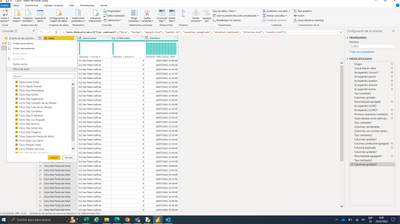
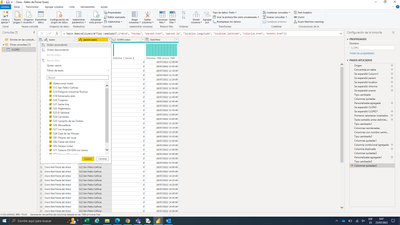
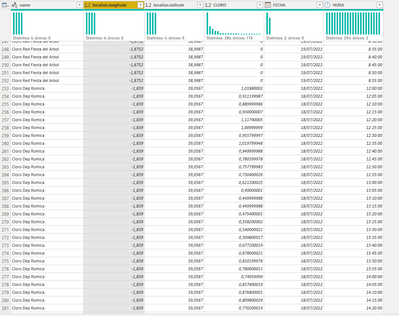
Primero muchas gracias por tu respuesta. He visto que tu solución funciona, pero sin distinguir los distintos puntos que tengo. Me explico, yo tengo varios punto de muestreo de cloro por lo que no me valdría tu solución ya que el contador se tiene que reiniciar cuando cambie el nombre. Las columnas que varían son "name" y "parent.name". Para cada "name" se le asocia un único "parent.name".


Te adjunto una captura para que puedas ver a lo que me refiero. Reitero mis gracias y perdonadme pero soy noob en esto.

ManuMC96_0-1658731657852.pngManuMC96_1-1658731689087.png


View solution in original post

4 REPLIES 4
v-kkf-msft
Community Support
Community Support

Hi @Anonymous ,


First add a DateTime column in Power Query, then add an Index column based on this column in descending order.


vkkfmsft_0-1658458525479.png


Then create the following measures.


Measure = 
VAR lowcount =
    COUNTROWS ( FILTER ( 'Table', 'Table'[Index] <= 12 && 'Table'[CLORO] < 0.4 ) )
VAR highcount =
    COUNTROWS ( FILTER ( 'Table', 'Table'[Index] <= 12 && 'Table'[CLORO] > 1 ) )
RETURN
    SWITCH (
        TRUE (),
        lowcount = 12, "Alarma cloro BAJO",
        highcount = 12, "Alarma cloro ALTO",
        "Cloro restaurado"
    )
La alarma ha durado = 
VAR low_index =
    CALCULATE ( MIN ( 'Table'[Index] ), 'Table'[CLORO] >= 0.4, ALL ( 'Table' ) )
VAR high_index =
    CALCULATE ( MIN ( 'Table'[Index] ), 'Table'[CLORO] <= 1, ALL ( 'Table' ) )
VAR minindex =
    SWITCH (
        [Measure],
        "Alarma cloro BAJO", low_index,
        "Alarma cloro ALTO", high_index,
        1
    )
RETURN
    "La alarma ha durado "
        & DATEDIFF (
            CALCULATE (
                MAX ( 'Table'[DateTime] ),
                FILTER ( 'Table', 'Table'[Index] = minindex )
            ),
            CALCULATE ( MAX ( 'Table'[DateTime] ), 'Table'[Index] = 1 ),
            MINUTE
        ) - 5 & " minutos"

vkkfmsft_1-1658458805447.png


If the problem is still not resolved, please provide detailed error information or the expected result you expect. Let me know immediately, looking forward to your reply.
Best Regards,
Winniz
If this post helps, then please consider Accept it as the solution to help the other members find it more quickly.

Anonymous
Not applicable

Buenos días.


Primero muchas gracias por tu respuesta. He visto que tu solución funciona, pero sin distinguir los distintos puntos que tengo. Me explico, yo tengo varios punto de muestreo de cloro por lo que no me valdría tu solución ya que el contador se tiene que reiniciar cuando cambie el nombre. Las columnas que varían son "name" y "parent.name". Para cada "name" se le asocia un único "parent.name".


Te adjunto una captura para que puedas ver a lo que me refiero. Reitero mis gracias y perdonadme pero soy noob en esto.

ManuMC96_0-1658731657852.pngManuMC96_1-1658731689087.png


Hi @Anonymous ,


Has your problem been solved? If it is solved, please mark a reply which is helpful to you.


If the problem is still not resolved, please provide detailed error information or the expected result you expect. Let me know immediately, looking forward to your reply.


Best Regards,
Winniz

Hi @Anonymous ,


I added two different names to the data. Then create the index column within the group with the following code.


let
    Source = Table.FromRows(Json.Document(Binary.Decompress(Binary.FromText("lZO/CsIwGMRfpWRuy/cnsYmb1idwLR1EHASl4vsPtg4iNKT3hSwhufuR3GUYXP+Y3lN1ur2q8/S8Xy+udtwSx0hEMi+ERJqu4bhsyJ5onm6ss0JqEzOnlGKXUYaiMsa0jLhbK3mDqfQdGSaXmNwyd54orHVSJnJGUb5dRqFmhpoZ3szwZkYwM4KRoVutyynMjI2W5RRmhrVXau6V/vXqcOy/NS9+49KhABxixIkRJ0GcBHGCnkARJ484ecQpIE5h20mR7BTJTpHsFMlOkex+XR4/", BinaryEncoding.Base64), Compression.Deflate)), let _t = ((type nullable text) meta [Serialized.Text = true]) in type table [name = _t, CLORO = _t, FECHA = _t, HORA = _t]),
    #"Changed Type" = Table.TransformColumnTypes(Source,{{"name", type text}, {"CLORO", type number}, {"HORA", type time}, {"FECHA", type date}}),
    #"Added Custom" = Table.AddColumn(#"Changed Type", "DateTime", each Text.From([FECHA]) & " " & Text.From([HORA])),
    #"Changed Type1" = Table.TransformColumnTypes(#"Added Custom",{{"DateTime", type datetime}}),
    #"Grouped Rows" = Table.Group(#"Changed Type1", {"name"}, {{"All", each _, type table [name=nullable text, CLORO=nullable number, FECHA=nullable date, HORA=nullable time, DateTime=nullable datetime]}}),
    #"Added Custom1" = Table.AddColumn(#"Grouped Rows", "AddIndex", each Table.AddIndexColumn(Table.Sort( [All], {{"DateTime", Order.Descending}}), "Index", 1, 1, Int64.Type)),
    #"Removed Other Columns" = Table.SelectColumns(#"Added Custom1",{"AddIndex"}),
    #"Expanded AddIndex" = Table.ExpandTableColumn(#"Removed Other Columns", "AddIndex", {"name", "CLORO", "FECHA", "HORA", "DateTime", "Index"}, {"name", "CLORO", "FECHA", "HORA", "DateTime", "Index"})
in
    #"Expanded AddIndex"
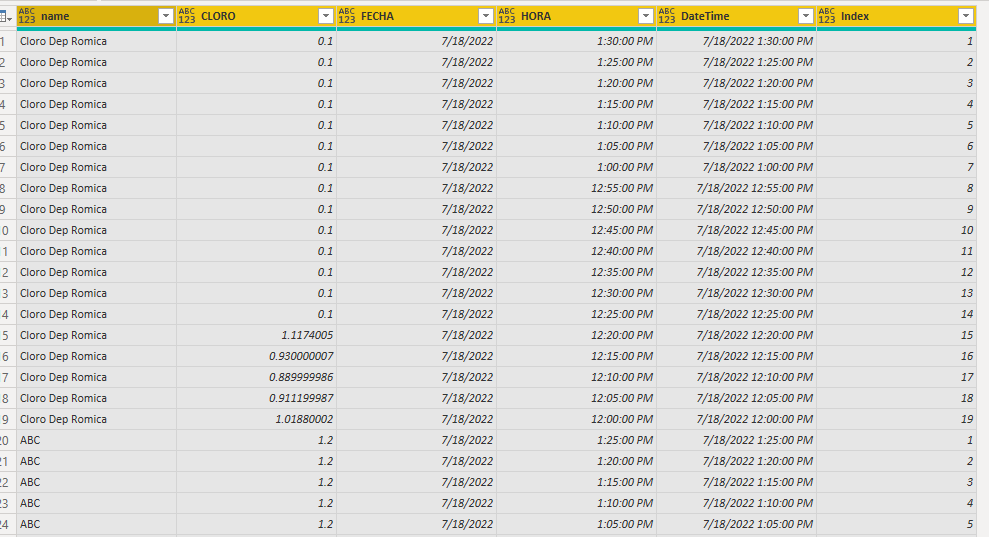
vkkfmsft_0-1658912897268.png


Then modify the formula for the [La alarma ha durado] measure. Does this match your desired output?


La alarma ha durado = 
VAR low_index =
    CALCULATE (
        MIN ( 'Table'[Index] ),
        'Table'[CLORO] >= 0.4,
        ALLEXCEPT ( 'Table', 'Table'[name] )
    )
VAR high_index =
    CALCULATE (
        MIN ( 'Table'[Index] ),
        'Table'[CLORO] <= 1,
        ALLEXCEPT ( 'Table', 'Table'[name] )
    )
VAR minindex =
    SWITCH (
        [Measure],
        "Alarma cloro BAJO", low_index,
        "Alarma cloro ALTO", high_index,
        1
    )
RETURN
    "La alarma ha durado "
        & IF (
            minindex = BLANK (),
            DATEDIFF ( MIN ( 'Table'[DateTime] ), MAX ( 'Table'[DateTime] ), MINUTE ),
            DATEDIFF (
                CALCULATE (
                    MAX ( 'Table'[DateTime] ),
                    FILTER ( 'Table', 'Table'[Index] = minindex )
                ),
                CALCULATE ( MAX ( 'Table'[DateTime] ), 'Table'[Index] = 1 ),
                MINUTE
            ) - 5
        ) & " minutos"

vkkfmsft_1-1658913753690.png


If the problem is still not resolved, please provide detailed error information or the expected result you expect. Let me know immediately, looking forward to your reply.
Best Regards,
Winniz
If this post helps, then please consider Accept it as the solution to help the other members find it more quickly.

Helpful resources

Announcements
Power BI DataViz World Championships

Power BI Dataviz World Championships

The Power BI Data Visualization World Championships is back! Get ahead of the game and start preparing now!

December 2025 Power BI Update Carousel

Power BI Monthly Update - December 2025

Check out the December 2025 Power BI Holiday Recap!

FabCon Atlanta 2026 carousel

FabCon Atlanta 2026

Join us at FabCon Atlanta, March 16-20, for the ultimate Fabric, Power BI, AI and SQL community-led event. Save $200 with code FABCOMM.

Top Solution Authors