Join us at FabCon Atlanta from March 16 - 20, 2026, for the ultimate Fabric, Power BI, AI and SQL community-led event. Save $200 with code FABCOMM.
Register now!The Power BI Data Visualization World Championships is back! Get ahead of the game and start preparing now! Learn more
HI,
Created a dataset with 1 fact table from Vertica using Direct Query, 1 Date table (Import), 1 Grouped table from Vertica (Import) and 1 table from SalesForce (Import)
I created relationships between Date--> Vertica DQ and Date -->Vertica Import and between SF -->Vertica DQ and SF-->Vertica Import.
Using "Manage Aggregation" on my grouped table from vertica, I could see good performance in PBI editor.
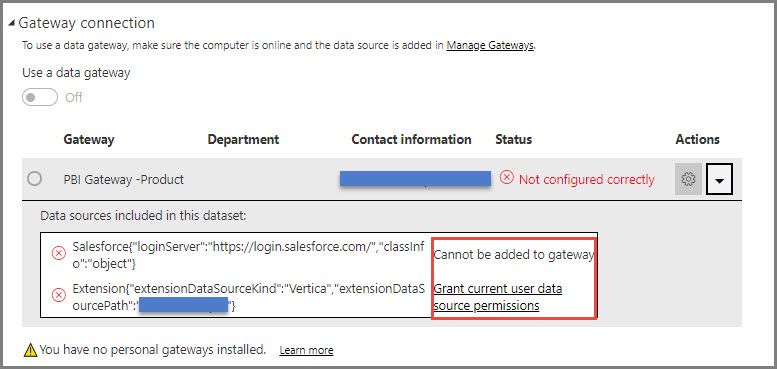
However, when published to Service, I see these errors:
I assume the Vertica part can be resolved with reviewing the credentials, but do not understand how to sort out the SalesForce part.
Any insights would be highly apperciated!
Solved! Go to Solution.
@Anonymous,
In your scenario, please add Vertica data source within gateway following the guide in this blog. Also make sure you
select Allow user's cloud data sources to refresh through your gateway cluster > Apply following the instructions in this article:https://docs.microsoft.com/en-us/power-bi/service-gateway-mashup-on-premises-cloud.
Regards,
Lydia
@Anonymous,
In your scenario, please add Vertica data source within gateway following the guide in this blog. Also make sure you
select Allow user's cloud data sources to refresh through your gateway cluster > Apply following the instructions in this article:https://docs.microsoft.com/en-us/power-bi/service-gateway-mashup-on-premises-cloud.
Regards,
Lydia
The Power BI Data Visualization World Championships is back! Get ahead of the game and start preparing now!
| User | Count |
|---|---|
| 19 | |
| 9 | |
| 8 | |
| 7 | |
| 6 |