cancel
Showing results for 
Search instead for 
Did you mean: 

Next up in the FabCon + SQLCon recap series: The roadmap for Microsoft SQL and Maximizing Developer experiences in Fabric. All sessions are available on-demand after the live show. Register now

Reply
Hindhind25
New Member

Probleme parameter table power query

Here is my question: I want to dynamicize a file path in Power Query. I have created two parameters, I named the first one "Month stopped" (it contains the month e.g., January, February, etc.), I named the second parameter "Year stopped", it contains the year of the stoppage (e.g., 2023, 2024, etc.). I want to insert the contents of these parameters into a query that contains the file path, but when I write my query, I get an error. Here is my query:

let
AnneeArrete = #"Année arrêté", 
MoisArrete = #"Mois arrêté", 
CheminFichier = "W:\PADS\3 - Service Reporting Risque\ANACREDIT\2. Déclarations\" & Text.From(Année Arreté) & "\" & Text.From(Mois Arreté) & ". " & Mois Arreté & " " & Text.From(Anné eArreté) & "\Controle ESTD_F pbi\ESTD-M\CounterpartyInstrument_F.csv",
Source = Csv.Document(File.Contents(CheminFichier), [Delimiter=";", Columns=14, Encoding=1252, QuoteStyle=QuoteStyle.None])
in
Source


could you help me solve this probleme? 


Thanks in advance! 

1 REPLY 1
BA_Pete
Super User
Super User

Hi @Hindhind25 ,


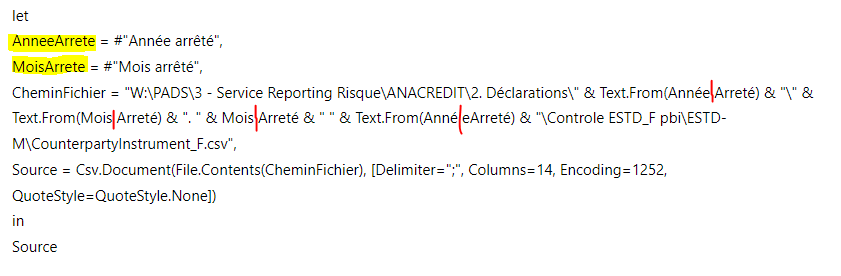
Not sure if this will fully fix the issue, but it looks like you're adding spaces into the parameter references where there shouldn't be any:


BA_Pete_0-1694088212144.png


Pete


Now accepting Kudos! If my post helped you, why not give it a thumbs-up?

Proud to be a Datanaut!


Helpful resources

Announcements
New to Fabric survey Carousel

New to Fabric Survey

If you have recently started exploring Fabric, we'd love to hear how it's going. Your feedback can help with product improvements.

Power BI DataViz World Championships carousel

Power BI DataViz World Championships - June 2026

A new Power BI DataViz World Championship is coming this June! Don't miss out on submitting your entry.

Join our Fabric User Panel

Join our Fabric User Panel

Share feedback directly with Fabric product managers, participate in targeted research studies and influence the Fabric roadmap.

March Power BI Update Carousel

Power BI Community Update - March 2026

Check out the March 2026 Power BI update to learn about new features.