cancel
Showing results for 
Search instead for 
Did you mean: 

Data Days is here! Join us now for 60+ days of learning, challenges, and connection. Learn more

Reply
paul_nixon
New Member

Problem w/ Azure Audit Log content pack


I'm trying to get the Azure Audit Log content pack setup by following this article: 


https://powerbi.microsoft.com/en-us/documentation/powerbi-content-pack-azure-audit-logs/


I get to step #6.  I enter my credentials.  It returns the error:


"Failed to update data source credentials:  We are unable to connect to the data source.  Please ensure that data source is accessible."


It gives add'l details (e.g. status code = 400) and "Web.Contents failed to get contents from...", "Bad Request").


I am an administrator for my Azure account and I'm copying/pasting the subscription ID where appropriate.


Any ideas?


Thanks.


8 REPLIES 8
anon_
New Member

Same issue for us. Microsoft, any updates on this please?

boonthawee
New Member

I found same problem. How to solve this ?

That is my ergent case I have the customer prefered to use Power BI to build Azure Audit Log report.


Anonymous
Not applicable

I have run into the same issue. Did any one ever get this working?


pinux
New Member

Hi,

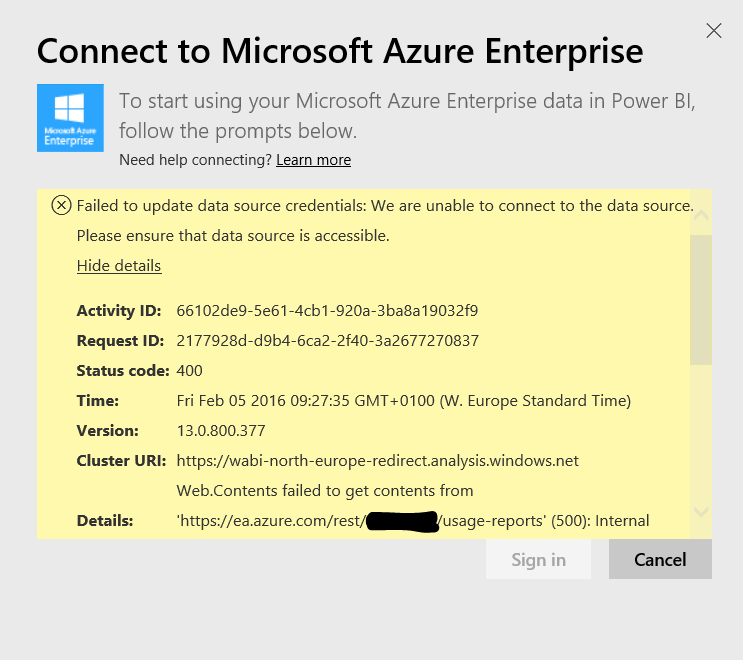
we have an issue trying to connect PowerBI with Azure Enterprise services.

We have regenerate the API KEY to extend the period of validity.

See image below for more details about that issue.

Capture.PNG


Thank you for the support.

Giuseppe

ciphertxt
New Member

This has been going on for several weeks with no updates (other thread at http://community.powerbi.com/t5/Integrations-with-Files-and/Failed-to-Import-Data-Azure-Audit-Log/m-...

Still no satisfying news on this front? 

Anonymous
Not applicable

@paul_nixon If I recall, I had to specifically have my IP address added in order to access an Azure SQL DB... Could this sort of access issue be of a similiar nature? (Just throwing out an idea)

Anonymous
Not applicable

Same problem here!


I've tried several times at different days and times. Also with different accounts and subscriptions, but the result is the same every time.


Hopefully this is solved quickly, I like the feature when it works (as seen in the video).

Helpful resources

Announcements
Fabric Data Days is here Carousel

Fabric Data Days 2026

Don't miss out on Data Days, June 15 through August 7. Learn Fabric, Power BI, SQL, AI and more.

May Power BI Update Carousel

Power BI Monthly Update - May 2026

Check out the May 2026 Power BI update to learn about new features.

Power BI DataViz World Championships carousel

Power BI DataViz World Championships - June 2026

A new Power BI DataViz World Championship is coming this June! Don't miss out on submitting your entry.