Join us at FabCon Atlanta from March 16 - 20, 2026, for the ultimate Fabric, Power BI, AI and SQL community-led event. Save $200 with code FABCOMM.
Register now!Learn from the best! Meet the four finalists headed to the FINALS of the Power BI Dataviz World Championships! Register now
Hello,
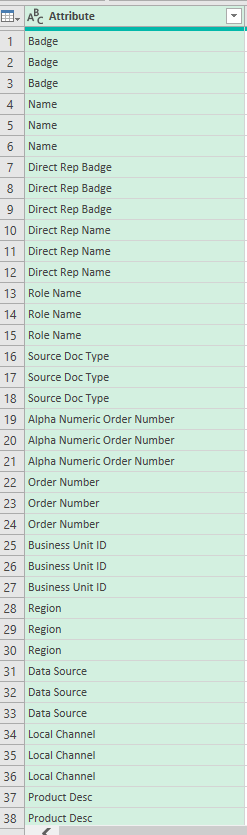
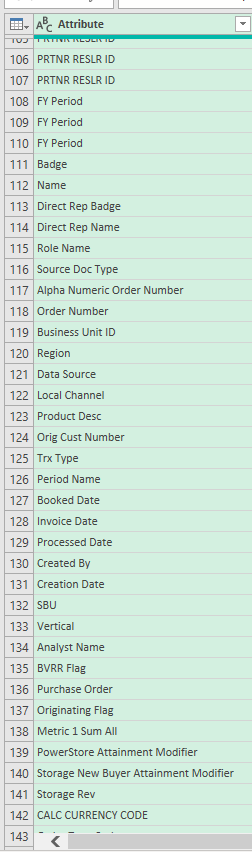
I'm having trouble mergeing two tables. Merge does the right thing, but puts the first 3 data we see in the value column, which represents Badge (Number of Badge) (429970, 14428 and 403976), directly below it ... and I don't want it to do that. However, it gives all the other records nicely one by one Badge Number and then nicely lists the other values. Only these first three are just below each other, although this should not be the case.
Thank you very much for your help.
@Simon_29I don't think I understand your question... You merged 2 tables and it works correctly. When you say "puts the first 3 data directly below it", I assume you want to sort the result table differently?
Also, are the screenshots before and after merging tables?
Hi,
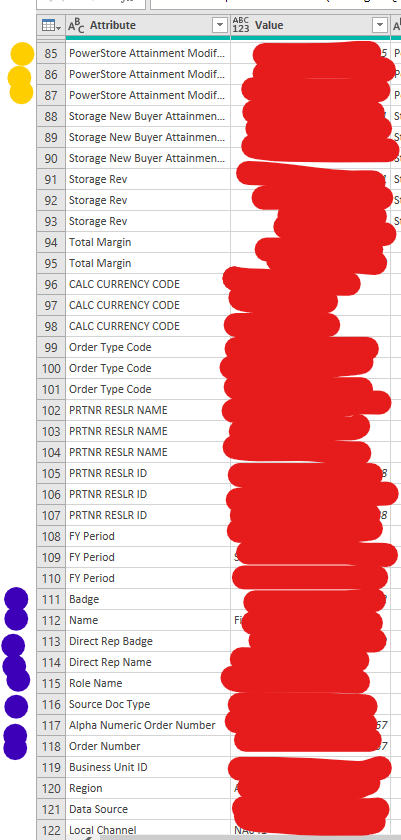
maybe some sort could help. It is mainly that this is a table after merging and I do not know why the first three data about employees are not listed nicely row by row, but it is always first 3x Badge, then 3x another attribute, etc. (as in the picture, where there are yellow balls ). However, after these three badges, each attribute is well behind it (blue balls in the picture). I just don't understand why he puts the first three pieces of data in the display - first three times in a row "Badge", then three times "Name", etc. until he gets to the last attribute. And then it goes as it should.Could you advise me some capable sort? Thank you very much
Hi @Simon_29 ,
How about click the dropdown arrow to choose the correct sorting order you need?Is this what you need?
If not,could you pls attach your expected output compared to what you get.
Best Regards,
Kelly
Did I answer your question? Mark my reply as a solution!
Share feedback directly with Fabric product managers, participate in targeted research studies and influence the Fabric roadmap.
Check out the February 2026 Power BI update to learn about new features.