Join us at FabCon Atlanta from March 16 - 20, 2026, for the ultimate Fabric, Power BI, AI and SQL community-led event. Save $200 with code FABCOMM.
Register now!The Power BI Data Visualization World Championships is back! Get ahead of the game and start preparing now! Learn more
Hi All
While tring to access data in Google BigQuery using GET DATA -> DATABASE -> GOOGLE BIGQUERY.
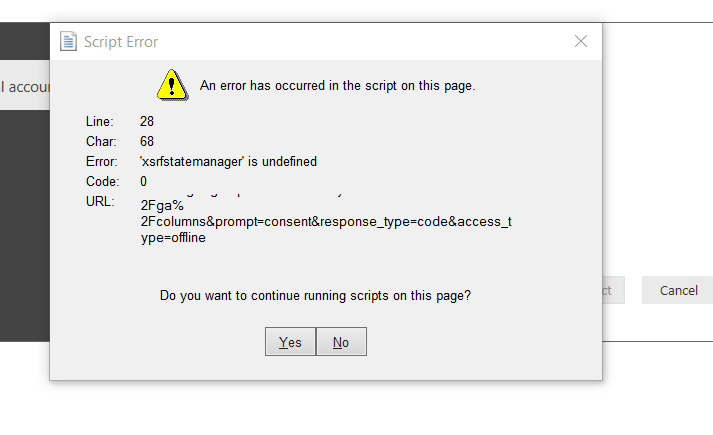
it seems that something is blocking me towards entering the BigQuery credentials and link, I cant get passed the "Sign in" menu. when i try to sign in i get this messege:
And when I click either "YES" Or "No".
I get a blank screen and nothing farther.
I assume this has to do with Firewalls of my company..
Will appreciate help here?
Thank you
Solved! Go to Solution.
Thank you Lydia.
Problem solved now.
What i did was to reset my Explorer settings to deafult. as the problem was with PBI trying to open mydeafult browser and couldnt for some reason.
Thank you
Shachar
@shacharbenor,
I have no issues connecting to Google BigQuery in Power BI Desktop October release. Do you use the latest version of Power BI Desktop? Are you able to sign in Google BigQuery in web browser?
In addition, to configure firewall ruls for google bigquery, I would recommend you post the question in Google BigQuery forum to get better support.
Regards,
Lydia
Thank you Lydia.
Problem solved now.
What i did was to reset my Explorer settings to deafult. as the problem was with PBI trying to open mydeafult browser and couldnt for some reason.
Thank you
Shachar
The Power BI Data Visualization World Championships is back! Get ahead of the game and start preparing now!
Check out the November 2025 Power BI update to learn about new features.