cancel
Showing results for 
Search instead for 
Did you mean: 

The Power BI Data Visualization World Championships is back! Get ahead of the game and start preparing now! Learn more

Reply
BlessingNtshele
New Member

Powerbi Relationship

BlessingNtshele_0-1682499344690.png

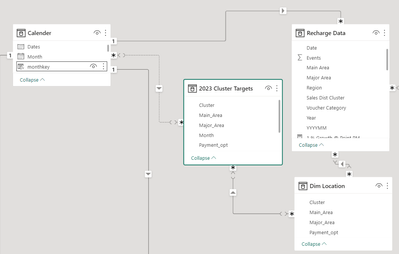
I have 2 fact tables( Cluster Targets and Recharge Data) and two dimensions( Calender and Dim Location), I have connected my two fact table to the dim location table. But when I am connecting to the calender table the relationship doesn't wanna be active. Please assist what should I do

2 ACCEPTED SOLUTIONS
halfglassdarkly
Responsive Resident
Responsive Resident

PowerBI won't let you add a second active Many-to-Many relationship to a table that already has one.


I'd start by looking at whether you need all those Many-to-Many relationships though. If your Dim Location table is actually functioning as a dimension table then your primary key should be unique and at least one of the relationships for that table should be able to be changed to one-to-many. If you can change to 'Dim Location' 1------>* '2023 Cluster Targets' then you should be able to make 'Calender' *------>* '2023 Cluster Targets' active.

If you're using month and not date as your key you could also consider whether to add a new Month dimension to use as a bridging table between your Calender dim and other tables filtered by month.


View solution in original post

BA_Pete
Super User
Super User

Hi @BlessingNtshele ,


I broadly agree with @halfglassdarkly , but I would go further and say that you should not be using Many:Many relationships AT ALL.


Aside from some niche use-cases, if you're modelling using M:M relations in general, you're modelling wrong.

This isn't just a 'looks pretty' thing, this is a 'will cause you serious problems down the line' thing (your post is case-in-point).


For example: Your Calendar to Cluster Targets relation should absolutely be One:Many. You would implement this correctly by creating a proper date column within your Cluster Targets table. How you go about this depends on the actual format of your Cluster Targets[Month] column but, for the sake of example, let's assume it's Text data type in YearMonth format, like this: "202305".

In Power Query, you would convert this into a proper date something like this:

#date(
    Text.Start([Month], 4),
    Text.End([Month], 2),
    01
)


You would then be able to create a proper One:Many relation one Calendar[Date] : Cluster Targets[NewDateColumn].


You should be looking to implement similar fixes with all of your tables that must relate to a dimension table before modeling.


Pete


Now accepting Kudos! If my post helped you, why not give it a thumbs-up?

Proud to be a Datanaut!


View solution in original post

2 REPLIES 2
BA_Pete
Super User
Super User

Hi @BlessingNtshele ,


I broadly agree with @halfglassdarkly , but I would go further and say that you should not be using Many:Many relationships AT ALL.


Aside from some niche use-cases, if you're modelling using M:M relations in general, you're modelling wrong.

This isn't just a 'looks pretty' thing, this is a 'will cause you serious problems down the line' thing (your post is case-in-point).


For example: Your Calendar to Cluster Targets relation should absolutely be One:Many. You would implement this correctly by creating a proper date column within your Cluster Targets table. How you go about this depends on the actual format of your Cluster Targets[Month] column but, for the sake of example, let's assume it's Text data type in YearMonth format, like this: "202305".

In Power Query, you would convert this into a proper date something like this:

#date(
    Text.Start([Month], 4),
    Text.End([Month], 2),
    01
)


You would then be able to create a proper One:Many relation one Calendar[Date] : Cluster Targets[NewDateColumn].


You should be looking to implement similar fixes with all of your tables that must relate to a dimension table before modeling.


Pete


Now accepting Kudos! If my post helped you, why not give it a thumbs-up?

Proud to be a Datanaut!


halfglassdarkly
Responsive Resident
Responsive Resident

PowerBI won't let you add a second active Many-to-Many relationship to a table that already has one.


I'd start by looking at whether you need all those Many-to-Many relationships though. If your Dim Location table is actually functioning as a dimension table then your primary key should be unique and at least one of the relationships for that table should be able to be changed to one-to-many. If you can change to 'Dim Location' 1------>* '2023 Cluster Targets' then you should be able to make 'Calender' *------>* '2023 Cluster Targets' active.

If you're using month and not date as your key you could also consider whether to add a new Month dimension to use as a bridging table between your Calender dim and other tables filtered by month.


Helpful resources

Announcements
Power BI DataViz World Championships

Power BI Dataviz World Championships

The Power BI Data Visualization World Championships is back! Get ahead of the game and start preparing now!

December 2025 Power BI Update Carousel

Power BI Monthly Update - December 2025

Check out the December 2025 Power BI Holiday Recap!

FabCon Atlanta 2026 carousel

FabCon Atlanta 2026

Join us at FabCon Atlanta, March 16-20, for the ultimate Fabric, Power BI, AI and SQL community-led event. Save $200 with code FABCOMM.

Top Solution Authors