cancel
Showing results for 
Search instead for 
Did you mean: 

Get Fabric certified for FREE! Don't miss your chance! Learn more

Reply
vmiki
New Member

PowerQuery: flatten multitable XML

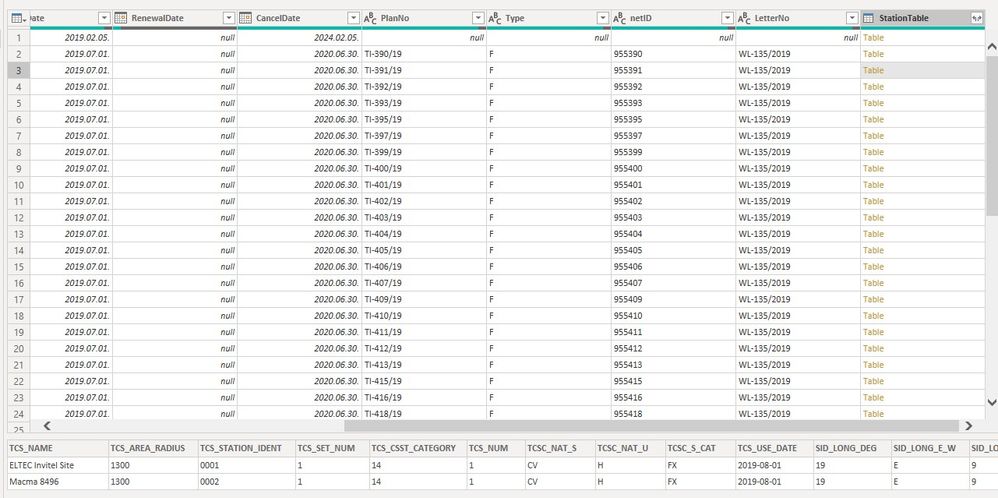
I've an XML with "sub tables". I've loaded into the Editor as you can see on the attached screenshot. The last column is "Table". That table has exactly 2 rows. I want to convert the first and the third columns of the subtable to columns in the main table. So having 4 new columnes (TCS_NAMA1, TCS_NAME2, TCS_STATION_IDENT1, TCS_STATION_IDENT2) instead of StationTable.


I've tried it in several way without success. Thanks in advance 🙂p_bi.jpg

1 ACCEPTED SOLUTION
vmiki
New Member

I've found the solution, here it is 🙂


  • Table.Column(Table.First([StationTable]),"TCS_NAME")
  • Table.Column(Table.Last([StationTable]),"TCS_NAME")


View solution in original post

1 REPLY 1
vmiki
New Member

I've found the solution, here it is 🙂


  • Table.Column(Table.First([StationTable]),"TCS_NAME")
  • Table.Column(Table.Last([StationTable]),"TCS_NAME")


Helpful resources

Announcements
Join our Fabric User Panel

Join our Fabric User Panel

Share feedback directly with Fabric product managers, participate in targeted research studies and influence the Fabric roadmap.

FabCon Atlanta 2026 carousel

FabCon Atlanta 2026

Join us at FabCon Atlanta, March 16-20, for the ultimate Fabric, Power BI, AI and SQL community-led event. Save $200 with code FABCOMM.

Top Solution Authors